
Wan Animate
Third-partywananimate.orgMotion-controlled character animation
Animate characters from photos and copy motion from reference videos for cinematic shots.
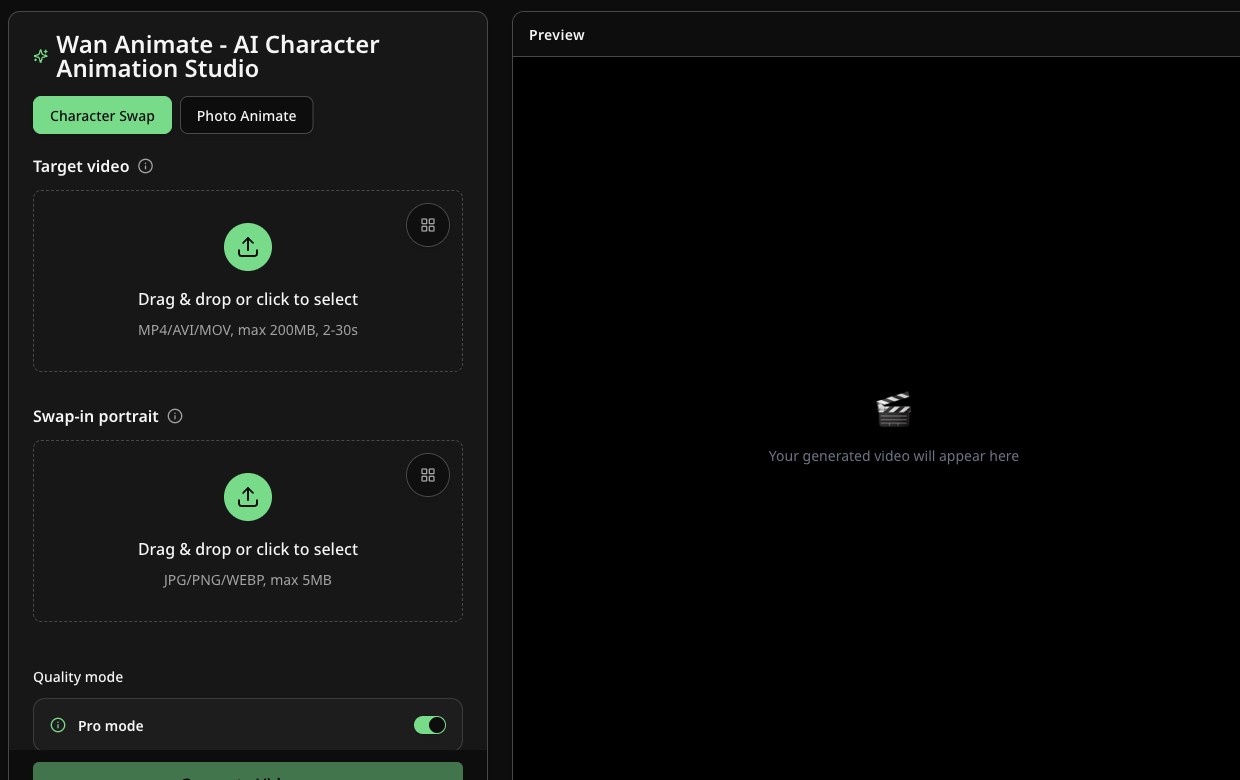
Overview
Wan Animate is an independent third-party AI video platform built around Alibaba's Wan-Animate technology. It lets you animate any character from a single photo and copy motion from any reference video, combining text-to-video, image-guided motion, and reference-based direction. Designed for creators, studios, and marketers, it supports expressive human animation, style-consistent characters, and cinematic camera sync for production-ready shots.
How it works
Wan Animate combines text-to-video, image-guided motion, and reference-based direction so teams can plan, produce, and refine AI videos faster. The workflow follows a prompt -> preview -> refine -> export pattern. Start with a single prompt, then add reference clips or assets to keep characters, outfits, and style aligned across shots. It supports iterative prompt tuning, shot-level guidance, and optional reference clips to keep long-form sequences coherent.
Quality settings and durations
Wan Animate offers wan-pro and wan-std presets to balance speed, credits, and fidelity. Typical outputs target 720p with stable motion. You can generate shorter clips for rapid iteration or longer shots for narrative continuity. Many teams prototype with wan-std, lock the creative direction, and then render hero shots with wan-pro for final delivery. Clip length depends on model settings and workload.
Inputs and outputs
Wan Animate supports common JPG/PNG inputs for characters and MP4 reference clips. For outputs, you can export MP4, GIF, or WebM so assets are ready for social, web, or editing timelines. If you need strict specs, you can post-process outputs with standard video tools for resizing or compression. A typical workflow is to export a master file, then optimize aspect ratios and bitrate per platform while preserving motion quality.
API integration
Wan Animate provides API access so developers can automate batch generation, integrate video creation into products, or trigger renders from existing pipelines. Common patterns include prompt templating, credit checks, webhook callbacks, and automated post-processing for delivery-ready assets. You can also schedule overnight runs and push results directly into storage or DAM systems. Teams often validate creative results in the UI first, then scale workflows through the API.
Key features
Motion Control
Map motion from reference videos or images, keep camera movement and timing in sync, and generate production-ready shots.
Expressive Human Animation
Capture eye contact, lip sync, and micro-gestures so every shot feels believable without manual keyframing.
Style-Consistent Characters
Swap anime heroes, branded mascots, or photoreal doubles while preserving proportion, lighting, and silhouette continuity.
Multi-Format Export
Deliver MP4, GIF, or WebM variants so assets fit every channel and spec.
Batch Processing
Queue multiple scenes and let Wan Animate render in parallel for campaign-scale production.
API Integration
Automate generation with Wan Animate APIs to plug into product and marketing workflows.
Use cases
Marketing video production
Create marketing videos with consistent brand characters and style across campaigns.
Educational content creation
Storyboard and iterate on scenes for educational content with character consistency.
Developer automation
Automate batch video generation and integrate into product pipelines via API.
Product demos and explainers
Produce product demos and explainers with motion-controlled characters and camera sync.
Pricing & limits
From the official site · checked 10/10/2026Frequently asked questions about Wan Animate
- What is Wan Animate and how does it work?
- Wan Animate is an AI animation and video generation suite built on Wan-Animate. You describe a scene or provide reference imagery, and it predicts motion, camera behavior, and character consistency. Teams use it to storyboard, iterate, and deliver marketing or educational videos faster.
- Can I use my own characters and brand assets?
- Yes. Upload character images, brand references, or reference video to guide motion and identity. Wan Animate preserves key facial features, wardrobe silhouettes, and color cues so your mascot or spokesperson stays consistent.
- What file formats and inputs does Wan Animate accept?
- Wan Animate supports common JPG/PNG inputs for characters and MP4 reference clips. For outputs, you can export MP4, GIF, or WebM so assets are ready for social, web, or editing timelines.
- Is there API access for Wan Animate integrations?
- Yes. Wan Animate provides API access so developers can automate batch generation, integrate video creation into products, or trigger renders from existing pipelines. Common patterns include prompt templating, credit checks, webhook callbacks, and automated post-processing.
- What are the pricing plans?
- Wan Animate offers a Free plan with 10 credits, a Creator plan at $9.9/month with 500 credits, and a Studio plan at $19.9/month with 1200 credits. Credits reset or expire after 30 days depending on the plan.
Related tools

Photo Animate - Photo to Video AI
Turn still portraits into lifelike videos with natural motion and easy controls.

Molyin
Generate cinematic videos, images, and music from text prompts in one studio.

Magic Hour
Create videos, images, and audio with 100+ AI tools in one browser-based studio.

Reference to Video
Turn reference images and source videos into consistent AI-generated clips for social content, product demos, and creative variations.
Veo 4
Create cinematic text-to-video and image-to-video clips with audio-ready scenes and 4K-ready output.

ClipMake
Create UGC video ads in minutes with AI, no hiring or waiting.
MagiHuman
Turn prompts and images into lifelike human videos with natural motion and expressive faces.
Photo to Video AI
Turn photos into videos with Veo, Kling, Seedance, and Wan models.