
Magic Hour
magichour.aiAI video and image studio with 100+ tools
Create videos, images, and audio with 100+ AI tools in one browser-based studio.

Overview
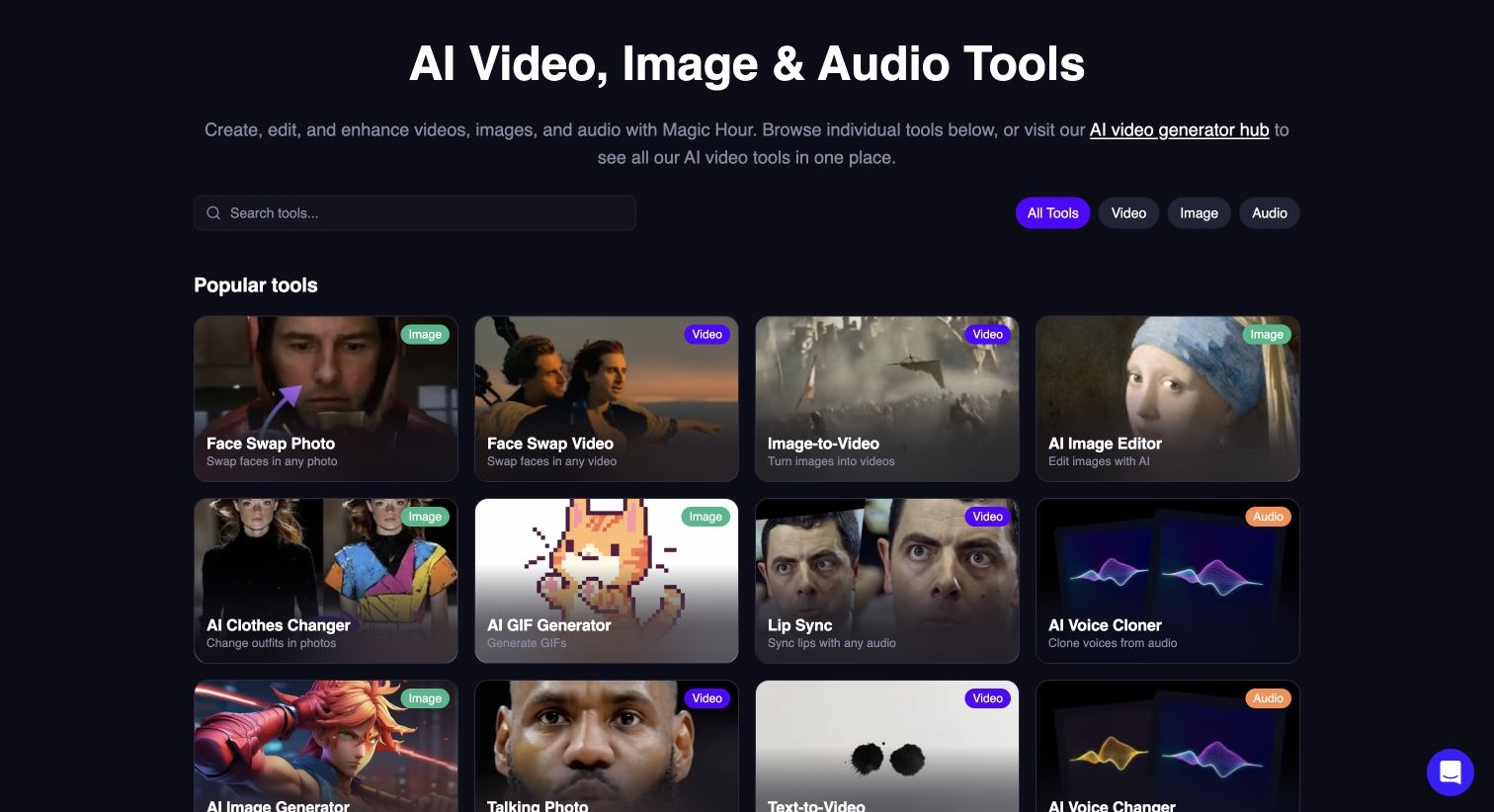
Magic Hour is a browser-based creative platform that brings 100+ AI tools for video and image generation, editing, face swap, lip sync, and talking photos into one studio. It accepts text prompts, images, video clips, and audio as inputs and outputs downloadable videos, images, GIFs, and audio. It is for creators, marketers, and developers who want to produce content quickly without separate apps, with free tools available without sign-up.
Key capabilities
Magic Hour supports text-to-video, image-to-video, video-to-video, face swap, lip sync, talking photo, AI image generation, and editing. It also includes audio tools like voice generation, voice cloning, and music generation. All tools are accessible from one account and credit balance, with a model selector to compare compatible options by task.
Pricing and limits
The free tier lets you try supported tools without signing up, including three free 3-second generations per day at 480p with audio. Paid plans start at $12/month with yearly billing and include higher resolutions up to 4K, watermark-free exports, commercial use, priority queue, and larger uploads. Credit packs are available for one-time top-ups, and credits never expire.
Who it is for
Creators can produce social posts, product demos, ads, and launch teasers. Marketing teams can scale content production with AI UGC ad generation and templates. Developers can automate workflows through the REST API with SDKs for Python, Node, Go, and Rust, and teams can use the API for personalized face swap and virtual try-on workflows.
What sets it apart
Magic Hour combines generation, editing, and finishing in one studio, so you can create and refine without moving files between apps. It offers 10,000+ templates sized for every channel, and credits roll over between billing cycles. The platform is trusted by 3.8M+ creators and has been used by teams like the Dallas Mavericks for live jumbotron content.
Key features
100+ AI tools
Text-to-video, image-to-video, video-to-video, face swap, lip sync, talking photo, and more in one studio.
Free tier
Free to try without sign-up; three free 3-second generations per day at 480p with audio.
API access
REST API with SDKs for Python, Node, Go, and Rust for automating workflows.
Template library
10,000+ templates for social posts, ads, and creative projects.
Credit system
Credits roll over; refunds on errors.
Use cases
Product marketing and ads
Create product ads, demos, and launch teasers without a production crew.
Storyboards and pre-production
Visualize scenes and pacing with text-to-video and image-to-video for pitches and client approvals.
Scale content production
Produce more videos per week without adding headcount or equipment.
Developer automation
Automate face swap, virtual try-on, and personalized image and video workflows via API.
Pricing & limits
From the official site · checked 10/10/2026Frequently asked questions about Magic Hour
- What is Magic Hour?
- Magic Hour is a browser-based creative platform with 100+ AI tools for generating and editing videos, images, and audio, plus a REST API for developers.
- Can I try Magic Hour for free?
- Yes. You can try supported AI video generation, AI image generation, and image editing tools for free, with no credit card. Free usage and available modes vary by tool.
- Do I need to sign up before I create?
- No. Supported free tools can be tried without an account. Sign up when you want saved projects, account-specific credits and rewards, or a workflow or model that requires an account.
- What can I download from Magic Hour?
- Depending on the tool, Magic Hour creates downloadable images, video clips, GIFs, or audio. Export resolution and watermarks vary by tool and plan.
- Can I use Magic Hour outputs commercially?
- You own the assets you create, subject to the Terms of Service. Outputs created without a subscription or credit-pack purchase are for personal, non-commercial use. Paid subscriptions and credit-pack purchases include commercial-use rights.
Related tools

Molyin
Generate cinematic videos, images, and music from text prompts in one studio.

Photo Animate - Photo to Video AI
Turn still portraits into lifelike videos with natural motion and easy controls.

AI BABY DANCER
Turn a single photo into a dance video with Kling motion control and share it on TikTok, Reels, or Shorts.

My Talking Pet AI
Turn any pet photo into a talking video with AI lip-sync for social media.

ShortsAi
Generate short videos for YouTube, TikTok, and Instagram with AI, or set autopilot scheduling.

VidMix AI
Create professional videos from text or images in seconds with top AI models.

Seedance 2.1
Turn prompts, images, and video cues into cinematic HD clips for quick review and download.
Kling 3 AI
Generate videos from text or images with motion control, free for 5 videos daily.