
Vizstudio
vizstudio.artMulti-model AI video and image generator
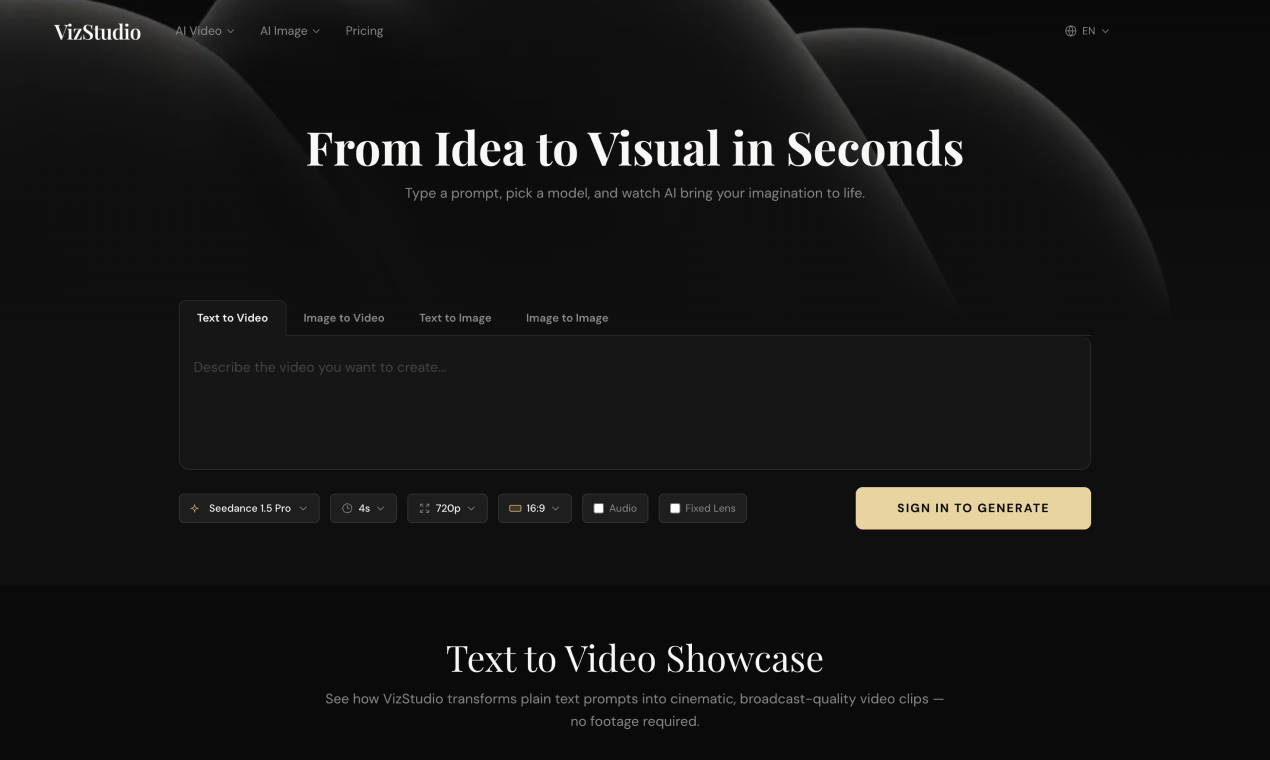
Generate AI videos and images with multiple top models, free credits on registration, no install needed.
Overview
VizStudio is an AI-driven platform for generating videos and images in seconds. Users type a prompt, pick a model, and produce content with tools for text-to-video, image-to-video, virtual try-on, photo editing, and more. It is designed for creators, hobbyists, and professionals who want multiple AI models in one browser-based workspace.
Powered by industry-leading models
VizStudio combines multiple top-tier AI video models so you always get the best quality and reliability for every creative scenario. Models include HappyHorse 1.0, Seedance 2.0, Seedance 1.5, Kling 3.0, Wan 2.6, Google Veo 3.1, and Grok Imagine. Each model excels at different tasks, from cinematic quality to artistic styles and specialized visual effects.
Key capabilities
The platform offers 20+ professional AI tools for video generation, image creation, virtual try-on, photo editing, and beyond. Specific tools include AI video generators, an image editor, virtual try-on for hats, rings, shoes, bridal gowns, and hair color, an AI outfit swapper, photo generators, and a background eraser. All tools run directly in your web browser on phone, tablet, or desktop with no app, plugin, or extension to manage.
Pricing and limits
Every new account receives free credits on registration, and most tools cost 1-2 credits per generation at standard resolution. Paid plans include Starter at $7.92/month (200 credits/month), Growth at $23.92/month (800 credits/month), and Pro at $39.92/month (1600 credits/month) when billed yearly. All paid plans include no watermarks and commercial use, with faster response times on higher tiers.
Community and file support
VizStudio includes a community prompt library with real video results for inspiration. Users can browse featured prompts like 'Surreal Battlefield Ronin Action Scene' or 'Optimus Prime vs Godzilla in Tokyo' and copy them for their own generations. The platform also supports uploading PNG, JPG, and WebP files up to 10 MB, with generated images downloading as high-quality PNGs by default.
Key features
Multi-model video generation
Access multiple top-tier AI video models including Seedance 2.0, Kling 3.0, Wan 2.6, and Google Veo 3.1.
Advanced image creation
Create images with Nano Banana 2 (Google Gemini), Flux 2 Pro, GPT-4o Image, and Grok Imagine.
20+ creative tools
Tools for virtual try-on, outfit swapping, background erasing, and photo editing.
Free credits to start
Free credits on registration; most tools cost 1-2 credits per generation at standard resolution.
Browser-based access
All tools run directly in the browser on phone, tablet, or desktop with no installation.
Use cases
Text-to-video generation
Create cinematic videos from text prompts using models like Seedance 2.0 and Veo 3.1.
Virtual try-on for shopping
Use virtual try-on tools to preview outfits, hats, rings, shoes, and hair color before purchasing.
Photo editing for content creators
Edit photos with background eraser, outfit swapping, and other creative tools for e-commerce or social media.
Concept art creation
Generate concept artwork and illustrations using Flux 2 Pro and Nano Banana 2.
Pricing & limits
From the official site · checked 10/10/2026Frequently asked questions about Vizstudio
- What is VizStudio?
- VizStudio is a free AI-driven platform offering video generation, image creation, virtual try-on, and 20+ creative tools — all consolidated in one place. No downloads or installations necessary.
- Which tools does VizStudio provide?
- We provide AI video generators (Seedance 2.0, Kling, Wan, Veo), image editor, virtual try-on (hats, rings, shoes, bridal gowns, hair color), AI outfit swapper, photo generators, background eraser, and beyond.
- Which AI models power the tools?
- For video: Seedance 2.0, Kling 3.0, Wan 2.6, and Veo 3.1. For images: Nano Banana 2 (Google Gemini), Flux 2 Pro, GPT-4o Image, and Grok Imagine. Each excels at different tasks.
- How much does it cost to get started?
- Nothing. Every new account receives free credits on registration. Most tools cost 1-2 credits per generation at standard resolution, so you can try several tools before deciding to purchase more.
- What file types can I upload?
- PNG, JPG, and WebP up to 10 MB. Generated images download as high-quality PNGs by default.
Related tools

Photo Animate - Photo to Video AI
Turn still portraits into lifelike videos with natural motion and easy controls.

Molyin
Generate cinematic videos, images, and music from text prompts in one studio.

Magic Hour
Create videos, images, and audio with 100+ AI tools in one browser-based studio.

RemoveFrom.Video
Erase text, captions, subtitles, and overlays from MP4, MOV, and WEBM videos online.

MakeAIVideo
Generate AI images and videos with frontier models in one prompt box, and let an agent handle the brief.

Music to Video
Upload MP3, WAV, or M4A and get a beat-synced music video in minutes, with 16:9 or 9:16 output.
Kling 5.0 AI Video Generator
Create 1080P HD videos from text or images with free daily credits and interactive controls.
ImagineToVideo
Turn text, images, or footage into professional videos with synced audio in minutes.