
VideoDubber Video Translator
videodubber.aiVideo translator with lip sync
Translate videos into 150+ languages with AI subtitles, dubbing, and voice cloning.
Overview
VideoDubber is an AI-powered video translation service that converts videos into 150+ languages with subtitles, dubbing, and transcripts. It supports file uploads and link imports from YouTube, TikTok, and other platforms, and offers voice cloning with lip sync for natural-sounding results. Designed for content creators, businesses, and educators, it provides a free tier of 9 minutes without requiring a credit card.
How it works
Upload a video file (MP4, MOV, WEBM, MKV, MP3, WAV) or paste a link from YouTube, TikTok, Vimeo, Instagram Reels, or Google Drive. The source language is auto-detected, and you choose from 150+ target languages with regional accents. After translation, you can preview and edit the transcript line by line, adjust timing, and re-translate specific segments before exporting.
Key capabilities
VideoDubber offers three output types: subtitles (burned-in or SRT/VTT), dubbing with voice cloning and lip sync, and transcripts (TXT/DOCX). It uses context-aware translation that considers surrounding sentences for accuracy, and adapts length and timing to avoid unnatural pacing. The tool also handles overlapping speakers, heavy slang, and noisy audio.
Who it is for
Content creators can localize YouTube videos and social clips, businesses can dub training videos and product demos, and students can translate lectures and academic videos. Journalists can quickly understand foreign news clips, and individuals can translate personal videos. It also supports accessibility by adding subtitles for deaf and hard-of-hearing viewers.
Pricing and limits
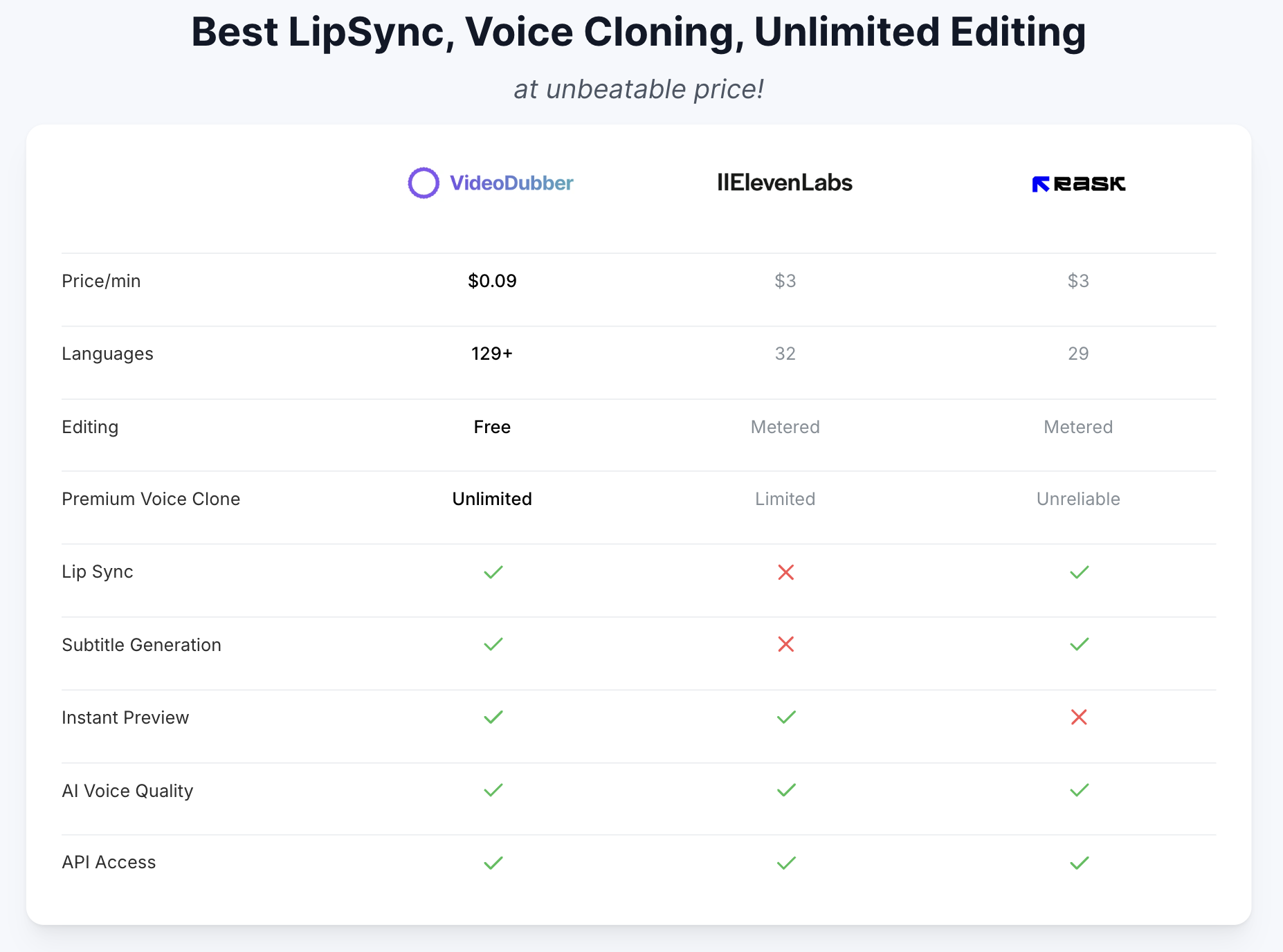
The free tier provides 9 minutes of translation without a credit card. Paid plans start at $0.09 per minute with unlimited edits, and Pro, Growth, and Scale plans can purchase extra-minute packs for $19. Enterprise plans offer premium lip sync and ElevenLabs voices. The service is browser-based and works on desktop, iPhone, and Android.
Key features
150+ language support
Translate videos into 150+ languages with regional accents and dialects.
Voice cloning and lip sync
Clone the original speaker's voice and lip-sync it to the target language.
Editable transcript editor
Edit transcripts line by line, adjust timing, and re-translate segments before export.
Multiple export formats
Export MP4 with burned-in or soft subtitles, SRT/VTT files, dubbed MP4, or TXT/DOCX transcripts.
Link import from popular platforms
Paste YouTube, TikTok, Vimeo, Instagram Reels, or Google Drive links for direct import.
Use cases
Content creators
Localize YouTube videos, TikToks, and social clips for global audiences without re-shooting.
Businesses and marketing
Dub training videos, product demos, and sales enablement content for global teams.
Students and researchers
Translate foreign-language lectures, interviews, and academic videos into transcripts for study.
Journalists and news
Quickly understand foreign news clips, press conferences, and field reports with translated subtitles.
Personal videos
Translate family messages, vacation clips, and personal recordings from relatives who speak another language.
Pricing & limits
From the official site · checked 10/10/2026Frequently asked questions about VideoDubber Video Translator
- What is VideoDubber?
- VideoDubber is an AI-powered video translation service that provides subtitles, dubbing, and transcripts in over 150 languages.
- Who is VideoDubber for?
- It is for content creators, businesses, students, journalists, and anyone needing to translate videos for global audiences.
- Is VideoDubber free to use?
- Yes, the first 9 minutes are free with no credit card required.
- What formats does VideoDubber support?
- It supports MP4, MOV, WEBM, MKV, MP3, and WAV inputs, and exports MP4, SRT, VTT, TXT, and DOCX.
Related tools

Photo Animate - Photo to Video AI
Turn still portraits into lifelike videos with natural motion and easy controls.

Molyin
Generate cinematic videos, images, and music from text prompts in one studio.

Magic Hour
Create videos, images, and audio with 100+ AI tools in one browser-based studio.
Video Upscaler
Upscale blurry videos to HD or 4K with AI, supporting mp4, mov, webm, m4v, and gif files.

Wan 2.7 AI
Generate cinematic 1080P videos from text, images, and voice with frame-level control.

Happy Horse Submission
Turn prompts, images, and clips into polished AI videos with multi-model access and fast iteration.
Wan Animate
Animate characters from photos and copy motion from reference videos for cinematic shots.

Reference to Video
Turn reference images and source videos into consistent AI-generated clips for social content, product demos, and creative variations.