
Video Upscaler
videoupscaler.onlineVideo upscaler with Topaz Proteus model
Upscale blurry videos to HD or 4K with AI, supporting mp4, mov, webm, m4v, and gif files.
Overview
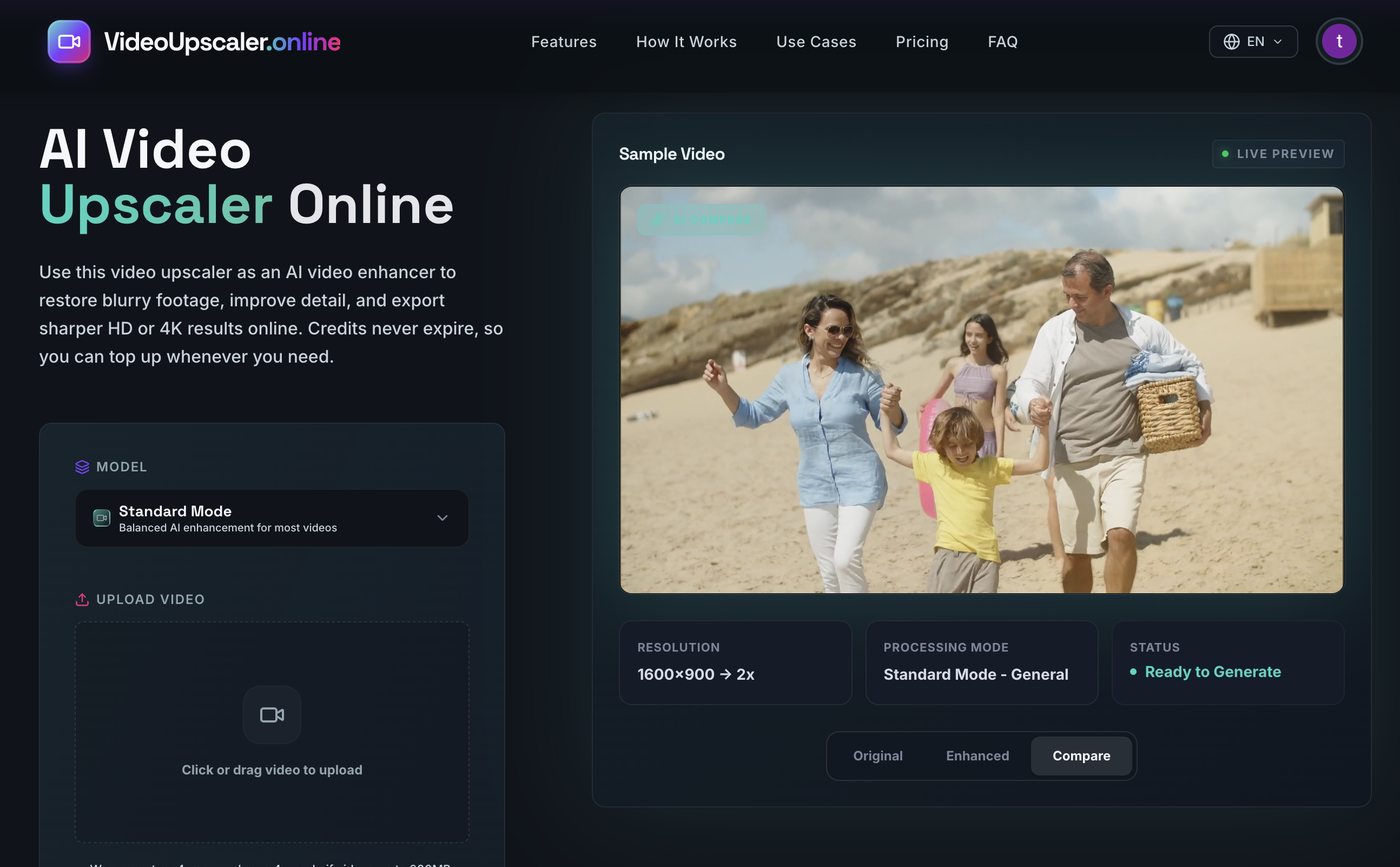
Video Upscaler is an online AI video enhancer that upscales blurry or low-resolution footage to HD, 2K, or 4K output. Users upload a video, choose output settings, and generate a sharper result with reduced noise and improved clarity. It is built for creators, social media managers, and archival restoration projects.
How it works
The workflow starts by uploading a video file in mp4, mov, webm, m4v, or gif format, up to 200MB and 60 seconds long. Users then select output resolution (2x, 4x, HD, 2K, or 4K) and processing mode, including general, UGC, short series, AI, and cold film. The system uses the Topaz Proteus model to analyze each frame, improve edges and texture, and reduce artifacts before exporting the enhanced clip.
Key capabilities
Video Upscaler offers HD and 4K output, noise reduction, blur softening, and clarity boost. It preserves the original style of anime videos while optimizing colors and details. The tool also supports restoration of old footage and enhancement of social media clips for platforms like TikTok, YouTube, and Instagram. Advanced settings allow choosing between Standard and Pro models.
Who it is for
This tool is designed for creators polishing tutorials, interviews, product shots, gameplay, and b-roll. It also serves heritage and archival restoration projects, helping to make faces, clothing, signs, and background texture easier to recognize in old recordings. Social media managers can upscale vertical clips, reels, and shorts before reposting to reduce platform compression artifacts.
Pricing and limits
Pricing is credit-based with three subscription tiers: Starter at $15/month for 300 credits, Standard at $39/month for 1000 credits, and Premium at $79/month for 2500 credits. Annual billing saves 20% (Starter $12/month, Standard $31/month, Premium $63/month). One-time credit packs are also available: 260 credits for $15, 900 for $39, and 2200 for $79. Credits never expire, and the final charge is calculated by the server based on the uploaded file and selected settings.
Key features
HD and 4K output
Upscale videos to HD, 2K, or 4K resolution with AI enhancement.
Multiple formats and size limits
Supports mp4, mov, webm, m4v, and gif files up to 200MB and 60 seconds.
Advanced model settings
Choose from Topaz Proteus model with processing modes like general, UGC, short series, AI, and cold film.
Credits never expire
Credits never expire, allowing flexible usage over time.
Anime video enhancement
Enhance anime videos while preserving the original style and optimizing colors and details.
Use cases
Heritage and archival restoration
Restore old family tapes and archived clips by improving clarity and reducing noise.
Social media optimization
Upscale vertical clips, reels, and shorts for TikTok, YouTube, and Instagram to look cleaner after platform compression.
Creator workflow enhancement
Polish tutorials, interviews, product shots, gameplay, and b-roll for a more professional look.
Fix low-quality videos
Reduce visible noise and soften blur in compressed or low-resolution videos.
Pricing & limits
From the official site · checked 10/10/2026Frequently asked questions about Video Upscaler
- What is a video upscaler?
- A video upscaler uses AI to increase resolution, reduce visible compression damage, and reconstruct plausible detail so low-quality footage can look sharper on modern screens.
- Can I use this video upscaler online to upscale video to 4K?
- Yes. The browser-based workflow can process clips for HD or 4K output while improving clarity, texture, and overall detail.
- What video formats are supported?
- We currently support mp4, mov, webm, m4v, and gif uploads.
- What kind of videos work best with a video resolution upscaler?
- Low-resolution, blurry, compressed, archived, and social clips usually benefit the most because they often need better clarity, cleaner edges, and more readable detail.
Related tools

Photo Animate - Photo to Video AI
Turn still portraits into lifelike videos with natural motion and easy controls.

Molyin
Generate cinematic videos, images, and music from text prompts in one studio.

Magic Hour
Create videos, images, and audio with 100+ AI tools in one browser-based studio.

Wan 2.7 AI
Generate cinematic 1080P videos from text, images, and voice with frame-level control.

Happy Horse Submission
Turn prompts, images, and clips into polished AI videos with multi-model access and fast iteration.

Wan Animate
Animate characters from photos and copy motion from reference videos for cinematic shots.

Reference to Video
Turn reference images and source videos into consistent AI-generated clips for social content, product demos, and creative variations.

Veo 4
Create cinematic text-to-video and image-to-video clips with audio-ready scenes and 4K-ready output.