Veoo
Third-partyveoo.videoVeo-based video studio with audio output
Turn a text prompt or uploaded image into 1080p video clips with audio using Veo models.

Overview
Veoo is an independent third-party AI video studio built around Google's Veo models, including Veo3 Fast, Veo3 Premium and Veo 3.1. You type a prompt or upload an image and it generates 1080p video with audio, with batch generation and smart prompt optimization. It is aimed at creators who want cinematic short clips without installing software.
How it works
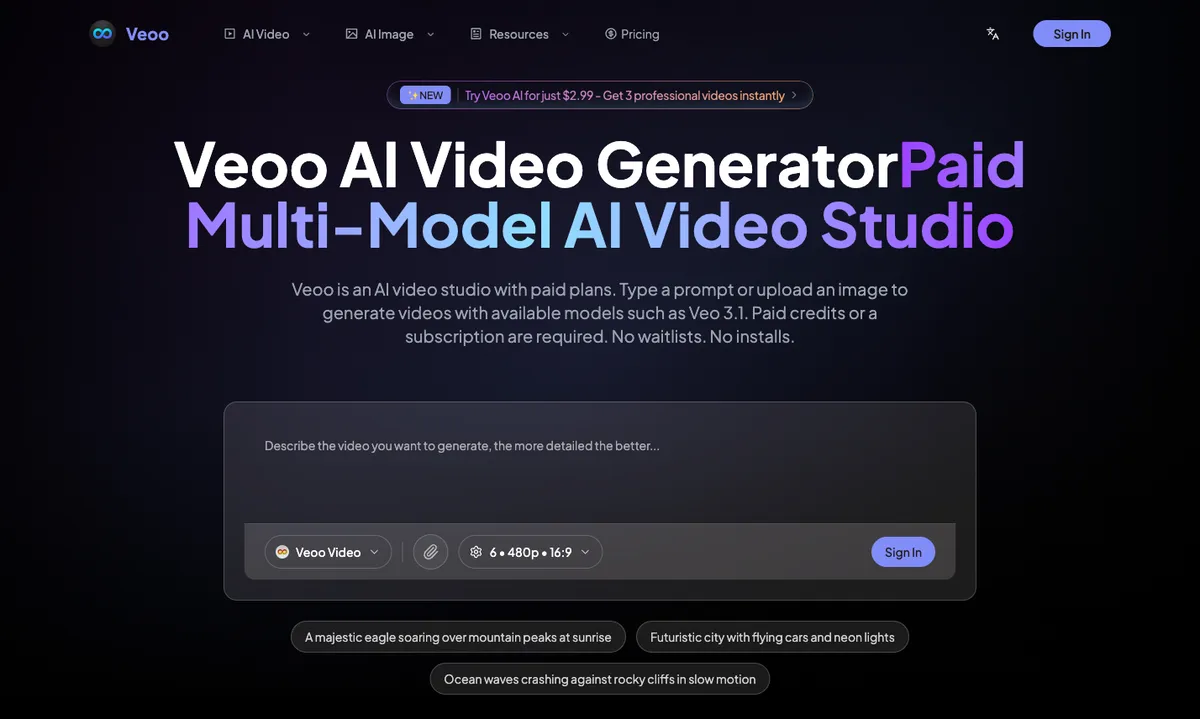
You sign in, then either type a prompt or upload an image as the starting point. The site shows sample prompts such as a majestic eagle soaring over mountain peaks at sunrise, a futuristic city with flying cars and neon lights, and ocean waves crashing against rocky cliffs in slow motion. Prompts are optimized automatically before generation, and the studio supports batch generation for producing several videos in one session.
Models and output
The multi-model engine covers Veo3 Fast for quick generation, Veo3 Premium for professional quality, and Veo 3.1 as the latest model, alongside Veoo Basic and Veoo Advance. Output is described as 1080p video with audio. The interface shows clip settings such as duration and aspect ratio, for example 6 seconds at 16:9.
Pricing and limits
Veoo is a paid studio with monthly plans, credit packs and an annual option advertised at 29% savings. The pricing page mentions 1 free Veoo video, and paid accounts get 10 Veoo videos per day. A promotional offer advertises trying Veoo AI for $2.99 to get 3 professional videos, and Veo 3.1 access unlocks after you upgrade.
Key features
Text to video
Type a prompt and generate a video clip, with example prompts such as an eagle over mountain peaks or a neon futuristic city.
Image to video
Upload an image as the starting point and generate a video from it instead of writing a prompt from scratch.
Multiple Veo models
Choose between Veo3 Fast, Veo3 Premium and Veo 3.1, plus Veoo Basic and Veoo Advance, depending on the creative need.
1080p video with audio
Output is described as 1080p video with audio, aimed at cinematic-looking clips rather than silent footage.
Batch generation
The studio supports batch generation so several videos can be produced in one session.
Smart prompt optimization
Prompts are optimized automatically to help get closer to the intended result.
Use cases
Cinematic short clips
Creators can produce short cinematic-style shots such as landscapes, cityscapes and slow-motion nature scenes from a written prompt.
Animating still images
An existing photo or illustration can be uploaded and turned into a moving video clip.
Producing several videos at once
Batch generation suits users who need multiple clips in one sitting, such as for a series of shots.
Pricing & limits
Listed as freemium. A dated pricing breakdown is not available. Check the provider for current plans and allowances.
Check current pricing on the official siteGetting started
Open the site and sign in, since generation requires paid credits or a subscription. Choose a model from the available options, enter a prompt or upload an image, and set the clip length and aspect ratio. There are no waitlists and no installs, so generation happens directly in the browser after you have credits.
Frequently asked questions about Veoo
- What is Veoo?
- Veoo is an independent AI video studio built around Veo models. You type a prompt or upload an image and it generates videos, with 1080p output and audio described on the site.
- Which models can I use?
- The site lists Veo3 Fast, Veo3 Premium and Veo 3.1, along with Veoo Basic and Veoo Advance. Veo 3.1 access is described as unlocking after you upgrade.
- Is Veoo free?
- There is 1 free Veoo video according to the pricing page. Beyond that, paid credits or a subscription are required, and paid accounts get 10 Veoo videos per day.
- Do I need to install anything?
- No. The site states there are no waitlists and no installs; you sign in and generate in the browser.
Related tools

AI Rap Video Generator
Turn one photo into a 4, 6, or 8-second rap video with generated vocals, a beat, and lip sync, ready for TikTok, Reels, and Shorts.

Magic Hour
Create videos, images, and audio with 100+ AI tools in one browser-based studio.

Molyin
Generate cinematic videos, images, and music from text prompts in one studio.

Photo Animate
Turn still portraits into lifelike videos with natural motion and easy controls.
VoooAI
Turn one sentence into a multi-step workflow that outputs images, video, music and digital-human narration.

Vidou
Turn a JPG, PNG or WEBP photo into a 5-second 720p video by describing the motion in plain words.

AI Tiny Desk
Make a 19-second desk-concert video with lead and sax, full band, Halloween or pet-band modes; audio and silent MP4.

SnapDub
Paste a YouTube, Twitch, Kick, Rumble or Zoom link and get captioned 9:16 clips with titles, descriptions and hashtags.