
SnapDub
snapdub.aiLong-video clipper that watches and listens
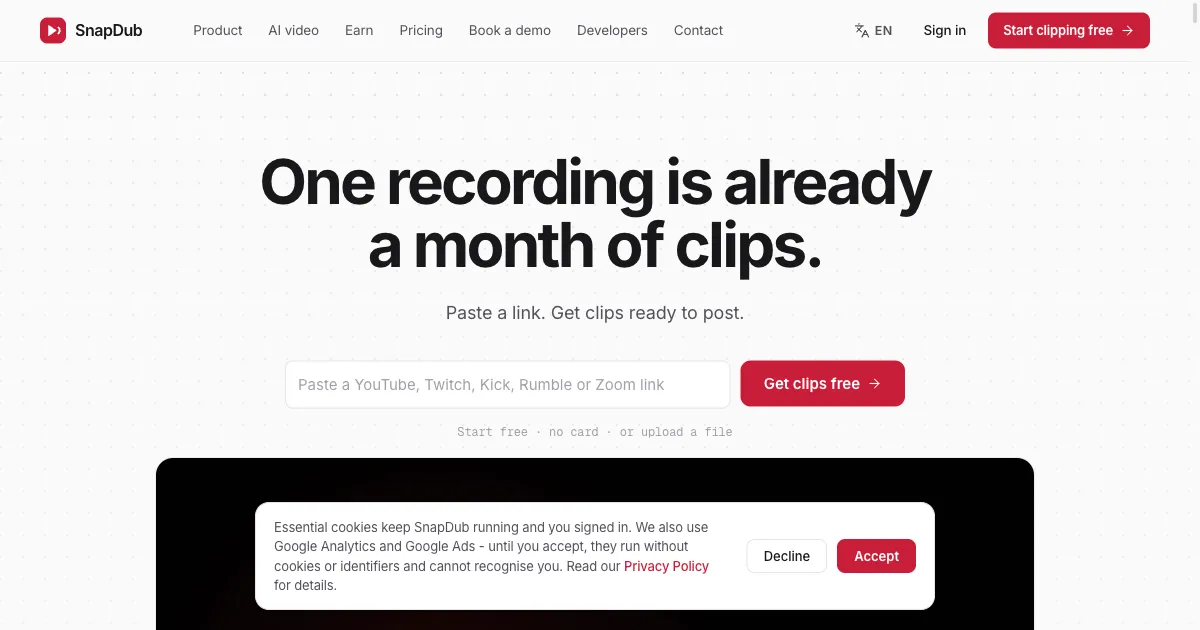
Paste a YouTube, Twitch, Kick, Rumble or Zoom link and get captioned 9:16 clips with titles, descriptions and hashtags.

Overview
SnapDub is a web-based clipping service that takes a long recording - a YouTube, Twitch, Kick, Rumble or Zoom link, an uploaded file, or a connected channel - and returns a batch of vertical 9:16 clips with word-by-word captions, a title, description and hashtags. It is aimed at podcasters, streamers, social media managers and agencies who need a steady supply of short-form posts.
How it works
You paste a link, upload a file or connect a channel, and SnapDub transcribes the audio and runs a separate pass that watches the picture. Moments are scored on both, so a laugh, a gesture or a reaction can rank as highly as a sentence. A batch comes back cropped to whoever is speaking, captioned word by word, and titled, described and tagged. You can post from the tool or download the lot, and every clip's captions also download as .srt or .vtt.
Key capabilities
A template holds caption style, font, color filter, logo, crop, title and clip length, and applies it to every clip so clip 30 matches clip 1. Each clip renders with spare footage on both sides, so you can drag in and out points, fix a misheard word, switch among 36 caption styles, or drop in images, GIFs and video overlays, rebuilding only that clip. Optional beta voice-clone dubbing with lip-sync and translation in 16 languages are available, and clips can be searched by keyword across everything said.
Publishing and automation
Connect a YouTube or Twitch channel and new uploads are clipped to your template without anyone pasting a link. You set weekly posting slots once, and new clips fill the next free slots, mixing clips from different recordings. Clips post directly to TikTok and YouTube, with X (Twitter) posting on Pro and Business, and finished videos also land in your team's Discord channel.
Pricing and limits
Every account starts with 500 free credits, no card and no trial timer; free clips carry a small watermark and only the first 3 clips of each video are downloadable. Starter is EUR 12 a month with 3,000 credits and 3 users, Pro EUR 27 with 9,000 credits and 10 users, and Business EUR 99 with 33,000 credits and 50 users. Credits cost 4 per source minute for transcription, 1 per source minute for the visual pass, 16 per clip rendered, plus 4 for captions and 3 for translation.
Key features
Topic-aware moment detection
Reads the whole recording for real topics so each clip opens and closes on a complete idea, and scores moments on facial expression, gesture, on-screen action and audio as well as the transcript.
Template-based batch rendering
Caption style, font, color filter, logo, crop, title and clip length are set once in a template and applied to every clip, so clip 30 matches clip 1.
Editable clips with spare footage
Every clip renders with extra footage on both sides, so in and out points can be dragged, misheard caption words fixed, and 36 caption styles swapped, rebuilding only that clip.
Auto-posting to connected channels
Connect a YouTube or Twitch channel and new uploads are clipped to your template and fill your chosen weekly posting slots, with direct posting to TikTok and YouTube.
Optional dubbing and translation
Beta voice-clone dubbing with lip-sync and translation across 16 languages, off by default and billed as extra credits.
Prompt-to-video and UGC promos
Generate 4, 6 or 8 second vertical clips from a sentence, or turn a campaign brief with a product link and up to four screenshots into a voiced 15, 30 or 45 second promo.
Use cases
Podcasters and streamers
Turn a multi-hour podcast or stream into a month of vertical clips, or pick just the one good hour of a four-hour stream and pay only for those minutes.
Social media managers
Keep separate templates for three shows or three clients and switch between them from a dropdown, with clips filling scheduled weekly slots.
Agencies and teams
Shared credit pools with 3, 10 or 50 included seats and up to 15 auto-imported channels on the Business plan.
Music and UGC campaigns
Cut footage to a TikTok or Instagram sound with lyric lines on screen, or produce faceless voiced promos from a brief alone.
Pricing & limits
Verified 11/18/2026Frequently asked questions about SnapDub
- What is SnapDub?
- A web tool that takes a long recording - a YouTube, Twitch, Kick, Rumble or Zoom link, an uploaded file, or a connected channel - and returns a batch of vertical 9:16 clips with word-by-word captions, a title, description and hashtags.
- Is SnapDub free to start?
- Yes. Every account starts with 500 free credits, no card and no trial timer. Free-tier clips carry a small watermark and only the first 3 clips of each video are downloadable; paid plans render without a watermark.
- How do credits work?
- Credits are spent on the work you run: 4 per source minute for transcription and moment finding, 1 per source minute for the visual pass, 16 per clip rendered, plus 4 for captions and 3 for a translation. Failed jobs are refunded automatically.
- Can I edit a clip after it is generated?
- Yes. Each clip renders with spare footage on both sides so you can drag in and out points, fix caption text, switch among 36 caption styles, adjust audio, or add images, GIFs and video overlays, then rebuild just that clip.
- Where can clips be posted?
- Clips can be downloaded or posted from SnapDub to TikTok and YouTube, with X (Twitter) posting on Pro and Business. Connected channels fill your chosen weekly slots automatically.
Related tools

AI Rap Video Generator
Turn one photo into a 4, 6, or 8-second rap video with generated vocals, a beat, and lip sync, ready for TikTok, Reels, and Shorts.

Magic Hour
Create videos, images, and audio with 100+ AI tools in one browser-based studio.

Molyin
Generate cinematic videos, images, and music from text prompts in one studio.

Photo Animate
Turn still portraits into lifelike videos with natural motion and easy controls.

Storyship
Turn a product URL or an MP4, WebM or MOV screen recording into a narrated demo video with captions and zooms.
AI Tiny Desk
Make a 19-second desk-concert video with lead and sax, full band, Halloween or pet-band modes; audio and silent MP4.

Seedance Now
Multi-model AI video & image generator in your browser
VoooAI
Turn one sentence into a multi-step workflow that outputs images, video, music and digital-human narration.