
subtitle.im
subtitle.imLocal OCR for duplicate YouTube captions
YouTube captions on or off, with local duplicate detection.

Overview
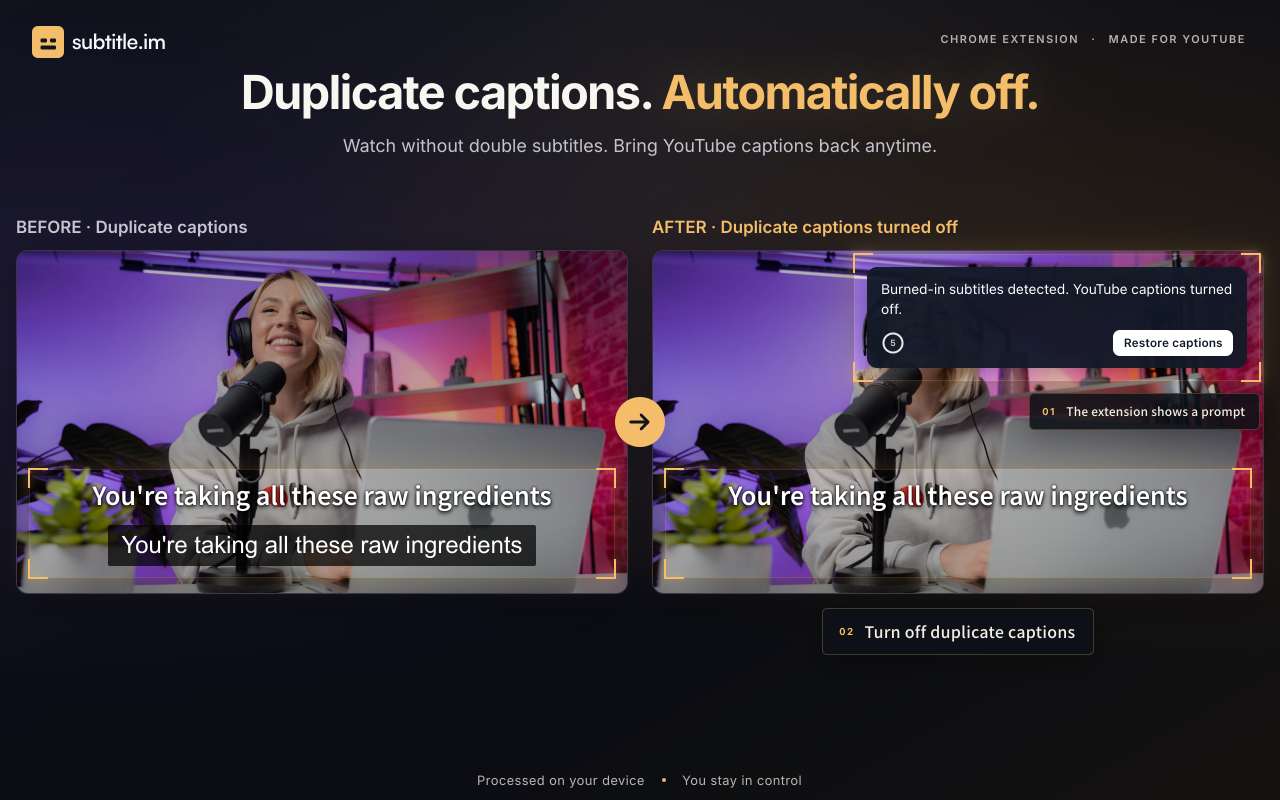
subtitle.im manages existing YouTube captions in Chrome. Choose follow YouTube, automatically on or automatically off across videos. Local OCR detects burned-in subtitles to help handle duplicate soft captions according to your settings. Restore captions anytime. Try 10 successfully handled videos without signup; optional Pro supports continued handling, channel rules, video exceptions and memory of confirmed closures. It does not generate, translate, download or remove burned-in subtitles.
Key features
Automatic caption control
Set captions to follow YouTube, auto-open, or auto-close across videos.
Local burned-in subtitle detection
Uses OCR in the browser to detect burned-in subtitles without uploading video frames.
Duplicate caption handling
Automatically close duplicate captions, ask first, or keep them when languages differ.
Channel and video rules
Optional Pro adds saved channel rules and video exceptions alongside global preferences.
Manual override
Manual CC/C changes take priority for the current viewing without altering saved rules.
Use cases
Keep captions on or off
Automatically enable or disable YouTube captions based on your preference.
Handle burned-in subtitles
Detect burned-in subtitles and manage duplicate captions when languages differ.
Fine-grained control
Optional Pro applies saved channel rules and video exceptions for consistent caption behavior.
Pricing & limits
Verified 10/29/2026Frequently asked questions about subtitle.im
- What is subtitle.im?
- subtitle.im is a Chrome extension that manages existing YouTube captions, detects burned-in subtitles locally, and handles duplicate captions with separate settings.
- Who is it for?
- It is for YouTube viewers who want automatic caption control, especially those watching videos with burned-in subtitles in another language.
- Is it free?
- Yes, there is a free plan with no sign-up needed, offering 10 successfully handled videos in total. Pro plans are available for unlimited use.
- Which platforms are supported?
- It works in desktop Chrome as an extension.
- Are video frames uploaded?
- No, frame sampling and OCR run locally in your browser; video frames and subtitle text are not uploaded.
Related tools

Otter.ai
Transcribe meetings, get summaries, and automate follow-ups with Otter.

Motion
Motion uses AI to automatically prioritize tasks, schedule your day, and manage projects.

Reclaim.ai
Automate your calendar to schedule tasks, habits, and meetings with AI.

Notion AI
Automate tasks, search across apps, and capture meeting notes inside Notion.

Gamma
Create presentations, documents, websites, and social posts from a prompt, with an AI agent that outlines and designs for you.

Fireflies.ai
Record, transcribe, and analyze meetings with 95% accuracy and 200+ AI skills.
Scrieb
Record, transcribe, and summarize meetings on your Mac or PC, fully offline.

AI timeline maker
Turn prompts or documents into visual timelines with real-time collaboration and multi-format export.