Scrieb
Third-partyscrieb.comLocal-first meeting transcription with Whisper
Record, transcribe, and summarize meetings on your Mac or PC, fully offline.
Overview
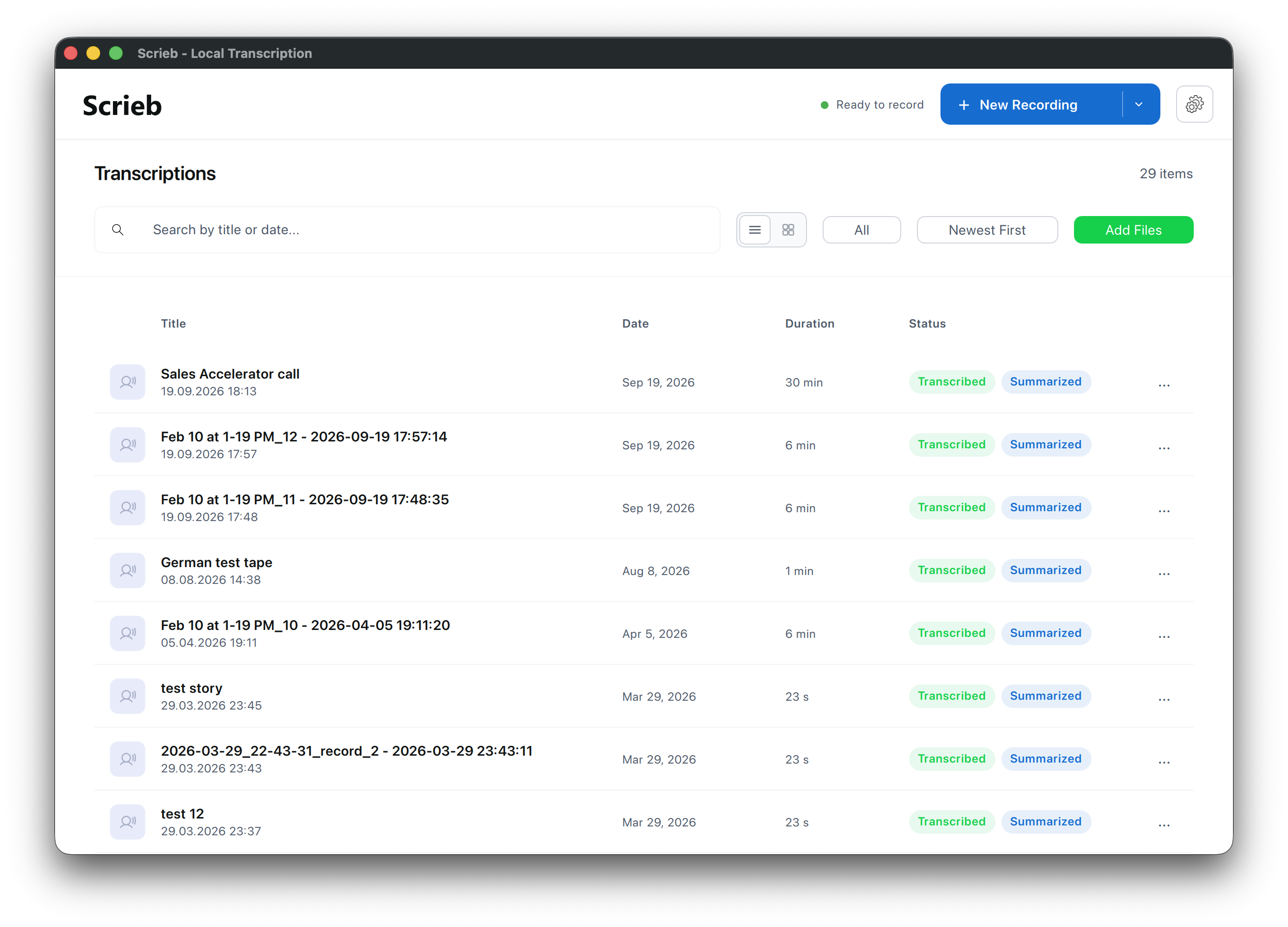
Scrieb is a local-first transcription and note-taking app for Mac and Windows. It records meetings, calls, and interviews on your own computer, transcribes them with Whisper models, and generates summaries and chat answers — all offline after a one-time model download. It is built for lawyers, therapists, clinicians, researchers, students, and teams who need private, on-device transcription without uploading recordings to the cloud. This is an independent third-party service and is not operated by the company behind the model it is built around.
How it works
Scrieb records on your own computer, so no bot appears in your call and nothing is uploaded. You can record the microphone only from the app or menu bar, or capture system audio from any meeting app like Zoom, Teams, or Meet. You can also drag in existing files: MP3, WAV, M4A, FLAC, AIFF, MP4, MOV, WebM, MKV, and Opus. Recording is written to disk as it happens, so long meetings are safe.
Pricing and plans
Scrieb offers a free plan with 1 hour of recording per day, including speaker identification, chat, and all export formats. Pro plans remove the limit and cost $24.99/month, $99.99/6 months, or $169.99/year. All paid plans include unlimited transcriptions, smart summaries, and priority support. A 14-day refund is available, and a free 15-minute onboarding call helps you set up model choice, recording, summary types, and export.
Who it is for
Scrieb is designed for people who cannot upload recordings: lawyers handling privileged material, therapists and clinicians needing HIPAA/GDPR compliance, researchers wanting verbatim quotes and topic-based summaries, students needing lecture notes, and teams that want searchable decisions and action items. It runs on Apple Silicon and Intel Macs, Windows 10 and 11, and a native build for Snapdragon laptops, with one licence covering all platforms.
Privacy and control
Scrieb processes everything on your device: transcription, speaker recognition, summaries, and chat run on your CPU or GPU. It offers zero data retention, no processor for the content, and an Offline mode that disables all automatic connections. You can encrypt the local database with a key in your OS keychain, and usage statistics can be turned off. Export to DOCX, PDF, TXT, or Markdown, and search inside transcripts and summaries across all recordings.
Key features
Local recording without a bot
Records meetings, calls, and interviews on your own computer, with no bot joining the call and no upload to the cloud.
Whisper-based transcription with speaker labels
Transcribes 90+ languages using Whisper Small, Medium, or Large v3 Turbo, with speaker recognition for 2–8 participants.
Smart summaries with custom types
Generates summaries in the language of the recording, with types like Interview, Meeting, Lecture, and Voice memo, plus custom summary types.
Search and chat across recordings
Search inside transcripts and summaries, and chat across all recordings with answers that cite the source recordings.
Export to DOCX, PDF, TXT, and Markdown
Exports to DOCX, PDF, TXT, and Markdown, with speaker names and summary formatting preserved.
On-device processing with optional encryption
Runs entirely on your CPU or GPU, with optional encryption of the local database and an Offline mode that disables all automatic connections.
Use cases
Legal file notes
Lawyers can transcribe client meetings and dictation into file notes without uploading privileged material.
Therapy session notes
Therapists and clinicians can turn session recordings into notes with nothing leaving the practice computer.
Research interviews
Researchers can get interview summaries with questions by topic and verbatim quotes, exportable to DOCX and TXT for analysis software.
Lecture summaries
Students can transcribe lectures and get summaries with topics, definitions, and what to revise.
Team meeting notes
Teams can capture decisions and action items from every call and search across all recordings.
Pricing & limits
From the official site · checked 10/17/2026Frequently asked questions about Scrieb
- What is Scrieb?
- Scrieb is a local-first transcription app for Mac and Windows. It records meetings, calls, and interviews on your computer, transcribes them with Whisper models, and generates summaries and chat answers — all offline after a one-time model download.
- Is there a free version?
- Yes. The free plan gives you 1 hour of recording per day, with speaker identification, chat, and all export formats. No card is needed. Pro removes the limit and covers Mac and Windows with one licence.
- Which platforms does Scrieb support?
- Scrieb runs on Apple Silicon and Intel Macs, Windows 10 and 11, and a native build for Snapdragon (ARM64) laptops. One licence covers all platforms.
- Can I use Scrieb completely offline?
- Yes. After the one-time model download, recording, transcription, summaries, search, and chat all work without internet. Subscribers can switch on Offline mode so Scrieb makes no connections on its own.
- Which languages does Scrieb support?
- Scrieb supports 90+ languages for transcription. Summaries are written in the language of the recording. The app itself is available in eleven languages.
Related tools

AI timeline maker
Turn prompts or documents into visual timelines with real-time collaboration and multi-format export.

Applytrackr
Track every job application, get tailored resumes and cover letters, and auto-apply with ease.
superscribe.io
Turn every business call into notes, tasks, and follow-ups on your own number.

ScanPilot
Convert PDFs, scans, photos, and handwritten documents into structured Excel, CSV, or JSON files.

XIMA DIGITAL
Translate, chat, and summarize PDFs with cited answers and multi-file support.

AI Prompt Anonymizer
Redact names, emails, API keys, and card numbers from any prompt before sharing with AI.

ConsultScribe
Record or upload consultations, get accurate transcription, and generate custom-formatted reports in seconds.

LastRound AI
Get tailored answers in about a second during live interviews, invisible on screen share.