
kovvid
kovvid.comMulti-model image and video workspace
Generate images and videos from text or reference images, then compare Sora 2, Veo 3, Kling AI, Seedream 4.5, and Nano Banana Pro.
Overview
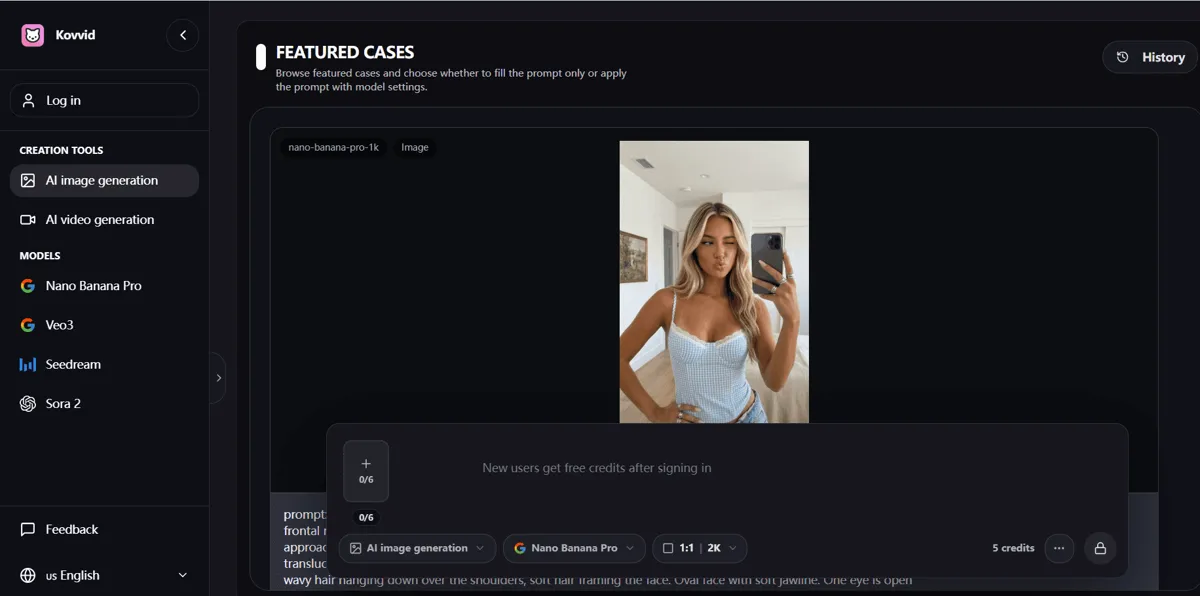
Kovvid is a web workspace for AI image and video generation that combines Sora 2, Veo 3, Kling AI, Seedream 4.5, and Nano Banana Pro on one page. You enter text prompts or upload reference images to produce product visuals, posters, social ads, and short videos, then compare results before downloading. It is aimed at marketers, designers, and content teams.
How it works
Pick image or video first, then choose the model that fits the job. Write a prompt describing the scene, look, or motion you want, or upload a reference image for image-to-image and image-to-video tasks. For frames to video, provide the starting and ending frames you want the motion to connect. Most jobs finish in 1 to 2 minutes, after which you compare outputs and download the version you want.
Key capabilities
The platform covers text-to-image, image-to-image, text-to-video, image-to-video, and frames workflows in one place. Nano Banana Pro suits text-heavy or layout-sensitive visuals, while Seedream 4.5 targets photoreal results, with image output up to 4K. On the video side, Sora 2 fits narrative motion, Veo 3 is built for punchy short-form clips, and Kling AI gives tighter motion control. You can run the same idea through multiple models to find the best fit for each project.
Pricing and limits
The Free plan starts at $0 with 10 free credits after signing in, daily check-in rewards, and saved generation history, but video is preview only and images carry a kovvid.com watermark. Paid tiers are Starter at $10/mo, Pro at $20/mo, Premium at $40/mo, and Ultra at $99/mo on annual billing, with monthly prices of $19.9, $39.9, $79.9, and $149. Pro includes 12,000 credits per year, roughly 3,000 images or 1,200 videos, while Ultra lists 48,000 credits per year and 365-day unlimited access to selected image models.
Who it is for
Kovvid is built for marketing, design, and content teams that need product shots, posters, social ads, YouTube clips, and short-form videos. Paid plans add private visibility controls and watermark-free exports, which the site positions as a better fit for team and client workflows. Commercial use is supported through paid plans, though the site advises reviewing the policy of the model you choose before commercial use.
Key features
Multi-model comparison
Run the same idea through Sora 2, Veo 3, Kling AI, Seedream 4.5, and Nano Banana Pro in one workspace and compare outputs before downloading.
Text and image inputs
Supports text-to-image, image-to-image, text-to-video, image-to-video, and frames-to-video workflows from a single page.
Frames video control
Set the starting and ending frame yourself for tighter control over transitions, product reveals, and scene changes.
Up to 4K image output
Image models produce output up to 4K resolution, with Nano Banana Pro suited to text-heavy layouts and Seedream 4.5 to photoreal results.
Watermark-free paid exports
Paid plans include watermark-free image and video downloads, private visibility controls, and full commercial use rights.
No charge for failures
Credits are not charged for failed generations, so you only pay for successful results.
Use cases
Product visuals and posters
Create product shots, posters, and social graphics from prompts or reference images using Nano Banana Pro and Seedream 4.5.
Short-form video and ads
Produce short videos, ads, and product demos with Sora 2 for narrative motion, Veo 3 for punchy short-form clips, and Kling AI for tighter motion control.
YouTube clips and social assets
Generate YouTube clips, thumbnails, and social media assets, including image-to-video outputs for character shots and product demos.
Marketing and design team workflows
Privacy controls, visibility settings, and watermark-free exports support marketing, design, and content teams working with clients.
Pricing & limits
From the official site · checked 11/24/2026Frequently asked questions about kovvid
- What is Kovvid AI?
- Kovvid AI is an all-in-one platform for AI image and video creation. It supports text-to-image, image-to-image, text-to-video, image-to-video, and frames workflows, letting you create and compare outputs from Sora 2, Veo 3, Nano Banana Pro, Seedream 4.5, and Kling AI in one place.
- Is Kovvid AI free to start?
- Yes. You get 10 free credits after signing in, plus daily check-in rewards. Free accounts can preview generated images and videos and download images with a kovvid.com watermark, but video downloads and advanced privacy controls require a paid plan.
- Do failed generations cost credits?
- No. No credits are charged for failed generations, so you only pay for successful results.
- Can I use Kovvid AI without registering an account?
- For saved history, fuller access, and free credits, you should create a free account. You can sign in quickly with Google and start creating after signup.
- Can images and videos generated with Kovvid AI be used commercially?
- Paid plans include watermark-free exports, stronger privacy controls, and full commercial use rights, making them a better fit for commercial workflows. You should still review the terms of the model you choose before commercial use.
Related tools

AI Rap Video Generator
Turn one photo into a 4, 6, or 8-second rap video with generated vocals, a beat, and lip sync, ready for TikTok, Reels, and Shorts.

Magic Hour
Create videos, images, and audio with 100+ AI tools in one browser-based studio.

Molyin
Generate cinematic videos, images, and music from text prompts in one studio.

Photo Animate
Turn still portraits into lifelike videos with natural motion and easy controls.

Flux IA Image à Vidéo
Animate a still image into an MP4 clip with camera moves, micro-movements and mood styles.

Motion Control AI
Transfer dance moves, gestures and facial expressions from a reference video onto a character image in 40 to 90 seconds.
No Scrubs AI
Turn portraits into a short music dance video with sound

MoveMyPhoto
Make your photo dance to a popular song with AI.