
Flux IA Image à Vidéo
Third-partyfluxia.proImage-to-video with camera moves
Animate a still image into an MP4 clip with camera moves, micro-movements and mood styles.
Overview
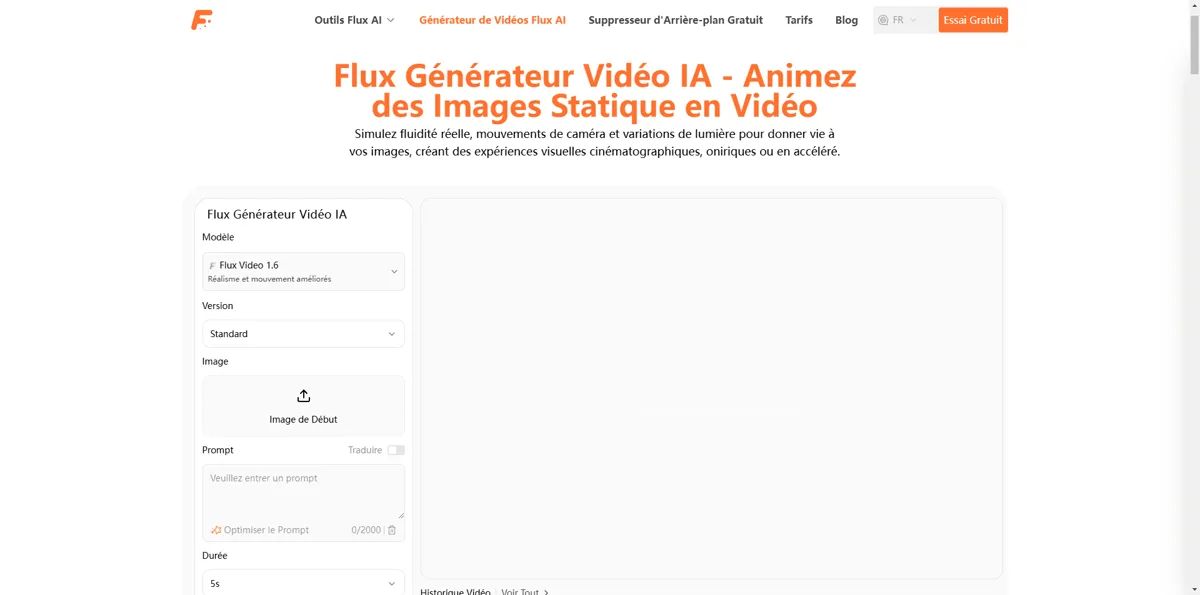
Flux IA is an independent third-party service built around the Flux model family, offering an image-to-video playground that animates a still image into a short clip. You upload an image, write a prompt of up to 2000 characters, pick a model such as Flux Video 1.6 and generate. It is aimed at content creators, marketers, photographers and digital artists.
How it works
The workflow has four steps: upload any image you want to animate, enter a creative prompt describing the video, let the AI generate the clip in seconds according to your settings, then download the finished video. The playground exposes a model selector, a start image field, a prompt box with translate and optimize buttons, a duration control and a public toggle. A video history panel lets you replay earlier generations.
Key capabilities
The tool analyzes visual elements and spatial structure of a static image to build coherent change over time. It simulates virtual camera moves including pan, zoom, rotation and aerial views, and generates micro-movements such as light shimmer, rippling water and wind-blown hair. Mood and pace controls offer styles like dreamy flux, cinematic lighting and slow drift, and output is described as HD with styles including slow motion, dreamy, sci-fi and romantic.
Who it is for
The page names content creators, brand marketing, photo post-processing and visual arts as its audiences. Typical applications include animated clips from static photos for vlogs, travel posts and selfies, video intros and transitions, photography showcases that reveal detail through camera moves and light variation, and animated versions of digital artworks for NFT collections. No animation experience is required: the page says you import an image and generate in one click.
Pricing and limits
The Free plan costs $0 and gives new users 100 credits plus 20 credits for daily registration, with limited models, a shared generation queue, 15-day history and no private generations or commercial license. Standard is $9.99 per month for 5000 credits and Professional is $29.99 per month for 21000 credits; both list unlimited image and video models, fast generation, private generations, commercial rights, 100-day history and no ads.
Key features
Camera motion simulation
Adds virtual camera moves including pan, zoom, rotation and aerial views to a static image.
Micro-movement generation
Creates realistic details such as light shimmer, rippling water and wind-blown hair so the image feels alive.
Mood and pace control
Lets you pick the video pace and emotional tone with styles such as dreamy flux, cinematic lighting and slow drift.
Prompt optimizer
The playground includes a prompt field with a 2000-character limit plus translate and optimize prompt buttons.
MP4 export for social platforms
Generated videos export as MP4 and are described as usable on TikTok, Instagram and YouTube.
Use cases
Social media content
Turn static photos into animated clips for vlogs, travel posts and selfies to raise engagement.
Video intros and transitions
Build memorable video introductions and transitions that enrich existing edits.
Photography showcase
Photographers can highlight details of their work through camera moves and light variation.
Art and NFT animation
Digital artists can produce animated versions of their works to add interactivity to NFT collections.
Pricing & limits
From the official site · checked 11/21/2026Frequently asked questions about Flux IA Image à Vidéo
- What is Flux IA image to video?
- It is an AI tool that animates a static image into a video, simulating camera moves, light variation and micro-movements such as shimmering light or rippling water.
- How do I create a video from an image?
- Upload the image you want to animate, enter a prompt describing the video, generate it with your chosen settings, then download the finished video.
- Is there a free way to use Flux IA?
- Yes. The Free plan costs $0 and gives new users 100 credits, with 20 credits for daily registration, limited models and a shared generation queue.
- What do the paid plans include?
- Standard is $9.99 per month with 5000 credits, and Professional is $29.99 per month with 21000 credits. Both list unlimited image and video models, fast generation, private generations, commercial rights, 100-day history and no ads.
- Which model and output format does it use?
- The playground offers Flux Video 1.6, described as improved realism and motion, and generated videos support MP4 export for platforms such as TikTok, Instagram and YouTube.
Related tools

AI Rap Video Generator
Turn one photo into a 4, 6, or 8-second rap video with generated vocals, a beat, and lip sync, ready for TikTok, Reels, and Shorts.

Magic Hour
Create videos, images, and audio with 100+ AI tools in one browser-based studio.

Molyin
Generate cinematic videos, images, and music from text prompts in one studio.

Photo Animate
Turn still portraits into lifelike videos with natural motion and easy controls.
Motion Control AI
Transfer dance moves, gestures and facial expressions from a reference video onto a character image in 40 to 90 seconds.

kovvid
Generate images and videos from text or reference images, then compare Sora 2, Veo 3, Kling AI, Seedream 4.5, and Nano Banana Pro.
No Scrubs AI
Turn portraits into a short music dance video with sound

MoveMyPhoto
Make your photo dance to a popular song with AI.