
Img2STL
img2stl.orgImage to STL converter with four modes
Turn PNG, JPG or SVG images into printable STL files
Overview
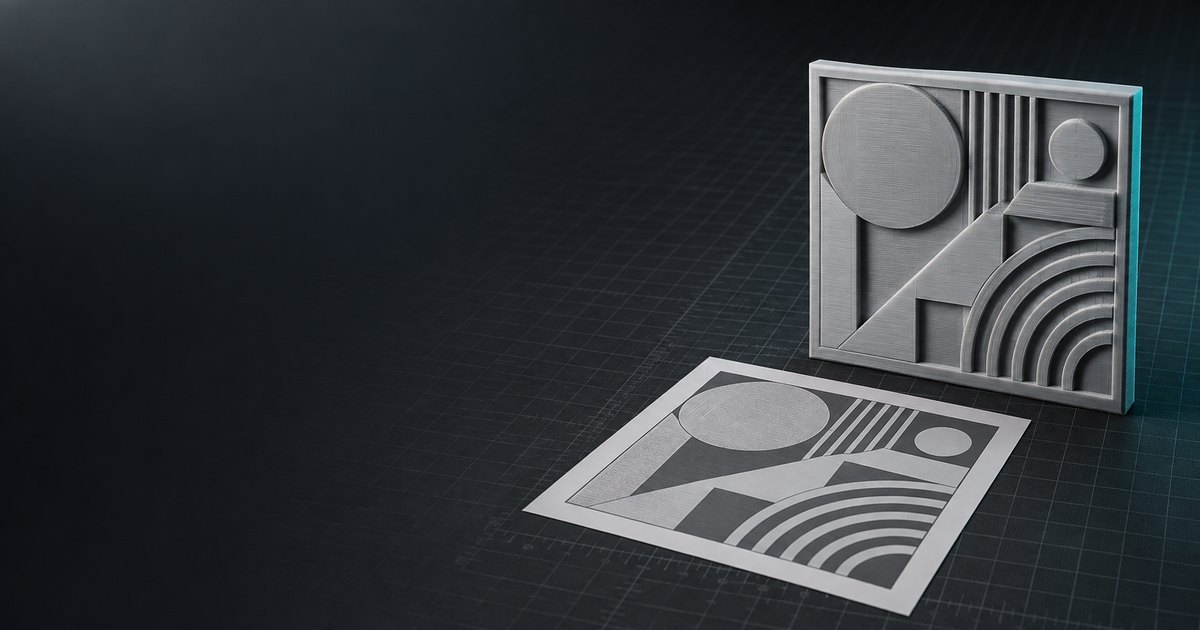
Img2STL converts a logo, photo or drawing into a watertight, millimetre-accurate STL file for 3D printing. Pick one of four modes — raised logo, heightmap relief, lithophane or cut-out — set the real-world size, and preview the model in 3D. The basic modes run entirely in your browser, so your image is never uploaded. Optional AI modes turn a single photo into a full 3D model or a 2.5D relief. Files open in Cura, PrusaSlicer, OrcaSlicer and other slicers. The 3D preview is free; STL downloads need a credit pack (from $2.99) or a plan. Free extras include an STL viewer and 3MF/OBJ/GLB/PLY to STL converters.
Key features
Four basic print modes
Raised logo, heightmap relief, lithophane, and cut-out modes convert images to STL geometry directly in the browser.
AI 3D model generation
AI Full 3D infers unseen parts of an object from a single photo, with Quick, Standard, and Pro tiers using credits.
Watertight binary STL export
Exports closed, manifold meshes sized in millimetres, ready for any slicer like Cura, PrusaSlicer, or OrcaSlicer.
No image upload in basic modes
Basic modes run entirely in the browser, so images never leave the user's computer.
Millimetre-accurate sizing
Users set width, relief depth, and base thickness in millimetres or inches, with the model re-meshing in real time.
Keychain hole and print checks
Includes a keychain hole option and checks for thin strokes, raised backgrounds, and bed size.
Use cases
Logo keychains and signs
Raised logo mode with a transparent PNG or SVG creates keychains, badges, and signs with a solid base plate.
Photo reliefs and terrain
Heightmap relief mode turns photos, textures, and greyscale heightmaps into raised relief panels.
Lithophane lamp panels
Lithophane mode converts photos into backlit panels where brightness controls thickness.
Stencils and cut-outs
Cut-out mode produces flat shapes with through-holes, ideal for stencils, cake toppers, and pet outlines.
Full 3D models from photos
AI Full 3D generates complete 3D objects from single photos, useful for tools, cars, and other hard-surface items.
Pricing & limits
Verified 11/13/2026Frequently asked questions about Img2STL
- What is Img2STL?
- Img2STL is a web-based converter that turns PNG, JPG, WEBP, or SVG images into watertight STL files for 3D printing, using four basic modes and optional AI 3D generation.
- Who is Img2STL for?
- It is for hobbyists, makers, and print shops who need to convert logos, photos, or drawings into printable STL models, from keychains to lithophane lamp panels.
- Is Img2STL free?
- The basic tools preview free with no sign-in, but downloading STL files requires a plan or credit pack. AI generations are paid in credits, starting at 10 credits for a Quick model.
- What image formats are supported?
- PNG, JPG, WEBP, and SVG, up to 12 MB. Transparent PNGs or SVGs work best for logos and cut-outs, while photos suit relief and lithophane modes.
- Does Img2STL upload my images?
- No, the four basic modes run entirely in the browser, so images never leave your computer. Only AI modes send images to a generation service after you press generate.
Related tools
Renderspace Ai
Turn a job-site photo into a photorealistic pool, patio, exterior or interior concept in about 30 seconds.

Apptune
Design App Store and Google Play screenshots, translate them into 87 languages, and publish or A/B test them in one click.
3D House Planner
Design houses and apartments in your browser with AI assistance, live 2D-3D sync, and BIM export.

AI Yard Design Studio
Upload a yard, patio, or room photo and get climate-aware landscape or interior designs with DIY planning lists.

Nean Project
Turn a rough idea into a structured task tree plan, then review AI-suggested changes before applying them.

SpeedUp AI
Turn a plain-language device brief into editable KiCad schematics, PCB layout, BOM, and design documentation.

SkySnail
Generate CTR-optimized thumbnails for YouTube, TikTok, and Instagram in seconds.

FloorPlanBot
Turn a text description into a house layout concept with AI, then edit and export as PNG, PDF, or DXF.