Apptune
apptune.ioScreenshot studio for iOS and Android apps
Design App Store and Google Play screenshots, translate them into 87 languages, and publish or A/B test them in one click.

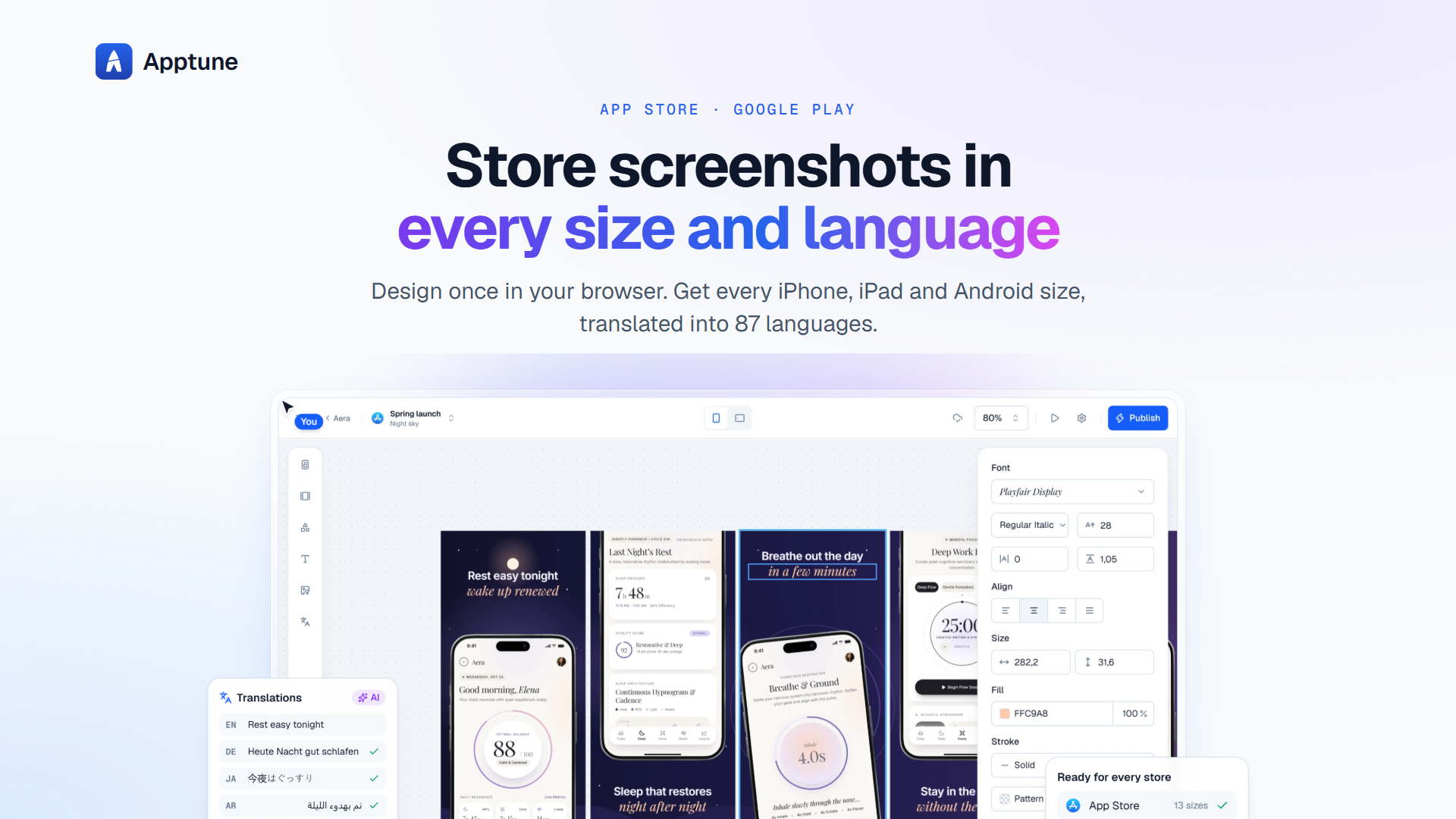
Overview
Apptune is a browser-based screenshot studio for iOS and Android apps, letting you design App Store and Google Play screenshots from templates or with an AI Designer. It translates screenshots into 87 store languages, exports all 16 device sizes, and publishes directly to App Store Connect and Google Play. It is built for indie developers, studios, and agencies that need polished, localized app store listings.
How it works
Start from a pro template or 15 free layouts, drop in your app's screens, and use the snap grid to align elements on 5x5, 9x9, or 17x17 grids. Design once for the iPhone 6.9-inch and Apptune automatically lays out for all 16 App Store and Google Play sizes, each with its own device frame. You can go panoramic to stretch one background across all screens, and then publish to the stores in one click or export a ZIP of PNG or JPEG files.
Key capabilities
The AI Designer generates three original designs from a description of your app, with headlines written for each screen, based on research of 290 top listings. AI translation converts all texts into 87 store languages in one click, with right-to-left mirroring for Arabic and Hebrew and proper word wrapping for Japanese, Chinese, and Thai. The toolkit includes realistic device frames in six finishes, 1,512 icons, 69 brand logos, and every Google Font plus your own uploads.
Who it is for
Lite is for indie developers launching their first app, with 1 app and 2 collections. Pro is for developers shipping their own apps, supporting up to 5 apps, all 87 languages, and 10,000 AI translations a month. Studio is for studios and agencies, allowing up to 25 apps, client work for apps you don't own, team seats, and priority support. The editor requires a screen at least 1024 pixels wide, so it works on laptops or desktops.
Pricing and limits
Lite is free forever with no card required. Pro costs $29 monthly or $228 yearly, and Studio costs $79 monthly or $588 yearly, with yearly billing saving up to 38%. Pro includes 10 AI design generations a month, and Studio includes 20. AI translations are limited to 200 per month on Lite, 10,000 on Pro, and 40,000 on Studio, counted over any 30 days. Storage ranges from 2 GB on Lite to 100 GB on Studio.
Key features
AI Designer
Describe your app and get three original screenshot designs with headlines, based on research of 290 top listings.
AI translation
Translate all texts into 87 store languages in one click, with right-to-left support for Arabic and Hebrew.
One-click publishing
Connect App Store Connect and Google Play to upload every size and language at exact pixel dimensions.
Snap grid and templates
Drag elements to a 5x5, 9x9, or 17x17 grid, start from pro templates or 15 free layouts, and design once for all 16 sizes.
Device frames and graphics
Realistic frames in six finishes, 1,512 icons, 69 brand logos, and every Google Font plus your own uploads.
A/B testing
Turn design variants into App Store product page tests, track them from Apptune, and record the winner.
Use cases
Indie developers
Design and publish screenshots for your own apps with the free Lite plan or Pro for up to 5 apps.
Studios and agencies
Use Studio to design and publish for client apps you don't own, with team seats and priority support.
Localization teams
Translate screenshots into all 87 store languages, with per-language screenshots and proper RTL mirroring.
Pricing & limits
Verified 11/5/2026Frequently asked questions about Apptune
- Is Apptune really free?
- Yes, the Lite plan is free forever with 1 app, 2 collections, your app's language plus 1 more, and 200 AI translations a month. No credit card needed.
- Does it work for Google Play as well as the App Store?
- Yes, one design covers both stores, laying out for all 13 App Store sizes and Google Play's phone, 7-inch, and 10-inch tablet sizes.
- Can I publish straight to the stores?
- With Pro, connect App Store Connect or Google Play, and Apptune renders and uploads every size and language at exact pixel dimensions.
- What does the AI Designer do?
- Describe your app, and it generates three original designs with headlines, based on research of 290 top listings. Pro includes 10 generations a month, Studio 20.
- Can I design on my phone or tablet?
- No, the editor requires a screen at least 1024 pixels wide, so it works on laptops or desktops only.
Related tools
Renderspace Ai
Turn a job-site photo into a photorealistic pool, patio, exterior or interior concept in about 30 seconds.
3D House Planner
Design houses and apartments in your browser with AI assistance, live 2D-3D sync, and BIM export.
Nean Project
Turn a rough idea into a structured task tree plan, then review AI-suggested changes before applying them.

AI Yard Design Studio
Upload a yard, patio, or room photo and get climate-aware landscape or interior designs with DIY planning lists.
SkySnail
Generate CTR-optimized thumbnails for YouTube, TikTok, and Instagram in seconds.
FloorPlanBot
Turn a text description into a house layout concept with AI, then edit and export as PNG, PDF, or DXF.
AuraUI | Design Context for AI Agents
Downloadable design systems and curated skills for AI coding agents.
Gender Swap AI
Create gender-swapped selfies and character art from a reference image.