Renderspace Ai
renderspace.aiContractor AI rendering tool
Turn a job-site photo into a photorealistic pool, patio, exterior or interior concept in about 30 seconds.
Overview
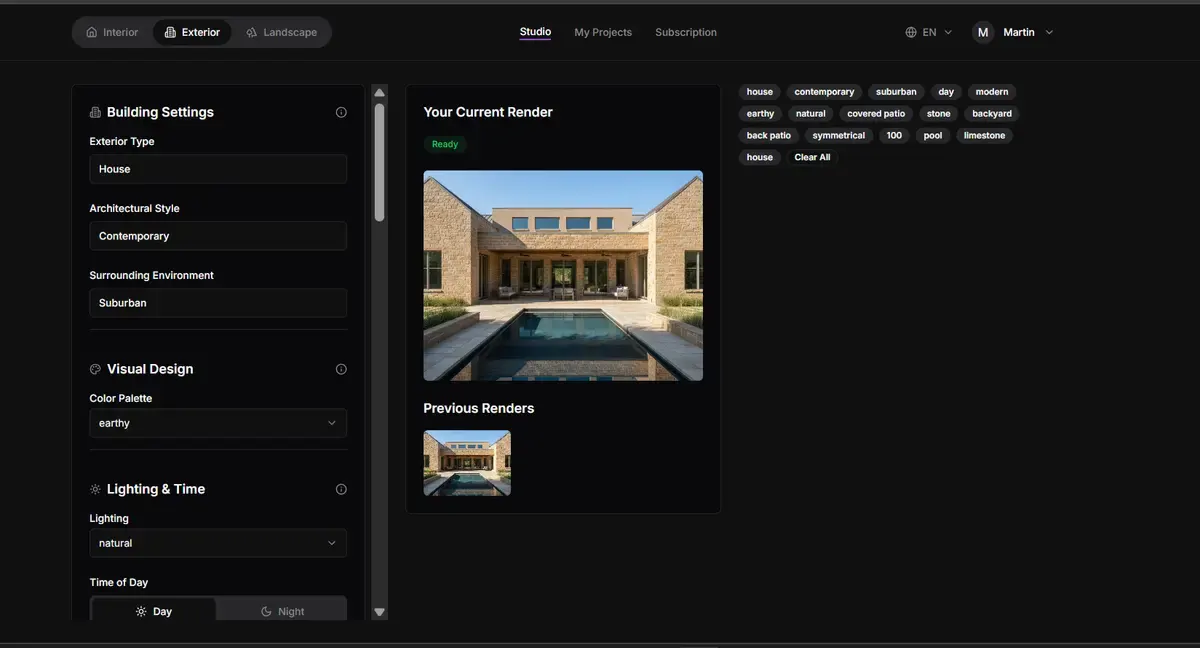
Renderspace is an AI rendering tool for outdoor contractors, remodelers and designers. Upload a photo of a real yard, home exterior or room, choose a style, and get a photorealistic concept in about 30 seconds, so your client can see the finished project before you quote. More than 10,000 renders have been generated so far.
How it works
Take a photo on site (a phone photo works) and choose the space type: landscape, exterior or interior. Adjust style, mood, and key variables to generate multiple design directions in seconds. Generate and compare concepts in real time to guide conversations and get early buy-in. Use aligned concepts as a visual reference before moving into detailed plans, pricing, or construction.
Key capabilities
Renderspace preserves the geometry of the real photo, so the concept stays true to the actual property. It works during client meetings, with rendering speed of 20-40 seconds per concept. It offers 4K export, all style options, and commercial use of renders in proposals, marketing and ads. Settings like space type, style, color palette, lighting, mood, geometry and symmetry carry over between generations.
Who it is for
Built for people who sell projects clients can't picture yet, outdoors first and indoors too. Pool builders and outdoor-living contractors can show the pool, deck, pergola or outdoor kitchen on the customer's own backyard during the first visit. Landscape and hardscape contractors turn a photo of a bare yard into planting, paver, path and lighting concepts. Remodelers, home builders and interior designers preview new finishes and layouts on the real house or room.
Pricing and limits
First Job Test is $19.99 per week for 40 credits, billed weekly until you cancel. Professional is $98 per month for 500 credits. Business is $349 per month for 6,000 credits. All plans include 4K resolution and all style options. There's no long-term commitment and you can cancel anytime. Renderspace is not intended for construction drawings, permit plans, engineering, or stamped documents.
Key features
Photorealistic concept renderings
Upload a photo of a real yard, home exterior or room and get a photorealistic concept in about 30 seconds.
Space type selection
Choose from landscape, exterior or interior space types to guide the rendering.
Style and mood presets
Adjust style, mood, and key variables to generate multiple design directions without writing prompts.
4K export
Export client-ready renders in 4K resolution on all paid plans.
Commercial use allowed
Use renders in proposals, presentations, website, social media and ads on every paid plan.
Use cases
Pool builders and outdoor-living contractors
Show the pool, deck, pergola or outdoor kitchen on the customer's own backyard during the first visit.
Landscape and hardscape contractors
Turn a photo of a bare or tired yard into planting, paver, path and lighting concepts.
Remodelers and home builders
Preview new siding, roofing, entries and exterior finishes on the real house.
Interior designers
Explore layouts, palettes and furnishings from a photo of the actual room.
Pricing & limits
From the official site · checked 11/4/2026Frequently asked questions about Renderspace Ai
- What is Renderspace?
- Renderspace is an AI rendering tool for outdoor contractors, remodelers and designers. Upload a photo of a real yard, home exterior or room, choose a style, and get a photorealistic concept in about 30 seconds.
- Who is Renderspace for?
- It is built for pool builders, landscape and hardscape contractors, remodelers, home builders, and interior designers who sell projects clients can't picture yet.
- Is Renderspace free?
- No. Renderspace offers paid plans only: First Job Test at $19.99/week for 40 credits, Professional at $98/month for 500 credits, and Business at $349/month for 6,000 credits.
- Can I use the renders commercially?
- Yes, on every paid plan. Use renders in proposals, presentations, your website, social media and ads. Reselling or licensing the images themselves to third parties is not allowed.
- Can I cancel my subscription?
- Yes. There's no long-term commitment. Cancel from your account settings and you keep access until the end of your billing period.
Related tools

Apptune
Design App Store and Google Play screenshots, translate them into 87 languages, and publish or A/B test them in one click.
3D House Planner
Design houses and apartments in your browser with AI assistance, live 2D-3D sync, and BIM export.

Nean Project
Turn a rough idea into a structured task tree plan, then review AI-suggested changes before applying them.

AI Yard Design Studio
Upload a yard, patio, or room photo and get climate-aware landscape or interior designs with DIY planning lists.

SkySnail
Generate CTR-optimized thumbnails for YouTube, TikTok, and Instagram in seconds.

FloorPlanBot
Turn a text description into a house layout concept with AI, then edit and export as PNG, PDF, or DXF.

AuraUI | Design Context for AI Agents
Downloadable design systems and curated skills for AI coding agents.

Gender Swap AI
Create gender-swapped selfies and character art from a reference image.