
Nean Project
neanproject.comReviewable AI task tree planner
Turn a rough idea into a structured task tree plan, then review AI-suggested changes before applying them.
Overview
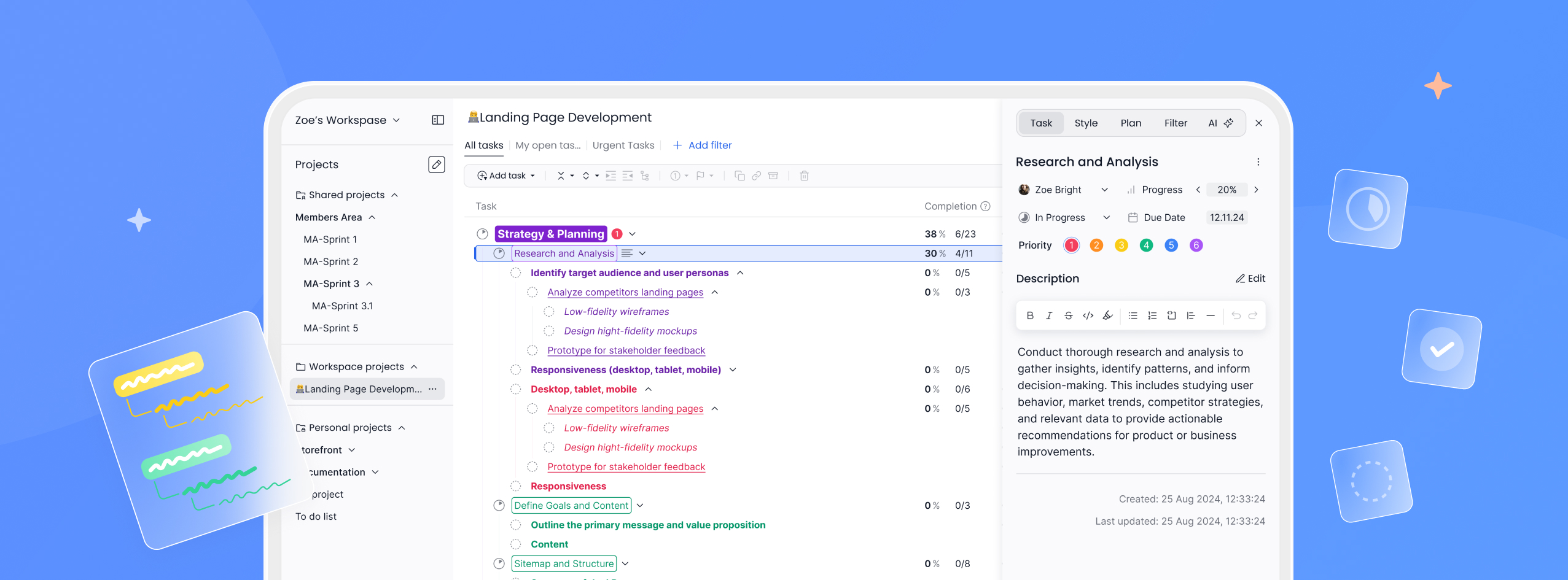
Nean Project is a task management platform built around a hierarchical task tree, with an AI project planning assistant that turns a rough idea into a structured plan. You can also ask the assistant to update an existing project, and every suggested change is shown for review before it is applied. It is aimed at individuals and teams who plan and track work in nested task lists.
How it works
You start from a rough idea or a simple outline, and the assistant generates a structured task tree plan with logical sections and actionable steps that you can refine immediately. Inside an active project, the assistant can create, edit, or remove tasks and improve structure. All suggested changes appear in an overlay where you review, edit, or discard them, and nothing is applied automatically. You can also ask questions about missing steps, risks, dependencies, or next actions based on the context of your current plan.
Key capabilities
The task tree supports unlimited nesting, with progress calculated automatically from completed subtasks so parent items update as work finishes. Search works inside the tree without breaking its structure, keeping matching tasks connected to their parent context. You can expand or collapse branches while the task you were working on stays selected, move tasks or full branches by drag and drop, and copy and paste single tasks, branches, or multiple selections including all child items.
Templates and export
Structured plans can be saved as templates and reused across projects. Projects can also be exported as Markdown files, a format readable by any LLM, so structured drafts can be shared outside the app. Task details support rich-text descriptions, and AI can expand task descriptions for clarity. Workspaces can be personalized with colors, fonts, and highlights.
Pricing and limits
The Basic plan is free and includes unlimited members, limited AI, 300 tasks per project, 10 projects, 3 free workspaces, 3 filters, and 50 MB storage. Pro costs $5 per user per month, or $60 billed yearly with a 20% discount, and adds unlimited AI, unlimited tasks per project, unlimited projects, unlimited Pro workspaces, unlimited filters, and unlimited file uploads. A demo is available without setup.
Key features
AI plan generation
Turns a rough idea into a structured task tree plan with logical sections and actionable steps that you can immediately refine.
Review before applying
AI suggestions for creating, editing, or removing tasks appear in an overlay where you accept, reject, or adjust them before any change is made.
Project Q&A
Ask the assistant about missing steps, risks, dependencies, or next actions based on the context of your current plan.
Templates and Markdown export
Save structured plans as reusable templates and export projects as Markdown files readable by any LLM.
Hierarchical task tree
Unlimited nesting with automatic completion calculation, context-preserving search, drag and drop, and copy and paste of whole branches.
Real-time collaboration
Work together in shared projects with instant updates as other members make changes.
Use cases
Drafting a new project plan
Convert a short outline or idea into a detailed task tree with sections and steps before committing to a structure.
Restructuring an active project
Ask the assistant to add, edit, or remove tasks and improve structure, then approve only the changes you want.
Risk and dependency review
Query the assistant about missing steps, risks, and dependencies to catch gaps in an existing plan.
Reusing plan structures
Save a finished plan as a template and reuse it across projects, or export it as Markdown to share with other LLM tools.
Pricing & limits
From the official site · checked 11/11/2026Frequently asked questions about Nean Project
- What is Nean Project's AI project planning assistant?
- It is a feature inside Nean Project that turns a rough idea into a structured task tree plan with logical sections and actionable steps, and can also update existing plans with AI-suggested changes.
- Do AI changes get applied automatically?
- No. Suggested changes appear in an overlay where you can review, edit, or discard them, and nothing is applied until you approve it.
- Can I export a plan to use with other tools?
- Yes. Projects can be exported as Markdown files, a format readable by any LLM, and structured plans can be saved as reusable templates.
- Is there a free plan?
- Yes. The Basic plan is free and includes unlimited members, limited AI, 300 tasks per project, 10 projects, 3 workspaces, 3 filters, and 50 MB storage.
- How much does the Pro plan cost?
- Pro costs $5 per user per month, or $60 billed yearly, and includes unlimited AI, unlimited tasks per project, unlimited projects, workspaces, filters, and file uploads.
Related tools

Apptune
Design App Store and Google Play screenshots, translate them into 87 languages, and publish or A/B test them in one click.
Renderspace Ai
Turn a job-site photo into a photorealistic pool, patio, exterior or interior concept in about 30 seconds.

3D House Planner
Design houses and apartments in your browser with AI assistance, live 2D-3D sync, and BIM export.

AI Yard Design Studio
Upload a yard, patio, or room photo and get climate-aware landscape or interior designs with DIY planning lists.

SkySnail
Generate CTR-optimized thumbnails for YouTube, TikTok, and Instagram in seconds.

FloorPlanBot
Turn a text description into a house layout concept with AI, then edit and export as PNG, PDF, or DXF.

AuraUI | Design Context for AI Agents
Downloadable design systems and curated skills for AI coding agents.

Gender Swap AI
Create gender-swapped selfies and character art from a reference image.