
Vidsembly
vidsembly.comGuided AI video generator
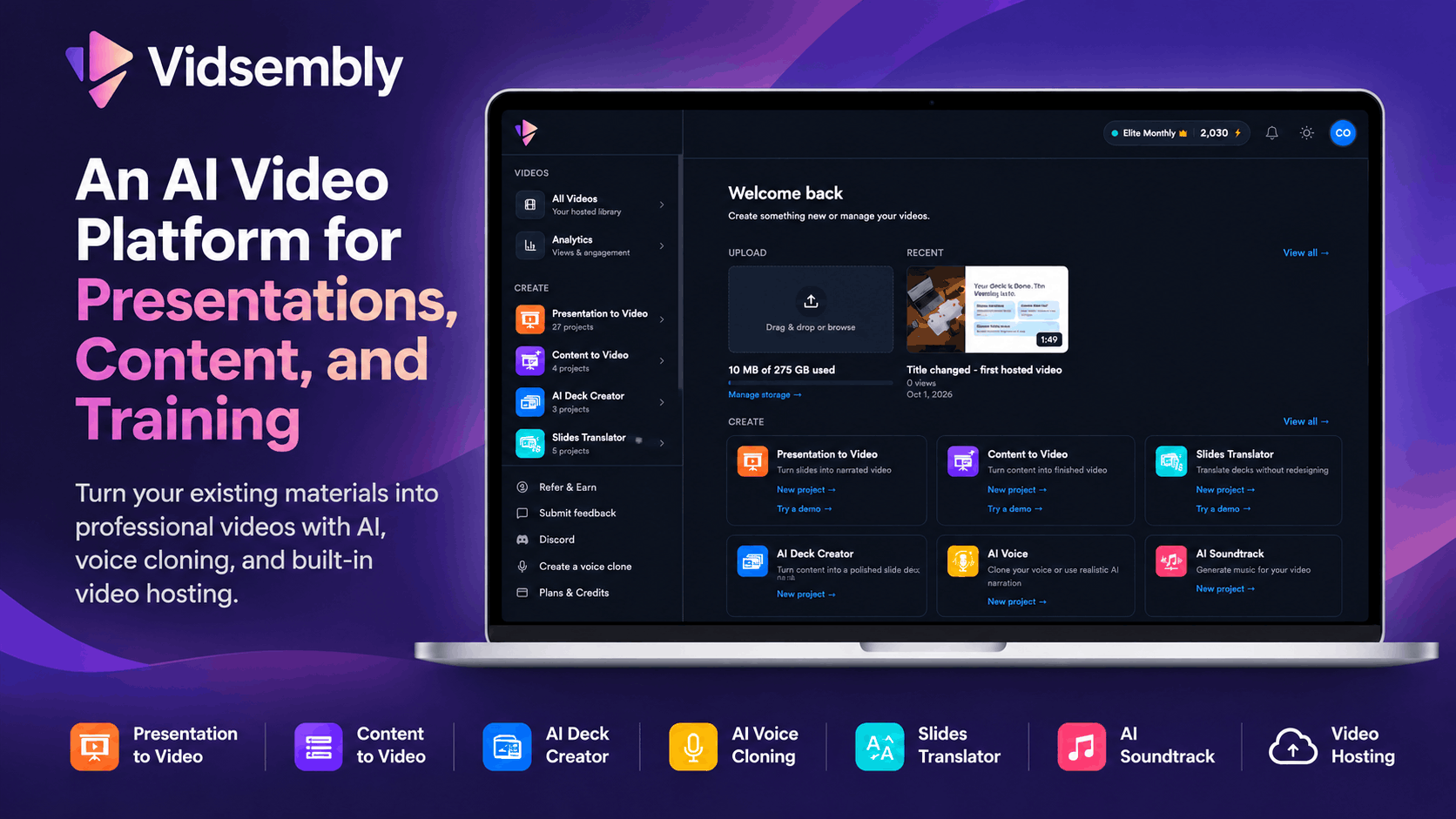
Turn PowerPoint, PDFs, and documents into narrated videos with AI voiceover or your voice clone.
Overview
Vidsembly is a guided AI platform that turns PowerPoint, PDFs, and documents into narrated videos, slide decks, and transcripts. Users upload files, generate or import scripts, choose library AI voices or their own voice clone, and export shareable MP4s without timeline editing. It is built for training teams, educators, sales enablement, and internal communications teams.
How it works
Upload a PPTX, PPT, or PDF for Presentation to Video, or paste text for Content to Video. Vidsembly keeps your slide layout, lets you import speaker notes or generate narration, and offers library voices or your cloned voice with previews. After previewing, export a shareable MP4 or regenerate with a new voice or script. The guided workflow requires no video editing experience.
Key capabilities
Tools include Presentation to Video, Content to Video, AI Voice, Transcriber, AI Deck Creator, and AI Soundtrack. Presentation to Video supports 12 output languages with AI voiceover: English, Spanish, Chinese, Hindi, German, Italian, Arabic, French, Dutch, Japanese, Korean, and Portuguese. Exports are original-resolution, and Pro and Elite plans add 720p, 1080p, and 4K re-render options. Video hosting provides share links, embeds, and view tracking.
Pricing and limits
Free accounts get 30 one-time credits, 50 MB video storage, standard library voices, and watermarked exports. Pro costs $6.99 per month with 300 credits per month, 50 GB storage, premium voices, 3 voice clones, and no watermark. Elite costs $21.99 per month with 1,200 credits per month, 250 GB storage, 5 voice clones, and 4K export. Yearly plans save about 17 percent, and top-up credits are available on paid plans.
Key features
Presentation to Video
Upload PPTX, PPT, or PDF and generate a narrated video with AI voiceover or your cloned voice.
Content to Video
Turn a document or pasted text into an AI-generated slide deck plus a narrated video.
AI Voice
Create voiceover clips from scripts using library voices or your own voice clone.
Transcriber
Convert audio or video files into searchable transcripts.
AI Deck Creator
Generate an editable slide deck from notes or a document.
AI Soundtrack
Add an original instrumental soundtrack to your videos.
Use cases
Training teams
Create onboarding, compliance, and internal training videos from existing materials.
Educators
Turn presentations and lectures into accessible video content.
Sales enablement
Convert decks and scripts into polished sales videos.
Internal communications
Repurpose updates, recordings, and documents into clear communication assets.
Pricing & limits
From the official site · checked 11/10/2026Getting started
Sign up at run.vidsembly.com with no credit card required. Start with the free plan to explore demo projects and use your 30 one-time credits. Upload a PPTX or PDF to Presentation to Video, generate or import a script, select a voice, and preview before exporting. Free accounts include 1 voice clone through the end of November, so you can clone your voice once and use it across tools.
Frequently asked questions about Vidsembly
- What is Vidsembly?
- Vidsembly is a platform of guided AI tools that helps teams turn presentations, recordings, and documents into training videos, slide decks, transcripts, and more, without video editing experience. You can also host videos in the app: share a watch link, embed on your site, and track views.
- What tools does Vidsembly offer today?
- Vidsembly currently includes Content to Video, Presentation to Video, Video Hosting, Transcriber, AI Deck Creator, AI Soundtrack, and AI Voice. Creation tools use a simple upload-and-export workflow; Video Hosting lets you upload MP4s or publish exports, then share links and embeds. More tools, including subtitles, are on the way.
- Do I need video editing experience to use Vidsembly?
- No. Every Vidsembly tool uses a guided, conversational workflow. Upload your file, answer a few prompts, and export your finished content. There is no timeline editor to learn.
- What file types can I upload?
- It depends on the tool. Presentation to Video accepts PPTX, PPT, and PDF. The Transcriber supports MP3, MP4, WAV, and M4A. Content to Video and AI Deck Creator accept documents and pasted text, including DOCX, PDF, TXT, and MD. AI Soundtrack accepts MP4, MOV, WebM, and M4V videos. AI Voice works from pasted or uploaded script text.
- Can I clone my own voice?
- Yes. Free includes 1 voice clone; Pro includes 3 and Elite includes 5. Create a clone in the app, then use it for narration in AI Voice, Presentation to Video, and Content to Video, or pick a library AI voice instead.
Related tools

AI Rap Video Generator
Turn one photo into a 4, 6, or 8-second rap video with generated vocals, a beat, and lip sync, ready for TikTok, Reels, and Shorts.

Magic Hour
Create videos, images, and audio with 100+ AI tools in one browser-based studio.

Molyin
Generate cinematic videos, images, and music from text prompts in one studio.

Photo Animate
Turn still portraits into lifelike videos with natural motion and easy controls.

Seedance Now
Multi-model AI video & image generator in your browser

Storyship
Turn a product URL or an MP4, WebM or MOV screen recording into a narrated demo video with captions and zooms.

PavoAI
One idea, every model, one finished video
VoooAI
Turn one sentence into a multi-step workflow that outputs images, video, music and digital-human narration.