
XIMA DIGITAL
pdfseek.comPDF tool with AI translation and cited chat
Translate, chat, and summarize PDFs with cited answers and multi-file support.
Overview
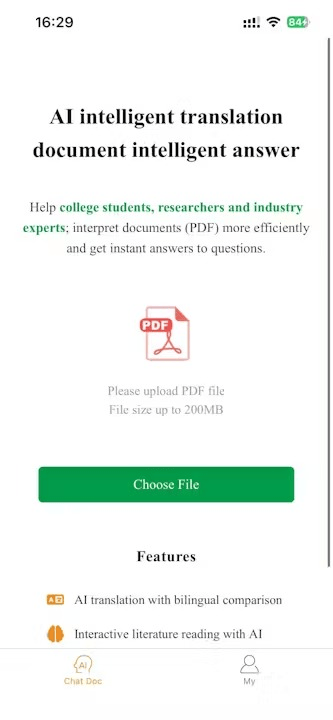
PDFSeek is an online PDF smart tool that uses AI to translate full-text documents, chat with PDF content, and summarize literature. It supports multi-language translation, multi-file chats, and cited answers, helping university students, researchers, and professionals interpret papers and documents efficiently. Users can upload PDFs from local files, links, or Dropbox.
Key capabilities
PDFSeek provides AI-powered translation that instantly converts PDF content into multiple languages. It also offers a chat interface where users can ask questions about the document and receive answers with built-in citations, eliminating the need for page-by-page searching. The tool supports summarizing academic articles, research papers, and reports to extract key insights without reading everything.
How it works
Users can upload PDFs from local storage, via a link, or from Dropbox. The platform allows creating folders to organize files and chat with multiple PDFs in a single conversation. A side-by-side view keeps the chat and PDF open together, linking answers to the original content for easy verification and further exploration.
Who it is for
PDFSeek is designed for university students who need help with exams, homework, and multiple choice questions. Researchers can explore scientific papers, academic articles, and books to gather information. Industry professionals can navigate legal contracts, financial reports, manuals, and training material by asking questions to any PDF.
What sets it apart
The tool emphasizes efficiency in document interpretation, with features like multi-file chats and cited sources that set it apart from simple PDF readers. It aims to simplify the process of understanding complex documents by providing instant answers and summaries, making it a comprehensive solution for academic and professional PDF handling.
Key features
AI Translation
AI-powered full-text translation of PDF documents with multi-language support.
PDF Chat with Cited Sources
Chat with PDFs to get instant answers, with built-in citations anchoring responses to references.
Multi-File Chats
Create folders and chat with multiple PDFs in one conversation.
PDF Summarization
Summarize academic articles, research papers, and reports to extract key insights.
Side-by-Side View
Side-by-side view keeps chat and PDF open together, linking answers to original content.
Use cases
Research paper translation
Translate academic papers and research articles into multiple languages for easier understanding.
Student study assistance
Chat with multiple PDFs to get instant answers for exam preparation and homework help.
Professional document analysis
Navigate legal contracts, financial reports, and manuals by asking questions and getting cited answers.
Document summarization
Summarize lengthy reports and articles to extract key insights without reading everything.
Pricing & limits
Listed as freemium. A dated pricing breakdown is not available. Check the provider for current plans and allowances.
Check current pricing on the official siteFrequently asked questions about XIMA DIGITAL
- What is PDFSeek?
- PDFSeek is an online tool that uses AI to translate PDFs, chat with PDF content, summarize documents, and provide cited answers.
- Who is PDFSeek for?
- It is designed for university students, researchers, and industry professionals who need to interpret literature, study, or analyze documents.
- Is PDFSeek free?
- The source does not specify pricing details, so it is unclear if PDFSeek is free or paid.
- What platforms and upload methods are supported?
- PDFSeek supports uploading PDFs from local files, links, and Dropbox, and offers multi-language translation.
Related tools

ScanPilot
Convert PDFs, scans, photos, and handwritten documents into structured Excel, CSV, or JSON files.

superscribe.io
Turn every business call into notes, tasks, and follow-ups on your own number.

Applytrackr
Track every job application, get tailored resumes and cover letters, and auto-apply with ease.

AI timeline maker
Turn prompts or documents into visual timelines with real-time collaboration and multi-format export.

AI Prompt Anonymizer
Redact names, emails, API keys, and card numbers from any prompt before sharing with AI.
ConsultScribe
Record or upload consultations, get accurate transcription, and generate custom-formatted reports in seconds.

LastRound AI
Get tailored answers in about a second during live interviews, invisible on screen share.

RankResume
Upload your resume, paste a job description, and get a tailored resume and cover letter in 60 seconds.