
Remove Handwriting
removehandwriting.comDocument cleanup tool
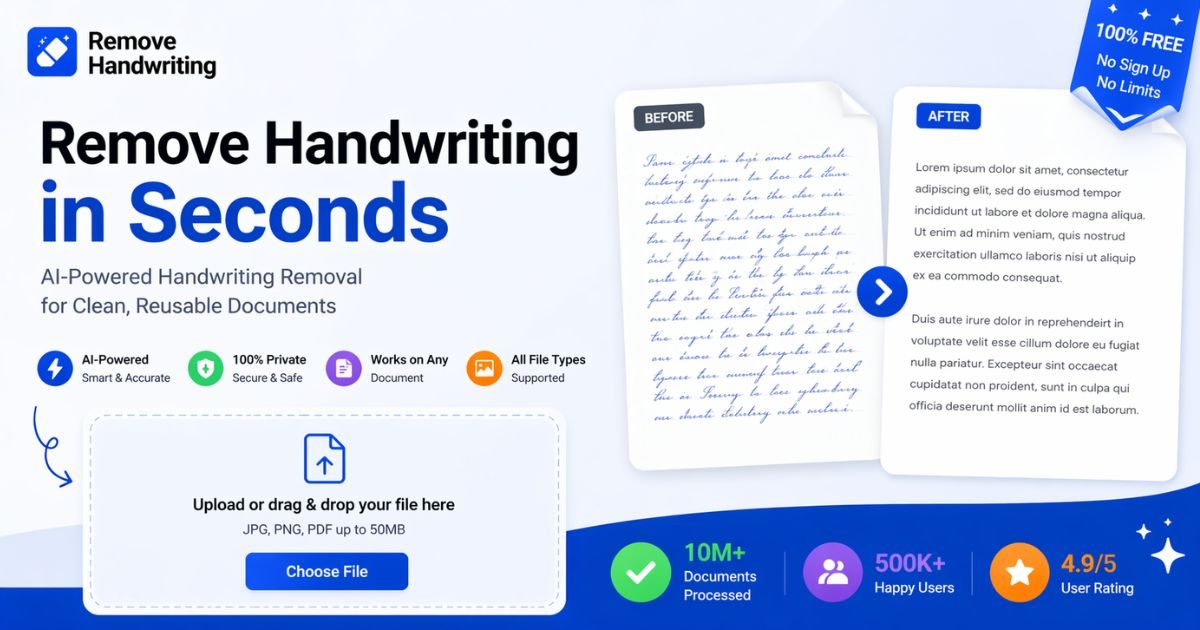
Erase handwritten notes from images and PDFs while keeping printed text intact.

Overview
RemoveHandwriting is an AI document cleanup tool that removes handwriting, pen marks, annotations, and scribbles from images and PDFs while preserving printed content and layout. It also corrects skew, removes shadows and stains, auto-crops edges, and restores aged documents. It is for students, teachers, businesses, archivists, and parents who need clean worksheets, exam papers, contracts, and scanned archives.
How it works
Upload a JPG, PNG, JPEG, or PDF file. The AI auto-detects document boundaries, removes backgrounds and shadows, corrects skew and curl, and erases handwriting while preserving printed text, tables, and diagrams. Processing typically takes 5 to 10 seconds, and you can download the clean image or PDF. For PDFs, you can select specific pages to process and export a new PDF.
Key capabilities
Choose from three processing modes: Standard for fast scan-style cleanup, Color to preserve original colors and highlights, and Ultra for harder pages needing deeper handwriting removal and document recovery. The tool also auto-crops edges, fixes warped scans, and enhances blurry or shadowed documents. It supports batch processing and API access for teams and businesses.
Who it is for
Students can erase answers from practice papers for repeated studying, teachers can create clean copies of test papers, and parents can reprint homework sheets. Businesses use it to clean contracts and forms with handwritten notes, while archivists restore old documents and scanned archives. It is also useful for document managers and compliance analysts who need clean PDFs for circulation and records.
Pricing and limits
New users get 3 free credits on signup, and you can earn more credits by watching ads in the app or sharing your referral link. Paid subscriptions include recurring credits that roll over when unused, and one-time credit packs never expire. Subscriptions and credits work across web, iOS, and Android with one account. Paid plans offer a 3-day money-back guarantee.
Key features
Handwriting removal
Erase handwritten notes, pen strokes, underlines, highlights, and scribbles while keeping printed text, tables, and layout intact.
Document restoration
Auto-detect document boundaries, correct skew and curl, remove shadows and stains, and auto-crop edges.
Three processing modes
Choose from Standard for fast scan-style cleanup, Color for preserving original colors, and Ultra for harder pages needing deeper removal.
Multiple formats and bulk processing
Supports JPG, PNG, JPEG, and PDF, with batch processing and API access for larger workflows.
Web and mobile apps
Available in the browser and on iOS and Android apps, with one account usable across all platforms.
Privacy and security
Uploaded images are automatically deleted after processing and not used for training; GDPR compliant and SSL secured.
Use cases
Clean worksheets and exam papers
Students and teachers can erase handwritten answers from worksheets and exam papers to create clean copies for reuse.
Clean contracts and forms
Businesses can remove handwritten annotations from contracts and forms before circulation or archiving.
Restore scanned archives
Archivists and records managers can restore old documents by removing handwritten corrections and stains.
Reuse homework sheets
Parents can scan completed homework, remove handwriting, and print fresh copies for repeated practice.
Pricing & limits
From the official site · checked 10/10/2026Frequently asked questions about Remove Handwriting
- What is RemoveHandwriting?
- RemoveHandwriting is an AI document cleanup tool that removes handwriting, pen marks, annotations, and scribbles from images and PDFs while preserving printed content and layout.
- Who is RemoveHandwriting for?
- It is for students, teachers, businesses, document managers, archivists, and parents who need to clean worksheets, exam papers, contracts, scanned archives, forms, and study materials.
- Is RemoveHandwriting free?
- Yes, you can use it for free. New users get 3 free credits on signup, and you can earn more credits by watching ads in the app or sharing your referral link.
- Which file formats are supported?
- It supports JPG, PNG, JPEG, and PDF files. You can upload images up to 10MB and process PDFs with page selection and PDF export.
- How long does processing take?
- Processing typically takes about 5 to 10 seconds per image, depending on server workload, image size, and network quality.
Related tools

MyFramework
Apply proven thinking frameworks to your real problems for clearer decisions and next steps.
Offer Bull
Practice mock interviews and get real-time answer suggestions for online interviews.
aiocr
Convert images and PDFs to editable text in your browser with 50+ languages and no uploads.

Side Space
Organize tabs into spaces, sync across browsers, and automate tasks with AI chat and agent modes.

Aspirely.ai
Automate job alerts, resumes, cover letters, and interview prep with Telegram AI agents.

ApplyGenius
Tailored CVs, cover letters, and ATS optimization for developers pivoting to AI engineering roles.

Video2PPT
Convert videos to editable PowerPoint, Google Slides, PDF, or HTML with local processing.

Dokie AI
Create professional, brand-aligned slides with clean layouts in minutes.