
Side Space
sidespace.appAI tab automation extension
Organize tabs into spaces, sync across browsers, and automate tasks with AI chat and agent modes.
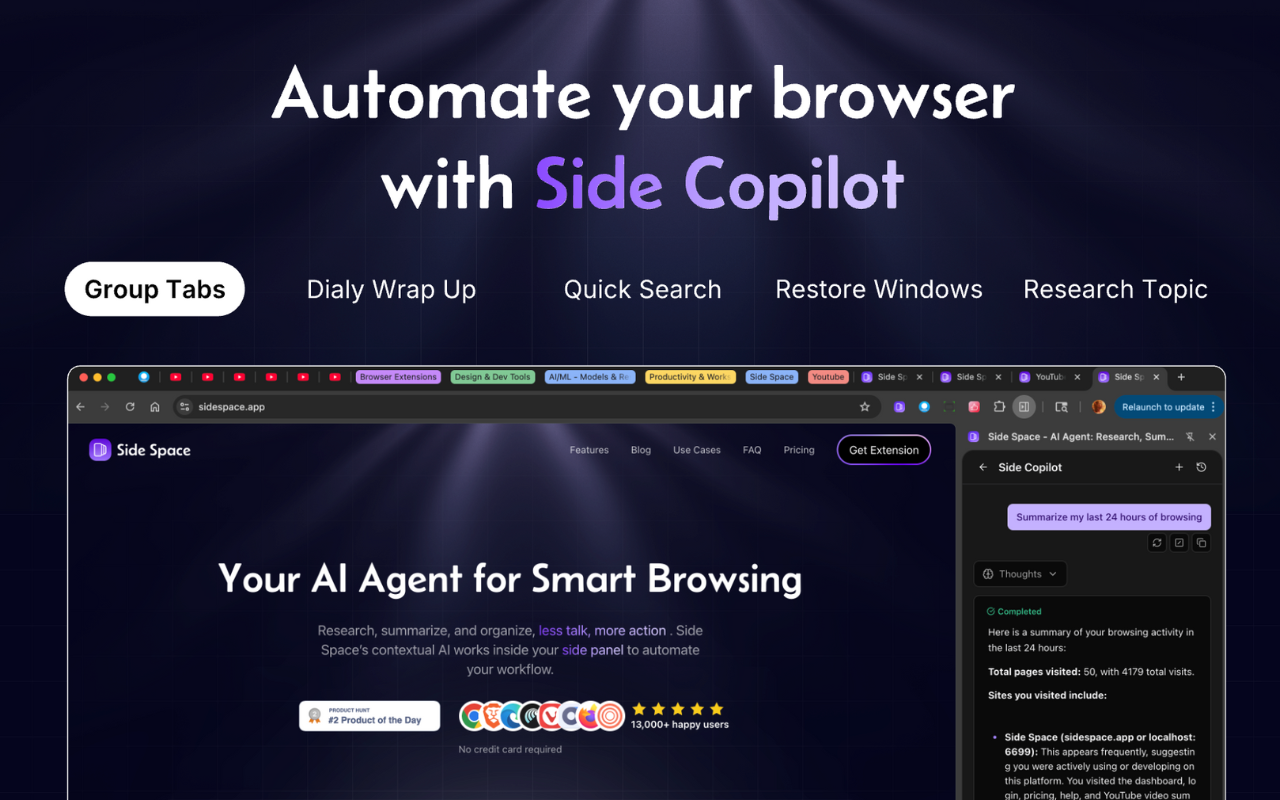
Overview
Side Copilot is a browser extension that combines vertical tab management with AI-powered assistance. It lets you organize tabs into spaces, sync them across devices, and use chat or agent modes to manage and automate browser tasks. It is designed for creators, productivity enthusiasts, and professionals who want to reduce tab clutter and streamline their browsing workflow.
How it works
Side Copilot lives in a vertical panel on the side of your browser, making it easier to scan, identify, and switch between tabs. You can create separate spaces for work, social media, shopping, study, or hobbies, and focus on one space at a time. Tabs automatically sync across devices when you log into your account, so your spaces are always up to date.
Key capabilities
The extension includes a chat mode that understands the context of your open tabs, letting you ask questions about them. Agent mode can take actions to automate your browser, such as grouping tabs, managing windows, searching history, and researching topics. You can also group tabs by domain, by AI, or with custom patterns using Group Guard, and use fuzzy search to find any tab or space instantly.
Who it is for
Side Copilot is trusted by over 16,000 users, including professionals at leading tech companies like ByteDance. It is aimed at creators, productivity enthusiasts, and professionals who deal with many tabs and want to keep their workspace organized. The extension supports multiple languages, including English, Chinese, French, Spanish, and Japanese, and offers dark mode for comfortable night browsing.
Pricing and limits
The free plan includes up to 5 spaces with cloud sync, access to chat mode, and unlimited AI chat with the current page. The Pro plan is described as best value for tab hoarders, offering unlimited spaces and access to Side Copilot for browser automation. Pricing is simple and transparent, with no credit card required for the free plan, and you can cancel anytime.
Key features
Vertical tab manager
Vertical tab panel for easier scanning and switching
Spaces
Organize tabs into separate spaces for work, social, shopping, study, or hobbies
AI chat mode
AI chat mode to ask about open tabs and get context-aware answers
Agent mode
Agent mode that automates browser tasks like grouping tabs, managing windows, and searching history
Cloud sync
Auto-sync spaces across devices and browsers by logging into your account
Tab grouping
Group tabs by domain, AI, or custom patterns with Group Guard
Use cases
Tab organization
Organize tabs into separate spaces for work, social media, shopping, study, or hobbies
Browser automation
Use agent mode to automate grouping tabs, managing windows, and searching history
AI chat assistance
Ask about open tabs and get context-aware answers with chat mode
Cross-device sync
Sync spaces across Chrome, Edge, Brave, Vivaldi, Sigma, Comet, Firefox, and Zen
Pricing & limits
From the official site · checked 10/10/2026Frequently asked questions about Side Space
- What is Side Copilot?
- Side Copilot is a browser extension that provides vertical tab management, spaces for organizing tabs, and AI-powered chat and agent modes to manage and automate tabs.
- Who is Side Copilot for?
- It is for creators, productivity enthusiasts, and professionals who want to manage many tabs and automate browser tasks.
- Is Side Copilot free?
- Yes, there is a free plan that includes up to 5 spaces with cloud sync, access to chat mode, and unlimited AI chat with the current page.
- Which browsers does Side Copilot support?
- It supports Chrome, Edge, Brave, Vivaldi, Sigma, Comet, Firefox, and Zen browsers.
Related tools

Aspirely.ai
Automate job alerts, resumes, cover letters, and interview prep with Telegram AI agents.

ApplyGenius - Al Resume Builder For Developers
Tailored CVs, cover letters, and ATS optimization for developers pivoting to AI engineering roles.

Video2PPT
Convert videos to editable PowerPoint, Google Slides, PDF, or HTML with local processing.

Dokie AI
Create professional, brand-aligned slides with clean layouts in minutes.

JobSprout
Build ATS-friendly CVs and cover letters tailored to any job in minutes.

Thawly AI
Break overwhelming tasks into tiny, actionable steps with a 2-minute timer.

GenPPT AI
Create professional presentations in minutes with AI-powered generation, beautification, and speaker notes.

genogram maker
Create professional genograms from text or images and export as PDF, PNG, or SVG.