
PatentFig AI
patentfig.aiPatent figure generator with editable numerals
Turn photos, sketches, or text into filing-ready patent figures for six offices.
Overview
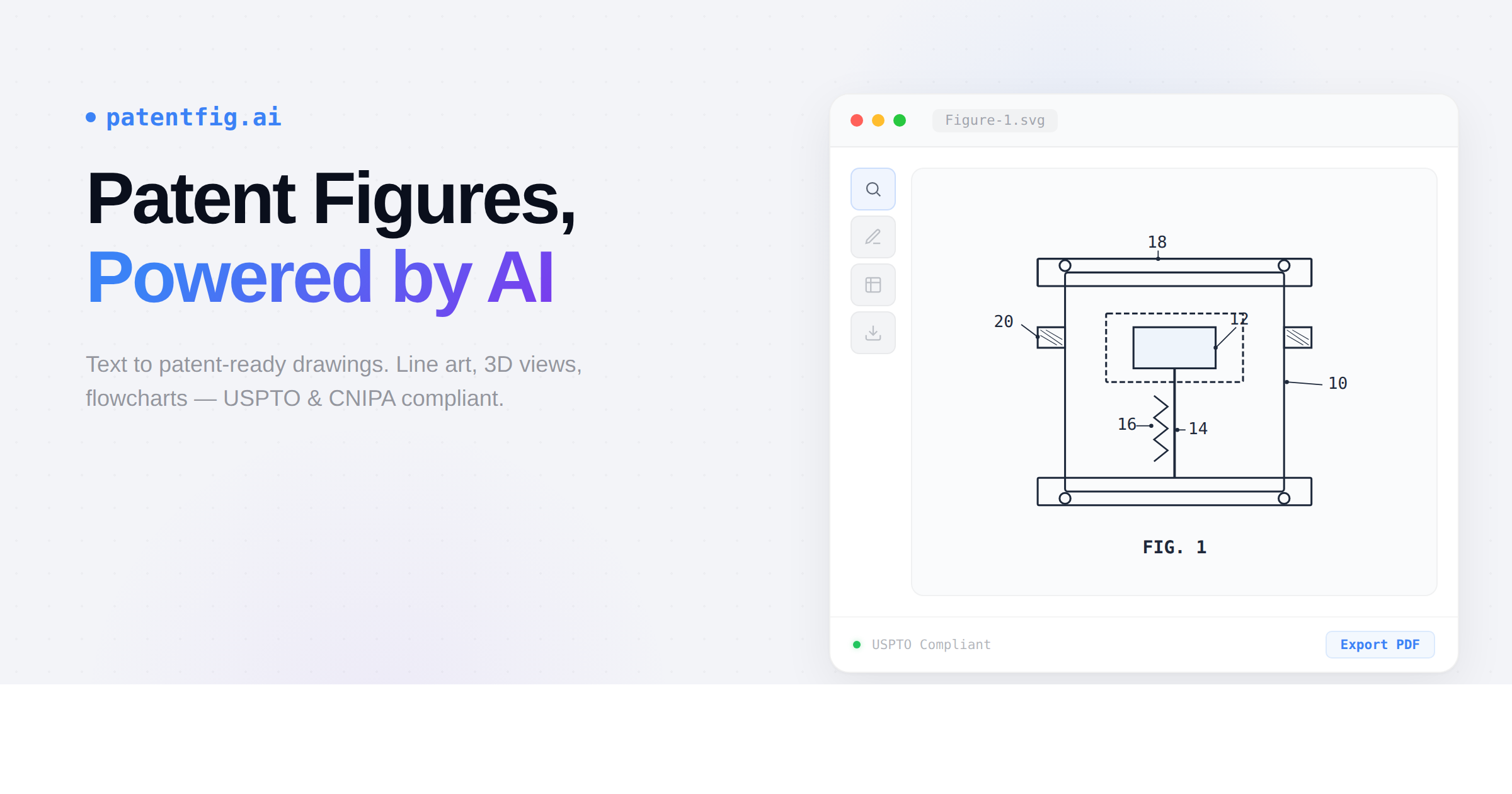
PatentFig AI is a web-based AI tool that generates patent figures from text descriptions, photos, sketches, or CAD views. It produces line art, 3D renderings, flowcharts, and block diagrams compliant with USPTO, EPO, CNIPA, JPO, KIPO, and PCT rules. Designed for patent attorneys, agents, and inventors, it streamlines the creation of filing-ready drawings with editable reference numerals and office-specific export.
How it works
Start by entering a description or uploading a sketch, photo, or CAD screenshot. Choose the view angles you want, such as front, rear, top, or perspective. The AI generates the figures, then you can adjust reference numerals and export filing sheets for your target patent office.
Key capabilities
PatentFig AI generates product structure drawings, process flowcharts, and system block diagrams. It supports multi-view design patent sets with consistent style across views. Figures are produced as black-and-white line art checked against rules including USPTO 37 CFR 1.84, plus EPO, CNIPA, JPO, KIPO, and PCT requirements.
Who it is for
The tool is built for patent professionals: attorneys, agents, patent engineers, and IP operations managers. It also serves individual inventors and outside patent illustrators who need faster drafting and consistent multi-view outputs. Users report saving time on early drafts, cross-office formatting, and revision-heavy review cycles.
Pricing and limits
Free accounts receive 20 credits on sign-up day and 10 free credits daily, with daily credits expiring the same day. Paid plans start at $50 per month for 500 credits, $100 per month for 1500 credits, and $200 per month for 4000 credits. A lifetime plan is available for $1999. Credits expire 30 days after grant, and a filing-ready figure costs roughly 10 credits.
Key features
Multi-type figure generation
Generate line art, 3D renderings, flowcharts, and block diagrams from text, photos, sketches, or CAD views.
Chat-to-modify
Edit figures with natural language commands like 'make the arrow thicker' or 'add a cross-section view'.
Editable reference numerals
Reference numerals are an editable layer on every figure; move, add, or renumber them directly on the drawing.
Filing sheet export
Export filing sheets for USPTO, EPO, PCT, CNIPA, JPO, and KIPO with office-specific margins, labels, and sheet numbers, in PDF or TIFF at 300 DPI.
Version control
Every generation and edit is saved as a new version, allowing you to switch and continue from any version.
Data confidentiality
Your prompts, uploads, and generated figures are never used to train models, and content is encrypted in transit and at rest.
Use cases
Design patent drafting
Generate multi-view design patent figure sets from a single reference image.
Process diagram creation
Create flowcharts and block diagrams from plain-language descriptions.
Cross-office filing preparation
Export filing sheets with office-specific margins and labels for USPTO, EPO, PCT, CNIPA, JPO, or KIPO.
Revision and iteration
Edit figures via chat commands and adjust reference numerals directly on the drawing.
Pricing & limits
From the official site · checked 10/10/2026Frequently asked questions about PatentFig AI
- What is PatentFig AI?
- PatentFig AI is a web-based tool that generates patent figures from text descriptions, photos, sketches, or CAD views. It produces line art, 3D renderings, flowcharts, and block diagrams compliant with USPTO, EPO, CNIPA, JPO, KIPO, and PCT rules.
- Is there a free plan?
- Yes, it is free to start. New accounts receive 20 credits on sign-up day and 10 free credits every day after that, with daily credits expiring the same day. Paid plans start at $50 per month for 500 credits.
- Which patent offices are supported?
- PatentFig AI supports USPTO, EPO, PCT, CNIPA, JPO, and KIPO workflows. It exports filing sheets with each office's margins, labels, and sheet numbers, and checks each sheet for compliance.
- Can I edit generated figures?
- Yes, you can edit figures via chat commands or the reference numeral editor. You can move, add, or renumber numerals, and every edit is saved as a new version.
- How does the credit system work?
- Credits are spent on figure generation, edits, and exports. A filing-ready figure costs roughly 10 credits. Credits expire 30 days after they are granted, and new batches arrive each billing cycle.
Related tools

Image to STL
Turn JPG and PNG images into 3D printable STL files in under a minute.

Birthday Invitation AI
Create personalized AI birthday invitations with QR code RSVP tracking and gift wishlists.

AppIconKitchen
Generate app icons from text prompts and export Xcode-ready asset catalogs, Android mipmaps, and Web/PWA icons.

ailogogenerator
Create professional logos in seconds with AI, no design skills needed.
Diatech Studio
Generate, search, price, and present jewelry designs in one project.

Floor Plan AI
Describe any space and get a professional floor plan in seconds with 2D, 2.5D, and 3D previews.

Spotify Logo Generator
Turn any logo into a glossy disco-ball icon for playlist covers, avatars, and campaign mockups.
Roomagic
Upload a room photo and get photorealistic AI redesigns with design reports, material ideas, and budget notes.