
Image to STL
imagetostl.orgImage to STL converter
Turn JPG and PNG images into 3D printable STL files in under a minute.
Overview
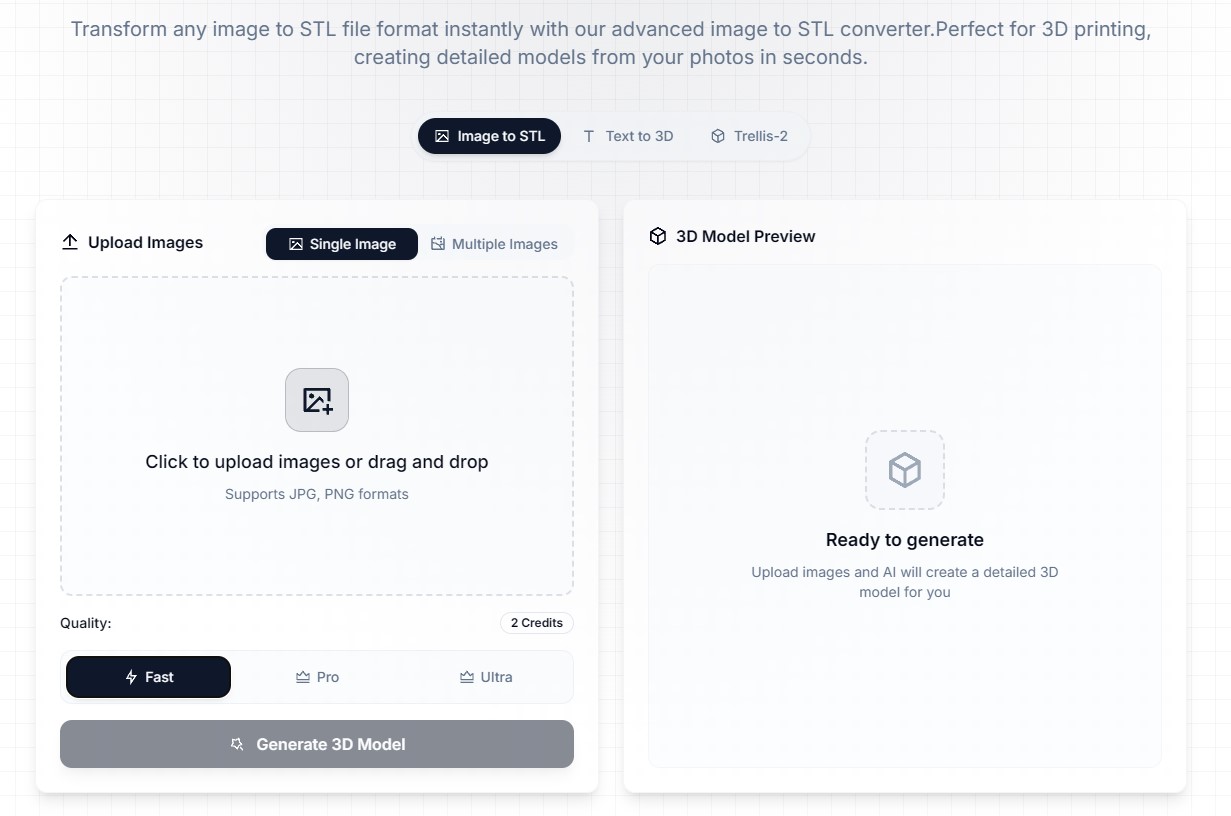
ImageToSTL is an AI-powered online converter that transforms 2D images into 3D printable STL files. It accepts JPG and PNG uploads up to 10MB, analyzes depth and contours, and outputs STL or GLB models ready for 3D printing. Designed for creators, designers, and engineers, it offers batch processing, a 3D preview, and customizable settings without requiring 3D modeling skills.
How it works
The converter uses AI algorithms to analyze pixel data, brightness values, and depth perception, creating 3D geometry that preserves fine details and object boundaries. It supports JPG, PNG, and most common image formats, with a maximum file size of 10MB. Users can upload single or multiple images, and the system generates STL and GLB files optimized for FDM, SLA, and other 3D printing technologies.
Key capabilities
Key features include batch processing for multiple images, an integrated 3D model preview, and customizable settings for height, base thickness, and detail levels. The tool offers three quality options - Basic, Pro, and Ultra - and processes conversions in under a minute for most images. Cloud-based processing ensures fast, secure results.
Who it is for
The service is ideal for creators, designers, engineers, and hobbyists who want to turn flat images into 3D printed objects without complex modeling software. It is also suitable for large-scale projects requiring batch conversions, such as architectural models, mechanical parts, and ship designs. The AI technology recognizes depth and contours, making it accessible to users without prior 3D modeling experience.
Pricing and limits
ImageToSTL offers a free tier for image to STL conversion, with paid plans starting at $10 per month for 300 credits. The Advanced plan costs $13 per month for 600 credits, and the Professional plan is $21 per month for 1000 credits. All plans include high-quality STL conversion, 3D model preview, and email support, with yearly billing saving over 20%.
Key features
AI-Powered Conversion
Advanced AI analyzes image depth, contours, and details to create precise 3D geometry.
Multiple Image Formats
Supports JPG, PNG, and most common image formats, with files up to 10MB.
Print-Ready Output
Generate STL and GLB files optimized for 3D printing and visualization.
Batch Processing
Convert multiple images to STL format simultaneously for large-scale projects.
3D Model Preview
Preview your 3D model before downloading with an integrated viewer.
Customizable Settings
Adjust height, base thickness, and detail levels for optimal results.
Use cases
3D printing from photos
Convert photos of objects or designs into 3D printable models for personal or professional projects.
Batch conversion for production
Process multiple images at once for large-scale 3D printing projects.
Design and engineering prototypes
Create detailed 3D models of architectural structures, mechanical parts, or ship designs for visualization and prototyping.
Pricing & limits
From the official site · checked 10/10/2026Frequently asked questions about Image to STL
- How does the image to STL converter work?
- The converter uses AI algorithms to analyze pixel data, brightness values, and depth perception to create 3D geometry from 2D images.
- What image formats can I convert to STL?
- You can convert JPG, PNG, and most common image formats, with support for high-resolution images up to 10MB.
- Is the image to 3D STL conversion suitable for 3D printing?
- Yes, the converter creates print-ready files optimized for FDM, SLA, and other 3D printing technologies with proper mesh geometry and normals.
- How long does it take to convert image to STL?
- Most conversions complete within 1 minute, depending on image complexity and chosen quality settings. Batch conversions may take longer.
- Can I customize the output from my image?
- Yes, you can adjust height, base thickness, and detail levels to optimize your 3D printing results.
Related tools
Birthday Invitation AI
Create personalized AI birthday invitations with QR code RSVP tracking and gift wishlists.
AppIconKitchen
Generate app icons from text prompts and export Xcode-ready asset catalogs, Android mipmaps, and Web/PWA icons.
ailogogenerator
Create professional logos in seconds with AI, no design skills needed.
PatentFig AI
Turn photos, sketches, or text into filing-ready patent figures for six offices.
Diatech Studio
Generate, search, price, and present jewelry designs in one project.
Floor Plan AI
Describe any space and get a professional floor plan in seconds with 2D, 2.5D, and 3D previews.
Spotify Logo Generator
Turn any logo into a glossy disco-ball icon for playlist covers, avatars, and campaign mockups.
Roomagic
Upload a room photo and get photorealistic AI redesigns with design reports, material ideas, and budget notes.