Image to Prompt
imagetoprompt.appImage-to-prompt generator
Convert any image into detailed prompts for Stable Diffusion, Midjourney, and DALL-E.
Overview
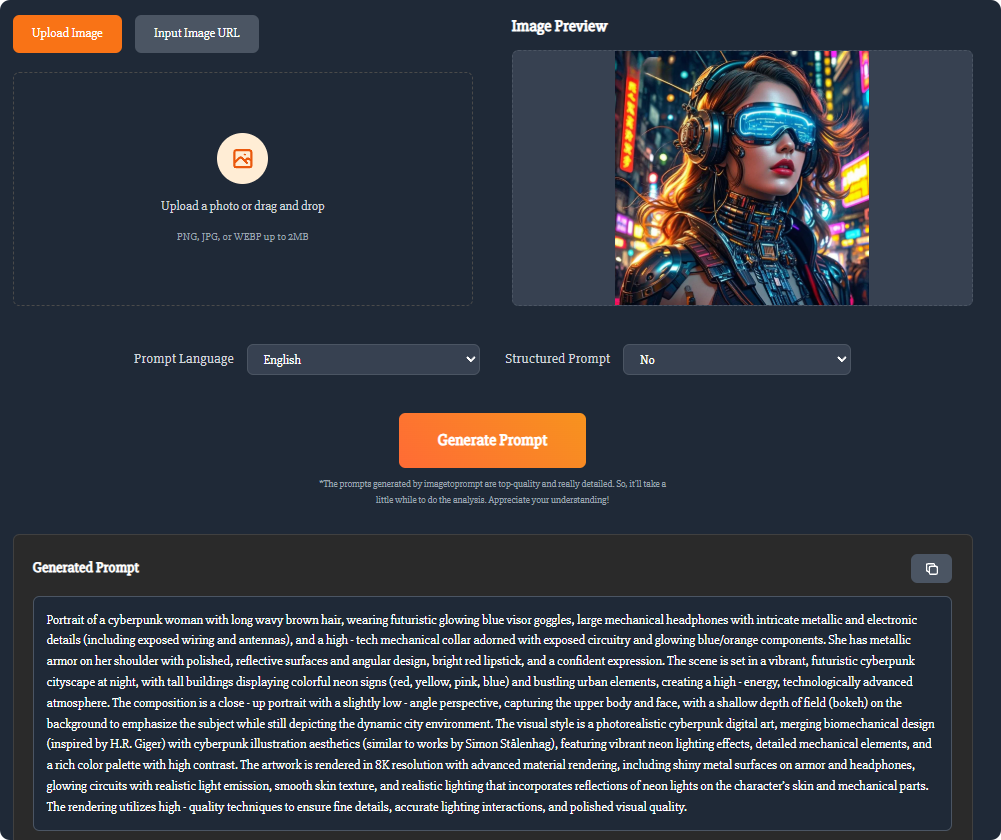
Image to Prompt Generator is a free AI-powered tool that converts uploaded images into detailed text prompts for AI art generators like Stable Diffusion, Midjourney, and DALL-E. It analyzes the image's subject, style, colors, lighting, and composition to produce comprehensive descriptions. Designed for creators, artists, and AI enthusiasts, it helps recreate styles, generate variations, and improve prompt-writing skills.
How it works
Users upload an image or provide an image URL, select a prompt language from 11 options, and choose whether to receive a structured prompt. The AI then performs an in-depth analysis to generate a detailed text description. The process takes a few seconds due to the thorough analysis, and the resulting prompt can be copied and used directly in AI art generators.
Key capabilities
The tool generates prompts that describe the main subject, background environment, artistic style, color palette, lighting atmosphere, composition, action, and detailed features. It supports general descriptions as well as prompts tailored for specific models like Flux, Midjourney, and Stable Diffusion. The AI is designed to be highly accurate, though occasional deviations may occur and users can fine-tune prompts as needed.
Pricing and privacy
The tool is free to use with no usage limits, and no registration or login is required. It accepts PNG, JPG, or WEBP images up to 2MB. All uploaded images are used only for real-time generation and are deleted immediately afterward, with no data stored on servers. This makes it accessible for quick, private use.
Who it is for
The tool is ideal for creators, artists, and AI enthusiasts who want to recreate a specific style, understand how AI interprets images, or generate variations of existing artwork. It also helps users improve their prompt-writing skills by showing how visual elements translate into text. The multi-language support makes it useful for non-English speakers.
Key features
Detailed prompt generation
Generates detailed prompts describing main subject, background, style, color palette, lighting, composition, action, and features.
Multi-language support
Supports 11 languages including English, Spanish, German, French, Portuguese, Chinese, Arabic, Russian, Japanese, and Korean.
Compatible with major AI models
Works with Stable Diffusion, Midjourney, DALL-E, and Flux, with general descriptions also available.
Privacy-focused
All uploaded images are used only for real-time generation and deleted immediately; no data is stored.
No registration needed
No login or sign-up required; just upload and generate.
Use cases
Style recreation
Recreate a specific style from an existing image by generating a prompt that captures its essence.
Artwork variations
Generate variations of existing artwork by using the prompt as a base for new creations.
Learning AI interpretation
Understand how AI interprets images and improve your own prompt-writing skills.
Multilingual prompt creation
Create prompts in 11 languages for international creative projects.
Pricing & limits
From the official site · checked 10/10/2026Frequently asked questions about Image to Prompt
- What is Image to Prompt Generator?
- Image to Prompt Generator is a free AI tool that analyzes uploaded images and generates detailed text prompts for use with AI art generators like Stable Diffusion, Midjourney, and DALL-E.
- Who is it for?
- It is designed for creators, artists, and AI enthusiasts who want to recreate styles, generate variations, or understand how AI interprets images.
- Is it free to use?
- Yes, it is completely free with no usage limits. You can upload images anytime and receive high-quality prompts without charge.
- What image formats are supported?
- It supports PNG, JPG, and WEBP formats up to 2MB. You can upload an image or provide an image URL.
- Do I need to create an account?
- No, registration or login is not required. You can open the page, upload your image, and get prompts immediately.
Related tools
Novabrand AI
Turn a product photo into ad-ready creatives and product page images for your ecommerce brand.
Idea To Image
Restyle photos, replace backgrounds, and create matching variations from one starting image.

Easy Watermark Remover
Remove Gemini watermarks from images online with Quick Crop or AI Smart Removal, no signup needed.
OmneSuite-All-in-one AI generator for images, video, music, voice, and text
Generate images, video scripts, music lyrics, voice, and text with 26 AI tools and 20 free credits on signup.
gpt image 2
Create 4K images with accurate text in any language and consistent characters for marketing, design, and publishing.
Gemini Nano Banana
Create images from text, edit photos, and combine up to 14 reference images with Nano Banana models.

Imaginepro
Create images with Midjourney and Flux models, remove backgrounds, and add text effects.
Nano Banana 2 Flash
Generate pro-level AI images with extreme speed and low latency, supporting 1K, 2K, and 4K resolutions.