
Hit the Road Dude AI
hittheroaddudeai.videoPet photo-to-video meme generator
Turn one pet photo into an 11-second Hit the Road Dude meme video with original English audio.

Overview
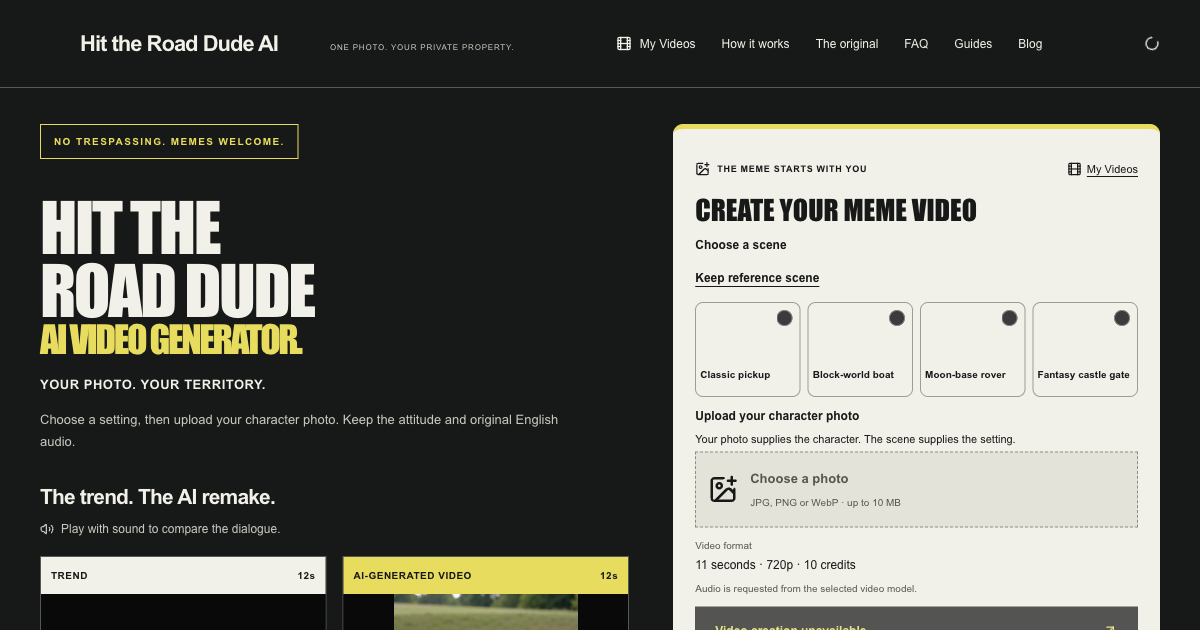
Hit the Road Dude AI is a browser-based photo-to-video tool that creates a personalized remake of the Hit the Road Dude meme from one pet photo. You upload a JPG, PNG, or WebP image up to 10 MB, choose a scene, and the tool generates an approximately 11-second, 720p landscape MP4 with the reference clip's original English audio. It is designed for pet owners who want to feature their dog or cat as the driver in the meme.
How it works
Choose a scene from options like Classic pickup, Block-world boat, Moon-base rover, or Fantasy castle gate, or keep the reference setting. Upload one clear pet photo; the photo supplies the character while the scene supplies the setting. The tool generates a video with the prepared reference clip's original English audio, preserving the voices rather than regenerating them. You can preview scenes and choose a photo locally before signing in to create with credits.
Key capabilities
The tool supports JPG, PNG, and WebP photos up to 10 MB. It generates videos approximately 11 seconds long at 720p in landscape format, with MP4 download for manual sharing to TikTok, Reels, or Shorts. It includes four prepared scenes and a reference setting. The current creator supports dog and cat photos; portrait creation is not yet available, though a human example is shown as a Wan 3.0 model preview.
Who it is for
This tool is for pet owners who want to create a fun, personalized meme video featuring their dog or cat. It is also for social media users who want to share a unique version of the Hit the Road Dude meme on platforms like TikTok, Reels, or Shorts. It is not for those seeking human portrait remakes, as the current creator only supports pets.
Pricing and limits
Video creation uses credits, with no automatic free-video allowance. One-time packs are available: Single for $4.99 (10 credits, 1 video), Starter for $19.99 (50 credits, 5 videos), Creator for $49.99 (150 credits, 15 videos), Pro for $99.99 (400 credits, 40 videos), and Studio for $199.00 (1000 credits, 100 videos). Credits never expire, and failed renders are refunded in credits. Purchases are currently unavailable on the site.
Key features
Photo-to-video remakes
Upload one JPG, PNG, or WebP photo up to 10 MB to replace the main character in the Hit the Road Dude meme.
Prepared scenes
Choose from Classic pickup, Block-world boat, Moon-base rover, or Fantasy castle gate, or keep the reference setting.
Original English audio
Finished videos include the prepared reference clip's original English audio, with voices preserved rather than regenerated.
MP4 download
Successful videos can be played and downloaded as MP4 files for manual sharing to TikTok, Reels, or Shorts.
Use cases
Pet meme videos
Create a Hit the Road Dude remake featuring your dog or cat as the driver.
Social media content
Download the MP4 and share it manually on TikTok, Reels, or Shorts.
Personal entertainment
Make a fun, personalized version of the meme for friends and family.
Pricing & limits
Verified 11/18/2026Frequently asked questions about Hit the Road Dude AI
- What is Hit the Road Dude AI?
- It is a browser-based photo-to-video tool that creates a Hit the Road Dude meme remake from one pet photo, using the reference clip's original English audio.
- Who is it for?
- It is for people who want to make a personalized meme video featuring their dog or cat as the driver in the Hit the Road Dude scene.
- Is it free?
- Watching examples and previewing a photo locally are free, but video creation requires credits purchased in one-time packs.
- What platforms does it support?
- It is a web-based tool; you can watch examples, sign in, and create videos without installing an app.
Related tools

AI Rap Video Generator
Turn one photo into a 4, 6, or 8-second rap video with generated vocals, a beat, and lip sync, ready for TikTok, Reels, and Shorts.

Magic Hour
Create videos, images, and audio with 100+ AI tools in one browser-based studio.

Molyin
Generate cinematic videos, images, and music from text prompts in one studio.

Photo Animate
Turn still portraits into lifelike videos with natural motion and easy controls.

Ozil AI
Turn one photo into a football goal video where you are the scorer.
Imagera AI
Create images, videos, music, and voice with 280+ media models in one credit-based studio.

AI Rap
AI rap generator that turns two portraits — or one photo of two people — into a short English duet rap video with original lyrics, vocals, and music.

Hit the Road Pets
Turn one photo of your cat, dog, or yourself into a 15-second Hit the Road Dude meme video with sound.