Blur & Unblur AI
blur-unblur.github.ioLocal face blur tool
Detect faces, blur selected regions, and export clean PNGs without uploading your photos.

Overview
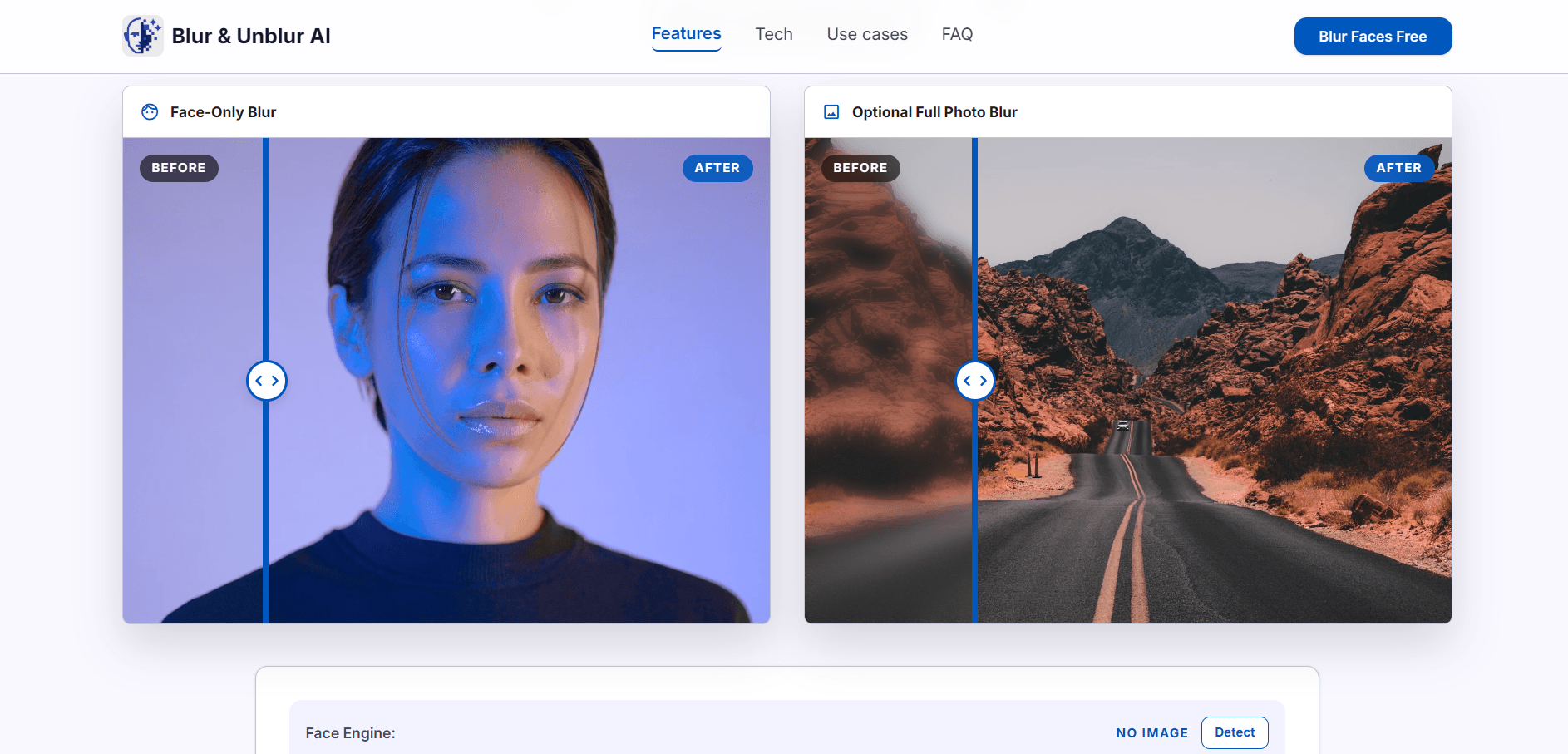
Blur & Unblur AI is a free browser-based tool that blurs faces in photos before sharing them online. It detects faces automatically, lets you correct masks with a lasso, adjusts blur strength live, and exports a clean PNG. All processing runs locally in your browser, so your source image is never uploaded. It is for anyone who needs quick face privacy edits on screenshots, group photos, event images, or social posts.
How it works
Start by loading a JPG, PNG, or WebP file. The editor draws the photo to an HTML5 Canvas, runs face detection in the browser, and creates editable masks for each detected face. In Face Blur mode, the blur effect is clipped to selected face regions instead of softening the entire image. If detection adds a wrong box, remove that selection; if it misses a face, switch to Lasso and draw a custom mask by hand.
Key capabilities
The tool includes Face Blur, Face Unblur, and Full Blur modes. Face Blur is the primary workflow, while Full Blur is available when the entire image or background needs obscuring. Select mode lets you remove false detections or toggle individual face masks on and off. Lasso mode allows manual face masks for missed faces. The blur strength slider provides live adjustment, and the export produces a clean PNG without guide boxes, dashed frames, or editor overlays.
Who it is for
Blur & Unblur AI is built for quick face privacy edits before publishing screenshots, group photos, event images, profile shots, school photos, or social posts. It is useful for public sharing where you need to hide identities while keeping the background readable. It also handles selective edits, such as blurring only one face in a group, and works well for fast local workflows when you do not want to upload a private source image to a cloud editor.
Pricing and limits
The tool is free to use, with no pricing plans mentioned. It works best in current Chrome, Edge, Safari, and Firefox releases with JavaScript and Canvas enabled. Supported image formats are JPG, PNG, and WebP. Very large face photos may be limited by your device memory, so resize high-resolution camera files if the browser becomes slow. All processing is local, ensuring privacy.
Key features
Automatic face detection
Automatically detects faces in photos and applies blur only to selected face masks.
Lasso correction
Draw a manual face mask with lasso when detection misses a face or for tighter control.
Adjustable blur strength
Adjust blur strength live with a slider that updates the canvas preview immediately.
Private local editing
All processing happens locally in the browser; no upload to a server.
Clean PNG export
Export a clean PNG without guide boxes, dashed frames, or editor overlays.
Use cases
Privacy sharing
Blur faces before posting screenshots, event photos, school photos, or public albums.
Group photos
Select exactly which people should be blurred in a group photo before export.
Missed faces
Draw a lasso mask when the detector misses a side face, small face, or low-light face.
Local downloads
Export a clean PNG after reviewing every detected face and lasso region.
Pricing & limits
From the official site · checked 10/10/2026Frequently asked questions about Blur & Unblur AI
- Is this mainly for blurring faces?
- Yes. Blur & Unblur AI is focused on face blur first: detect faces, select the faces you want to hide, adjust blur strength, and export a clean PNG.
- What if face detection misses a face?
- Switch to Lasso mode and draw around the missed face. That hand-drawn region becomes a face mask and can be blurred like an automatically detected face.
- Can I remove a wrong face detection?
- Yes. In Select mode, remove false detections or turn individual face masks on and off before downloading the final blurred image.
- Can I blur the whole photo too?
- Yes, but full photo blur is secondary. The main workflow is face blur, while Full Blur is available when the entire image or background also needs to be obscured.
- Are my face photos kept private?
- Yes for this implementation. The image is decoded, face masks are created, and the blurred result is rendered with browser APIs locally; no upload endpoint is used.
Related tools

GPT Image2 Generator
Turn written prompts into high-quality images with GPT Image2, choosing aspect ratios and resolutions online.
AddFamilyPhoto
Add a missing loved one to any family photo with AI in about 20 seconds.
BabyVideo.ai
Upload parent photos and generate a realistic future baby preview with AI.

AI Moire Remover
Upload screen photos or scans and get moire-free images in seconds with AI.

AIClothSwap
Swap outfits, change backgrounds, and direct poses in photos with free daily credits.
AI Photo Editor
Edit, enhance, and transform photos in one click with AI background removal, object erasing, and image upscaling.

AI Image Generator
Create custom images from text prompts and export them as PNG, PDF, HTML, or PPT.

AIGenTools
Create images, videos, and chat with leading AI models under one login.