
AIClothSwap
aiclothswap.comAI clothes swap with scene editing
Swap outfits, change backgrounds, and direct poses in photos with free daily credits.
Overview
AIClothSwap is an AI clothes swap and virtual try-on studio that replaces or previews outfits in photos. Users upload a person photo and one or more garment images, or describe a look, and the AI generates a realistic result preserving body proportions, lighting, and background. It is built for stylists, ecommerce sellers, fashion brands, and social creators who need quick, editorial-grade outfit changes.
How it works
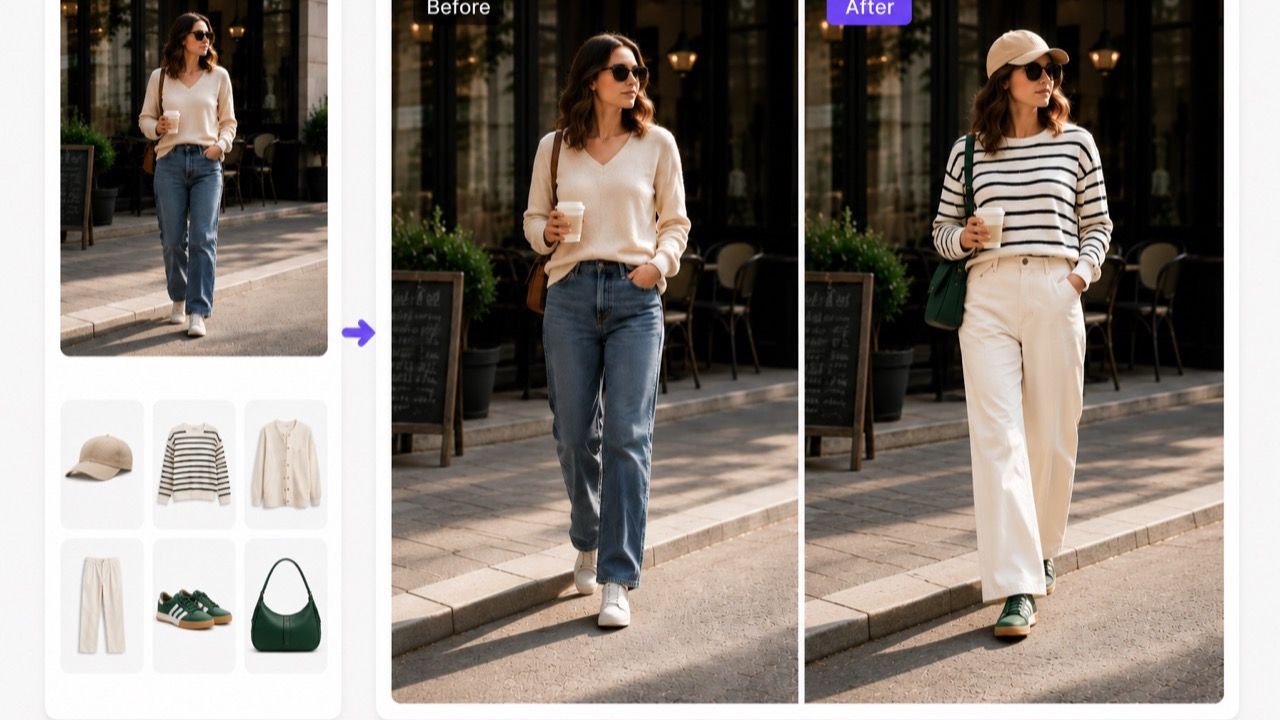
The tool takes two inputs: a person photo and an outfit image, either a flat lay or on-model. It blends them into a single realistic result, preserving fabric drape, lighting, body proportions, and background. Users can iterate on styles, colors, and outfits in seconds instead of organizing a full photoshoot. The workflow is simple: upload a photo, choose a style or describe a look, and get a new outfit instantly.
Key capabilities
AIClothSwap supports swapping a whole outfit at once, including top, bottom, shoes, hat, and bag. Studio Quality allows changing the background, setting, or pose with plain text instructions. The AI detects body contours and garment regions automatically for precise, balanced swaps. Users can also skip the garment photo entirely and describe a look or occasion to generate an outfit. Curated presets like Perfect Text, Editorial Draping, and Complex Textures are available for specialized results.
Who it is for
The tool is built for stylists who preview wardrobe combinations, ecommerce sellers who generate on-model product images from flat-lay photos, and fashion brands creating lookbook variations. Social creators can try outfits before buying and build content without restocking a closet. Photographers can extend the value of a single shoot across multiple wardrobe variations. It is also useful for shoppers who want to see how a garment looks on themselves before purchasing.
Pricing and limits
The Starter plan is free forever, with watermarked results and 10 free credits daily for eligible accounts. Monthly membership costs $19.99 per month for 750 credits, about 75 swaps, with no watermark, ad-free, and commercial use license. Yearly membership is $89.90 for the first year, billed annually, providing 10,000 credits up front. One-time credit packs range from $9.99 for 150 credits to $89.99 for 2,000 credits, with credits that never expire.
Key features
Full outfit swap
Swap a whole outfit at once, including top, bottom, shoes, hat, and bag, in a single natural-looking result.
Background and pose editing
Use Studio Quality to change the background, setting, or pose with plain text instructions alongside the outfit swap.
Smart body and garment detection
Automatically detect body contours and garment regions for precise, balanced swaps that align texture, folds, and lighting.
Text-based outfit generation
Describe a look or occasion without a garment photo, and the AI generates an outfit on your own photo.
Curated presets
Choose from curated presets like Perfect Text, Editorial Draping, and Complex Textures for specialized results.
Use cases
Ecommerce product imaging
Generate on-model product images from a single flat-lay photo and scale to catalog size.
Stylist consultations
Preview wardrobe combinations for clients before pulling pieces.
Social content creation
Try outfits before buying and share styled looks on social media.
Fashion brand lookbooks
Create lookbook variations and seasonal campaigns without booking a second shoot.
Pricing & limits
From the official site · checked 10/10/2026Frequently asked questions about AIClothSwap
- How does the AI clothes changer work?
- AI clothes swap replaces the outfit in a photo while keeping the person, pose, lighting, and background unchanged. You upload a photo of the person and one or more garment images, and the AI fits the new clothing onto them with realistic fabric, folds, and shadows.
- Is the AI clothes changer free to use?
- Yes. Eligible new accounts receive free first-day credits automatically, with no card required. Return tomorrow to claim another 10 for Essential Try-On.
- Is my data safe when I upload photos?
- Yes. Uploads are encrypted in transit and at rest, used only to generate your result, and never used to train public models. You can delete your generations and source photos from your gallery at any time.
- Can I use the AI clothes changer on my phone?
- Yes, it runs entirely in your mobile browser on iOS Safari and Android Chrome, with no app to install. You can upload from your camera roll or take a photo, and the editor adapts for one-handed use.
- How realistic are the results?
- The AI keeps your body proportions, pose, and the photo's lighting intact, and renders fabric drape, folds, and shadows so the new outfit looks like it was really photographed. It handles tailored suits, flowing dresses, and casual streetwear without obvious distortion.
Related tools

AI Photo Editor
Edit, enhance, and transform photos in one click with AI background removal, object erasing, and image upscaling.

AI Image Generator
Create custom images from text prompts and export them as PNG, PDF, HTML, or PPT.

AI Moire Remover
Upload screen photos or scans and get moire-free images in seconds with AI.

AIGenTools
Create images, videos, and chat with leading AI models under one login.

BabyVideo.ai
Upload parent photos and generate a realistic future baby preview with AI.

Consistent Character AI
Create recognizable characters across scenes, outfits, and videos with reference-guided AI.

Nano Banana Pro
Transform photos into posters, infographics, and storyboards with simple text prompts.

Pixolm
Generate AI images from text or references, then edit with prompts and masks.