
Vikas Editor AI
Third-partyvikas-editor.netAI creative studio for cinematic photo and video concepts
Your photo. A whole new story

Overview
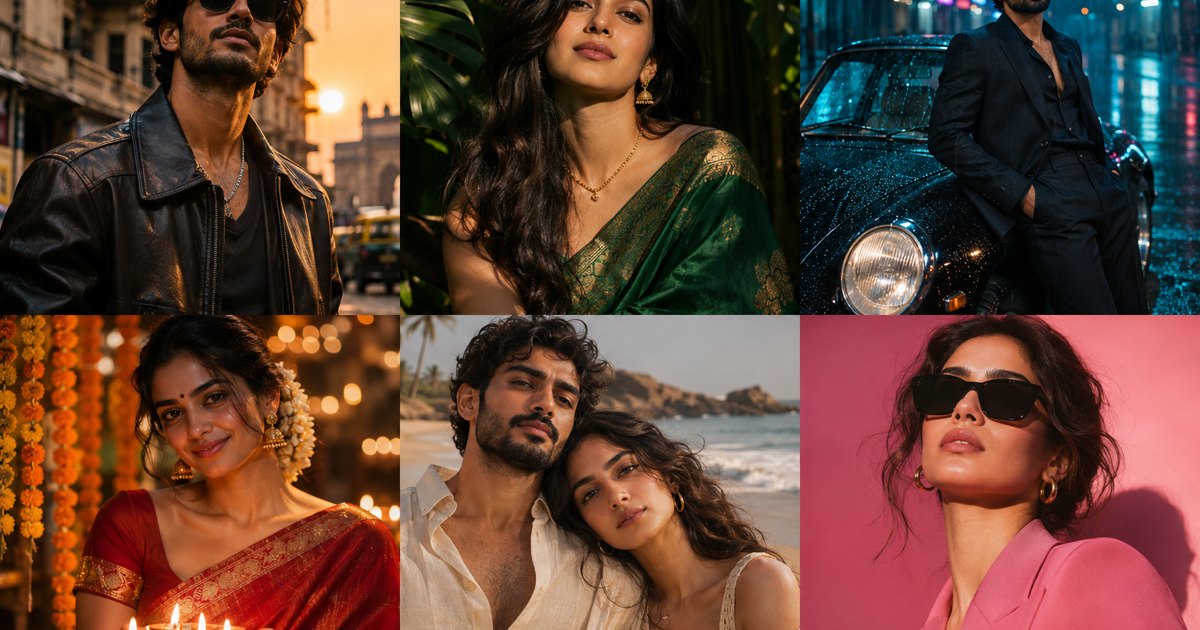
Vikas Editor is an AI-powered creative studio designed to help users imagine new possibilities for their photos and short videos. With a special focus on Indian creators, the website offers cinematic portraits, fashion transformations, festive greetings, couple photography, and photo-to-video concepts. Its template collection includes styles such as Golden Hour Hero, Emerald Saree, Midnight City, Diwali Glow, Sunset Together, and Spotlight. Each template presents a visual example, a creative direction, and an original prompt that users can inspect, copy, and adapt. This makes it easier to experiment with lighting, clothing, locations, moods, and cinematic compositions. The website is built as a planning and inspiration workspace rather than a fully operational generation platform. Users can upload a JPG, PNG, or WebP image, choose a style, describe an idea, and prepare a customised prompt. However, image and video generation are not currently available on the site. Instead, users can take the prepared prompts to a compatible AI tool. Vikas Editor also provides practical guidance for writing effective prompts. It encourages users to describe the subject, setting, outfit, lighting, mood, and movement clearly while refining one detail at a time. For video concepts, the platform focuses on gentle five-second movements, such as a slow camera push, drifting fabric, or rain passing through a city scene. It is a useful creative starting point for personal projects, social media posts, festive greetings, and visual moodboards.
Key features
Template gallery with editable prompts
Explore visual examples, creative directions, and original prompts for styles such as Golden Hour Hero, Emerald Saree, Midnight City, Diwali Glow, Sunset Together, and Spotlight.
Prompt customization
Inspect, copy, and adapt prompts while experimenting with lighting, clothing, locations, moods, and cinematic compositions.
Image upload planning
Upload a JPG, PNG, or WebP image, choose a style, describe an idea, and prepare a customised prompt.
Creative photo concepts
Plan cinematic portraits, fashion transformations, festive greetings, and couple photography concepts.
Photo-to-video concepts
Prepare gentle five-second movement ideas such as a slow camera push, drifting fabric, or rain passing through a city scene.
Use cases
Cinematic portraits and fashion edits
Develop visual directions for cinematic portraits and fashion transformations using templates and adaptable prompts.
Festive greetings and couple photography
Prepare festive greeting and couple photography concepts with clear subjects, settings, outfits, lighting, and mood.
Photo-to-video concepts and moodboards
Plan short video concepts and visual moodboards with gentle movement ideas that can be taken to a compatible AI tool.
Pricing & limits
Listed as freemium. A dated pricing breakdown is not available. Check the provider for current plans and allowances.
Check current pricing on the official siteFrequently asked questions about Vikas Editor AI
- What is Vikas Editor AI?
- Vikas Editor AI is an independent online image and video generation website focused on Indian creators. It uses Nano Banana 2 for image generation and Seedance 2.0 for photo-to-video animation.
- Is Vikas Editor AI free?
- Browsing templates and copying prompts is free. Each account with a verified email can claim one free image, subject to daily availability. Further images and every video require purchased credits.
- How do I use Vikas Editor AI to edit a photo?
- Choose a template and open it in the studio. Add a photo you have permission to use, adjust the prompt, and generate. Review the result and download it within 24 hours.
- Can Vikas Editor AI turn a photo into a video?
- Yes. Upload a photo, choose a motion prompt, and generate a five-second 720p clip with audio using Seedance 2.0. Video generation requires purchased credits; the free image allowance does not apply.
- Is Vikas Editor AI affiliated with Editing By Vikas?
- No. Vikas Editor AI is an independent website and is not affiliated with Editing By Vikas or any individual creator.
Related tools
Consistent Character AI Generator
Generate the same character in different poses, expressions, and scenes from a single reference photo.

Beautyface AI
Turn 1 to 5 selfies into studio-quality AI photoshoots with identity-preserving facial lock and 1K to 4K export.

Estate AI by Pixel Perfects Solutions
Upload property photos once, then enhance, stage, declutter, convert to dusk, and deliver market-ready listing media from one connected workspace.

Nano Banana 2
Generate 2K images with readable text in 100+ languages and upscale them to 4K.

Enhance My Photo
Online AI photo enhancer that sharpens portraits, product shots, scenery, pets, and images with text — export JPEG/PNG/WebP without watermarks.

NanoBananaPro
Generate hyper-realistic images from text or reference images with sharper 2K output and intelligent 4K scaling.

Hotel Lobby AI
Two photos, one mic, one unforgettable duet.
AI Headshot Generator
Upload your photos and get professional AI headshots for LinkedIn, CVs, and social media in minutes.