
Beautyface AI
beautyface.appIdentity-preserving AI photoshoot generator
Turn 1 to 5 selfies into studio-quality AI photoshoots with identity-preserving facial lock and 1K to 4K export.
Overview
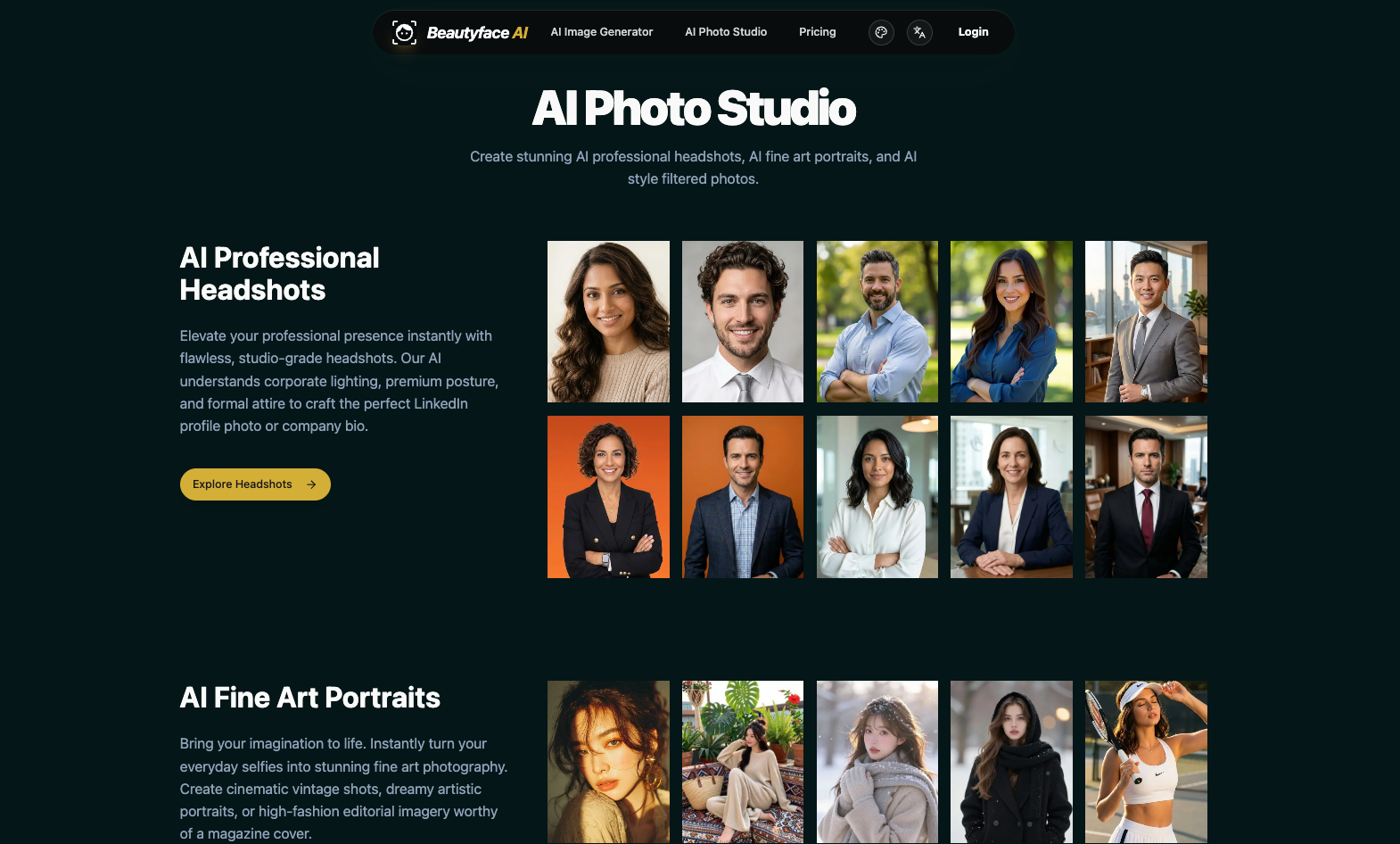
Beautyface is a web-based AI photoshoot generator that turns 1 to 5 everyday selfies into professional studio-quality portraits. Users upload reference photos, choose a preset style or type a prompt, and receive high-resolution 1K, 2K, or 4K images in under 30 seconds. It is designed for individuals needing LinkedIn headshots, holiday cards, wedding or maternity photos, and creative artistic portraits without studio bookings.
How it works
Upload 1 to 5 clear selfies in JPG, PNG, or WebP format. The AI analyzes facial landmarks, bone structure, eye shape, and skin texture to lock identity. Then choose from 98+ curated prompt presets or type custom instructions for outfit, lighting, or background changes. The system routes tasks across Nano Banana 2.1, GPT Image 2.6, and Z Image Turbo with automatic fallback, rendering finished portraits in 10 to 25 seconds.
Key capabilities
The generator supports multiple aspect ratios including 1:1, 3:4, 4:3, 16:9, and 9:16, with an Auto mode that matches the first uploaded photo. It offers themed presets for Christmas, bridal, couple, family, maternity, graduation, and LinkedIn photos. Additional tools include an AI photo editor for retouching, an AI style filter for anime or painting effects, and an image-to-prompt reverse engineer for other models.
Pricing and limits
New accounts receive 20 free credits upon sign-up, enough for 2 full-resolution 1K portraits without watermarks. Pay-as-you-go credit packs are available: the $20 Glimmer Pack includes 1,600 credits, the $50 Emerald Reserve includes 4,000 credits plus 500 bonus, and the $100 Royal Collection includes 8,000 credits plus 2,000 bonus. Credits from one-time packs never expire, and monthly subscription credits refresh each billing cycle.
Key features
Multi-reference identity lock
Preserves facial bone structure, eye color, and skin texture across 1 to 5 uploaded photos.
98+ curated prompt presets
Includes Christmas, bridal, couple, family, maternity, graduation, and LinkedIn themes.
1K, 2K, and 4K export
Unwatermarked portraits in 1:1, 3:4, 4:3, 16:9, or 9:16 aspect ratios.
Multi-model routing
Routes tasks across Nano Banana 2.1, GPT Image 2.6, and Z Image Turbo with automatic fallback.
Prompt-based photo editor
Change outfits, hairstyles, backgrounds, and lighting with natural-language instructions.
Commercial usage rights
All generated images come with full commercial rights for business and print use.
Use cases
Professional headshots
Create executive LinkedIn photos, corporate team bios, and studio business portraits.
Seasonal and milestone photoshoots
Generate Christmas cards, wedding and bridal portraits, maternity keepsakes, and graduation photos.
Creative and artistic portraits
Turn photos into anime, oil paintings, charcoal sketches, 3D figurines, or chibi stickers.
Photo restoration and retouching
Remove tourists, clean clutter, fix closed eyes, deblur vintage prints, and restore scratched photos.
Pricing & limits
From the official site · checked 11/10/2026Before you use it
Beautyface is a web application accessible through a browser, requiring a Google sign-in for authentication and credit management. Uploaded photos are encrypted in transit and at rest, used only to generate requested images, and never sold or used to train third-party AI models. All generated images include full commercial usage rights for business profiles, marketing, and print media.
Frequently asked questions about Beautyface AI
- What is Beautyface?
- Beautyface is a web-based AI photoshoot generator that turns 1 to 5 everyday selfies into professional studio photoshoots, preserving facial identity while changing lighting, outfits, and backgrounds.
- Is Beautyface free to use?
- Yes, every new account receives 20 free credits upon sign-up, enough to generate 2 full-resolution 1K portraits without watermarks and without a credit card.
- How many reference photos should I upload?
- One clear, front-facing selfie in natural daylight is enough to start. Uploading 2 to 5 photos from different angles helps capture likeness more accurately or include a partner or family member.
- What photoshoot themes and styles can I generate?
- You can pick from 98+ curated prompt presets or type custom scenes, including Christmas fireplace shoots, bridal and wedding scenes, couple sessions, family holiday cards, maternity setups, graduation regalia, and LinkedIn business backdrops.
- Can I use generated images commercially?
- Yes, all images created on Beautyface come with full commercial usage rights for LinkedIn, company websites, marketing campaigns, social media, and high-resolution print.
Related tools
Nano Banana 2
Generate 2K images with readable text in 100+ languages and upscale them to 4K.

Vikas Editor AI
Your photo. A whole new story
Consistent Character AI Generator
Generate the same character in different poses, expressions, and scenes from a single reference photo.

Estate AI by Pixel Perfects Solutions
Upload property photos once, then enhance, stage, declutter, convert to dusk, and deliver market-ready listing media from one connected workspace.
Enhance My Photo
Online AI photo enhancer that sharpens portraits, product shots, scenery, pets, and images with text — export JPEG/PNG/WebP without watermarks.

NanoBananaPro
Generate hyper-realistic images from text or reference images with sharper 2K output and intelligent 4K scaling.

Hotel Lobby AI
Two photos, one mic, one unforgettable duet.
AI Headshot Generator
Upload your photos and get professional AI headshots for LinkedIn, CVs, and social media in minutes.