PNGtoSTL
pngtostl.xyzImage-to-3D converter with AI and heightmap modes
Turn PNG and JPG images into 3D STL files for printing and modeling.
Overview
PNGtoSTL is a free online converter that transforms 2D PNG and JPG images into 3D STL files for 3D printing, CNC machining, and modeling. It offers three modes: AI mode for high-quality 3D models, Heightmap mode for variable-height models based on pixel brightness, and Extrude mode for clean edge tracing. The tool is web-based, requires no installation, and is suitable for hobbyists, designers, and professionals.
AI mode capabilities
AI mode uses advanced artificial intelligence to analyze images and generate high-quality 3D models, with options for Standard quality (single front-facing image) or Pro quality (multi-angle input with four views). It supports PBR material generation, single-view or multi-view modes, and adjustable face count from 40,000 to 1,500,000. AI mode consumes credits, while other modes are free.
Heightmap and extrude modes
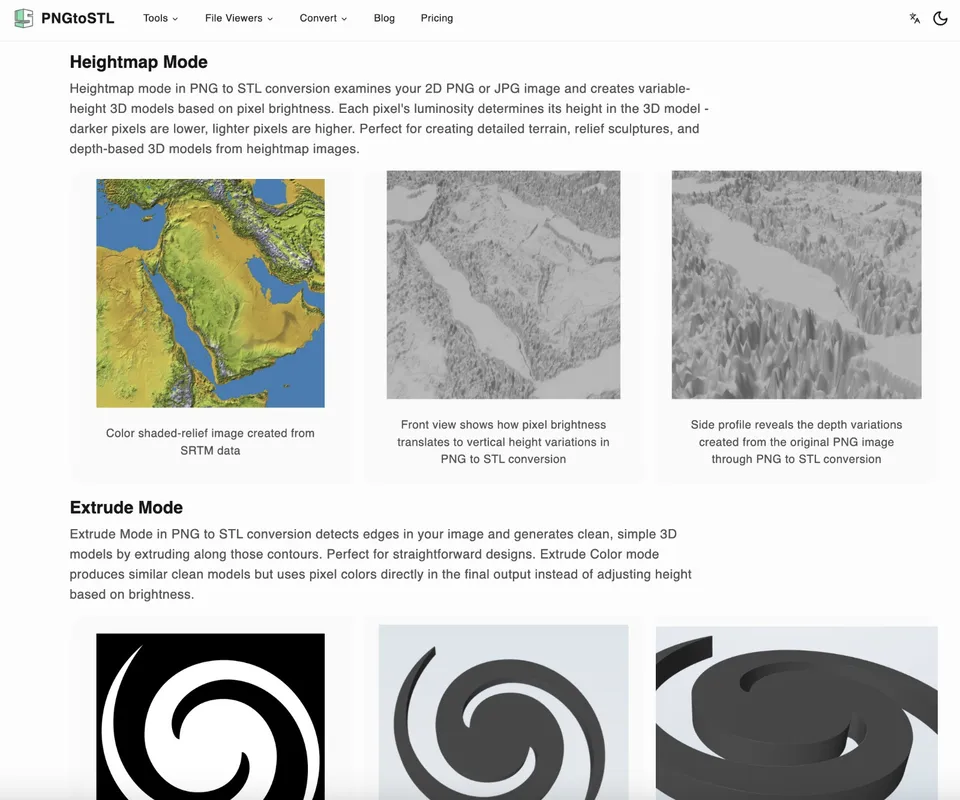
Heightmap mode creates variable-height 3D models based on pixel brightness, where darker pixels are lower and lighter pixels are higher, ideal for terrain and relief sculptures. Extrude mode traces edges to produce clean, fixed-height models, with Extrude Color using pixel colors directly. Both modes offer controls for extraction target, color threshold, thickness, bevel, smoothing, and model size.
How it works
The conversion process is simple: choose a mode, upload a PNG or JPG image, preview and adjust parameters in real-time, then download the STL file. Standard modes typically complete in about 5 seconds, while AI mode takes 1-3 minutes. The tool runs on servers, so no powerful computer is needed, and it works on all major platforms with a modern web browser.
Pricing and plans
PNGtoSTL offers free access to Heightmap and Extrude modes, with AI mode requiring credits. Paid plans include Pay-as-you-go at $9.9 one-time, Pro at $16.9/month with 500 monthly credits and 2 concurrent tasks, and Max at $26.9/month with 1000 credits and 3 concurrent tasks. All plans include unlimited downloads per day and private assets.
Key features
AI-powered 3D conversion
AI mode uses advanced AI to create high-quality 3D models from single or multiple images, with options for Standard and Pro quality.
Heightmap and Extrude modes
Heightmap mode maps pixel brightness to height, and Extrude mode traces edges for clean, fixed-height models.
Customizable parameters
Adjust parameters like face count, thickness, bevel, smoothing, and model size in real-time with instant preview.
Multiple export formats
Export in STL (binary), OBJ, and GLB formats, with options for color support and background removal.
Use cases
3D printing
Convert 2D images into 3D printable STL files for 3D printing projects.
CNC machining
Create 3D models for CNC machining from 2D designs.
Game development
Generate 3D game assets from concept art using AI mode.
Terrain modeling
Produce terrain models and relief sculptures from heightmap images.
Pricing & limits
From the official site · checked 10/10/2026Frequently asked questions about PNGtoSTL
- What is PNGtoSTL?
- PNGtoSTL is a web-based tool that converts 2D PNG or JPG images into 3D STL files, with modes for AI, heightmap, and extrude conversion.
- Who is PNGtoSTL for?
- It is for 3D printing enthusiasts, designers, CNC machinists, game developers, and anyone needing to turn 2D images into 3D models.
- Is PNGtoSTL free?
- Yes, the standard Heightmap and Extrude modes are free. AI mode uses credits, which can be purchased or obtained through subscription plans.
- What platforms does PNGtoSTL support?
- It works on any device with a modern web browser, including Mac, Windows, Linux, Android, and iOS, with no installation required.
Related tools
Gender Swap AI
Create gender-swapped selfies and character art from a reference image.

BlurOutAI
Blur sensitive areas in photos and videos instantly with AI.
AuraUI
Downloadable design systems and curated skills for AI coding agents.

FloorPlanBot
Turn a text description into a house layout concept with AI, then edit and export as PNG, PDF, or DXF.

PetIntoArt
Turn your pet photo into a custom digital portrait
SkySnail
Generate CTR-optimized thumbnails for YouTube, TikTok, and Instagram in seconds.

Mixels.ai
Convert photos to pixel art and create 8-bit sprites with a free editor and PNG export.

Grafista
Generate branded and editable social media posts, presentations, flyers, and more from text and images.