
Mixels.ai
mixels.aiPixel art maker with AI photo conversion
Convert photos to pixel art and create 8-bit sprites with a free editor and PNG export.
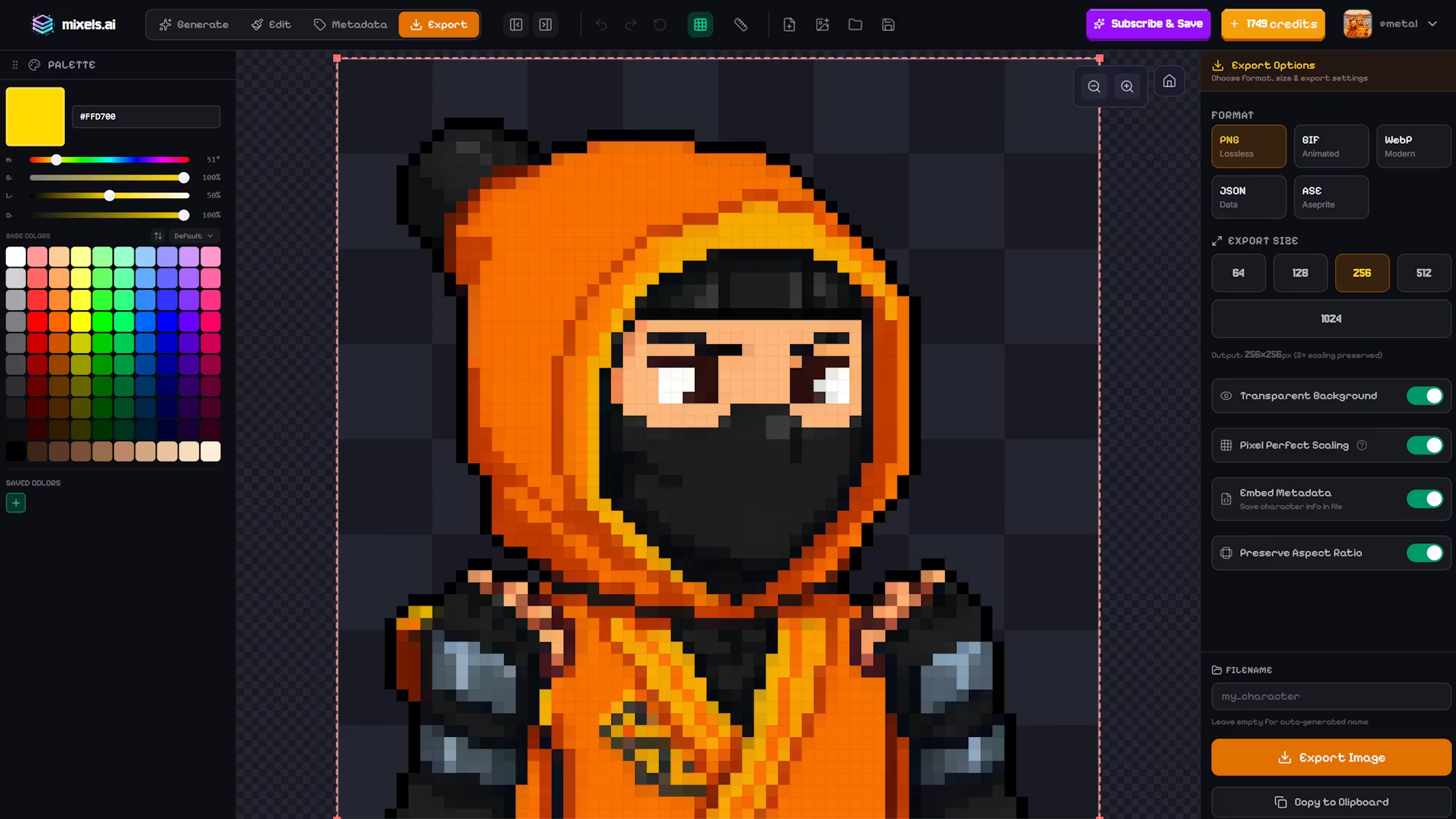
Overview
Mixels.ai is a free online pixel art maker that converts photos into pixel art and creates 8-bit sprites and avatars. It uses AI for grid-aligned, game-ready outputs at 64x64 and 128x128 resolutions. Designed for artists, hobbyists, and game developers, it includes a free editor with multi-layer support and PNG export.
How it works
Upload a photo and the AI pixelator converts it to authentic pixel art with strict grid alignment and limited color palettes. The tool generates game-ready sprites at 64x64 and 128x128 resolutions. Users can also create 8-bit characters and avatars from scratch or by converting existing images.
Key capabilities
The free editor includes brush tools, color palette management, and multi-layer support. It allows for detailed editing of pixel art with transparent PNG export. The editor is free forever, enabling users to refine AI-generated sprites or create original pixel art manually.
Who it is for
Mixels.ai is built for artists, hobbyists, and game developers seeking retro aesthetics. It serves those who need quick pixel art conversions or detailed sprite creation for games. The platform supports both casual creators and professionals with scalable plans.
Pricing and limits
The Free Edition offers 3 AI generations at no cost. The Pro Edition costs $29.95 per month for 100 AI tokens, while the Studio Edition at $99.95 per month provides 350 tokens. Studio subscribers get full commercial rights to generated art without attribution.
Key features
AI photo-to-pixel conversion
AI converts photos to pixel art with grid alignment and limited color palettes.
Game sprite generator
Create game-ready sprites at 64x64 and 128x128 resolutions.
Free pixel art editor
Free editor with brush tools, color palette management, and multi-layer support.
Transparent PNG export
Export pixel art as transparent PNG files.
8-bit character creator
Generate 8-bit characters and avatars for retro aesthetics.
Use cases
Create 8-bit avatars
Convert personal photos into pixel art avatars for social media or profiles.
Design game sprites
Generate game-ready sprites at 64x64 or 128x128 for indie game development.
Edit pixel art
Use the free editor to refine AI-generated pixel art or create original pieces with multi-layer support.
Pricing & limits
From the official site · checked 10/10/2026Frequently asked questions about Mixels.ai
- What is Mixels.ai?
- Mixels.ai is an online pixel art maker that uses AI to convert photos into pixel art, create 8-bit sprites, and edit with a free editor.
- Who is Mixels.ai for?
- It is for artists, hobbyists, and game developers who want to create pixel art, sprites, and avatars.
- Is Mixels.ai free?
- Yes, there is a free plan with 3 AI generations and a free editor with multi-layer support and PNG export.
- What platforms does Mixels.ai support?
- Mixels.ai works in a web browser and supports transparent PNG export and multi-layer editing.
Related tools

Grafista
Generate branded and editable social media posts, presentations, flyers, and more from text and images.

Roomstage AI
Stage property photos for sales and rentals with AI lighting harmonization and MLS disclosure tools.

PetIntoArt
Turn your pet photo into a custom digital portrait
BlurOutAI
Blur sensitive areas in photos and videos instantly with AI.
PNGtoSTL
Turn PNG and JPG images into 3D STL files for printing and modeling.
Gender Swap AI
Create gender-swapped selfies and character art from a reference image.

AuraUI
Downloadable design systems and curated skills for AI coding agents.

FloorPlanBot
Turn a text description into a house layout concept with AI, then edit and export as PNG, PDF, or DXF.