
Luo
luo.appCustom team software built by asking
Describe the tool your team needs and Luo builds it, connects your tools, and runs the work on a schedule or trigger.
Overview
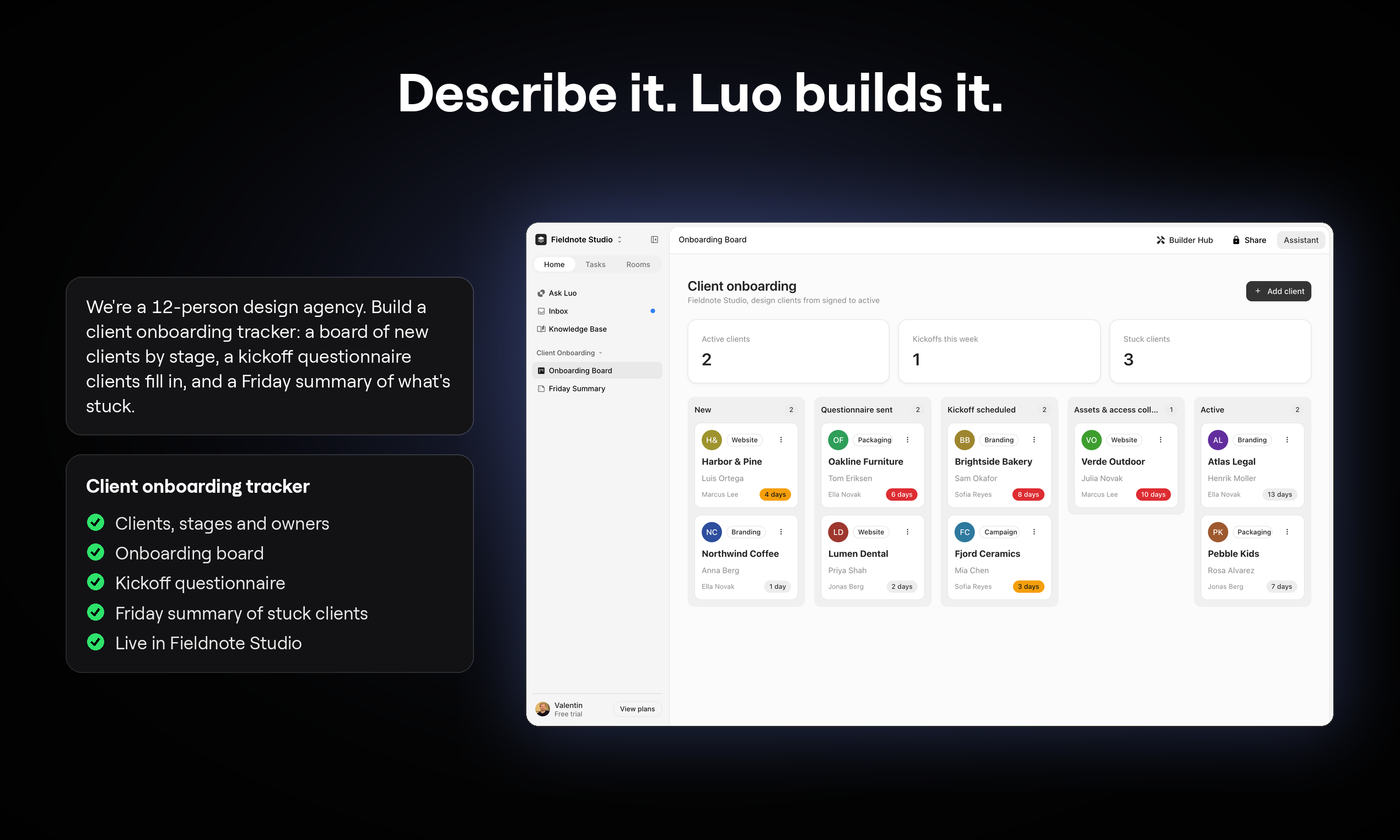
Luo is a platform where teams describe the software they need in plain language, and it builds a workspace with pages, tables, and dashboards, connects to tools like Slack, HubSpot, and Gmail, and runs tasks on schedules or triggers. It is for teams and individuals who want custom business software without coding, from sales and marketing workflows to people operations and creative production. Luo also offers pre-built solutions like Product Visuals Generator and Startup HRIS that can be customized by asking the assistant.
How it works
Start by describing what your team needs, and Luo builds the workspace with pages, data, and automations. You can connect your existing tools by authorizing each connection, and tasks can run on a schedule, from a trigger like a new lead, or by name in chat. Luo also assembles a private knowledge base from your company's docs and tools, citing every source it draws from.
Key capabilities
Luo includes built-in connections to Slack, HubSpot, Gmail, Google Sheets, Notion, Monday, Asana, and more. It supports scheduled tasks, triggers, and workflows that can be saved and run by name. The platform also offers a Builder Program to create AI tools without code and publish them to the Builder Hub.
Who it is for
Luo is designed for teams and individuals who need custom software without technical expertise. It fits most sales, marketing, operations, and founder workflows, and offers pre-built solutions for specific needs like product visuals generation, HRIS, RFP responses, and support queues. Users can start from a template or describe their own requirements.
Pricing and limits
Luo has a free plan with 1 user, and paid plans include Starter at €20/month, Individual at €90/month, and Team at €450/month for 5 users. Paid plans add more AI usage, scheduled tasks, and team workspaces. The Individual and Team plans offer a free 7-day trial, and AI usage is currently on them during beta.
Key features
Build custom workspaces
Describe what you need in plain language and Luo builds pages, tables, and dashboards for your team.
Connect existing tools
Built-in connections to Slack, HubSpot, Gmail, Google Sheets, Notion, Monday, Asana, and more.
Automate tasks
Run recurring work on a schedule, from triggers in connected tools, or by name in chat.
Private knowledge base
Luo assembles a private knowledge base from your company's docs and tools, with cited sources.
Customizable solutions
Start from templates like Product Visuals Generator or Startup HRIS and reshape them by asking the assistant.
Use cases
Sales and marketing workflows
Automate lead research, email briefs, and board reports that run on schedule or from triggers.
People operations
Manage employee records, onboarding, leave, reviews, and payroll preparation with role-based access.
Creative operations
Generate on-brand product visuals with reusable presets and per-result review.
Pricing & limits
From the official site · checked 10/29/2026Frequently asked questions about Luo
- What is Luo?
- Luo is a platform where you describe the tool your team needs in plain language, and it builds a workspace with pages, tables, and automations, then connects to your existing tools.
- Who is Luo for?
- Luo is for teams and individuals who want custom software without coding, including sales, marketing, operations, and founder workflows.
- Is Luo free?
- Yes, Luo has a free plan you can start on today with no credit card. Paid plans add more AI usage, scheduled tasks, and team workspaces.
- What tools does Luo connect to?
- Luo has built-in connections to Slack, HubSpot, Gmail, Google Sheets, Notion, Monday, Asana, and more. You authorize each connection and can disconnect anytime.
- Can tasks run without me?
- Yes, tasks can run on a schedule or from triggers like a new lead in HubSpot, and results are sent to your workspace, inbox, or Slack.
Related tools

Stable Commerce
Turn your Etsy shop into an independent store with AI agents that handle design, marketing, and operations.

TrustGrowth
Connect Google Search Console and get a GSC-verified audit of technical, performance, content, and E-E-A-T signals in about 60 seconds.

Profit Pages
Build a Shopify store with AI, customize themes, and generate marketing content.

Gixo Lex
Draft, review, and track legal agreements with structured intake and deterministic checks.

Kapient
Kapient monitors your website 24/7 to catch broken forms, slow pages, and SSL issues before they cost you sales.

Commenty
Write LinkedIn comments in your voice and know which conversations to continue.

QApilot MCP CLI
Automate mobile app testing across Android, iOS, and Flutter with AI-driven coverage and no scripts.

WZRD
Create interactive rooms with tabs, forms, and a voice agent that answers from your content.