
AI Image Edit
aiimageedit.appPhoto editor with free daily credits
Edit photos by describing the change in plain English
Overview
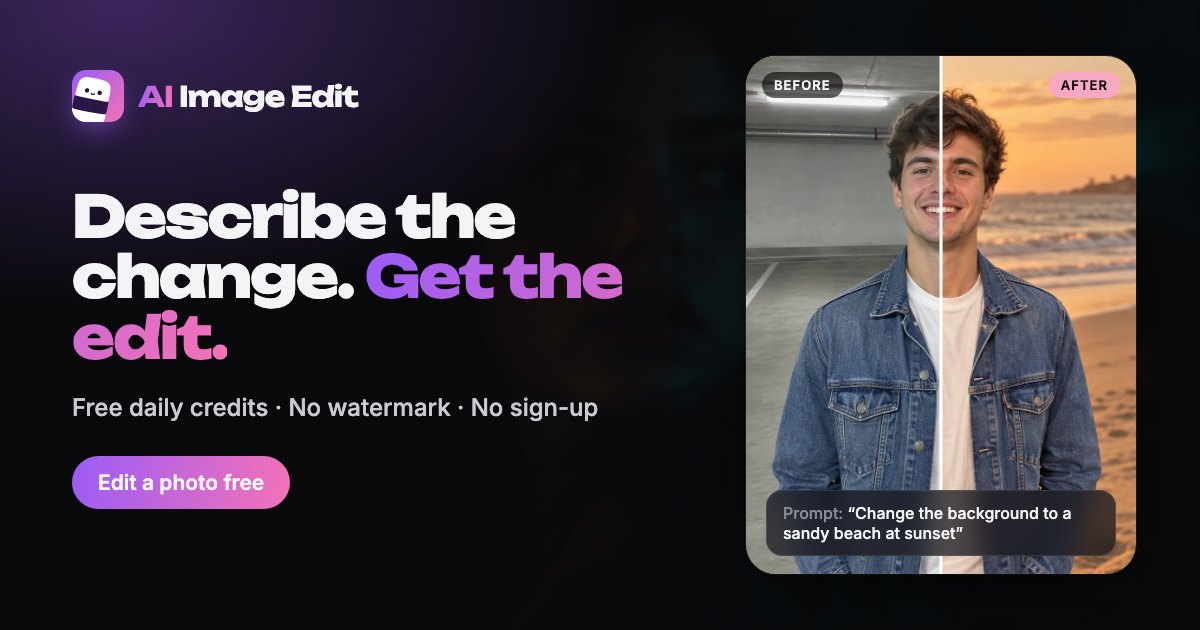
AI Image Edit is an online photo editor that lets you describe changes in plain English and get edited images in return. Upload a JPG, PNG, or WebP photo, type what to change, and download the result, or feed it back for further edits. It is designed for everyday users who need quick fixes like removing objects, swapping backgrounds, or restoring old photos without learning complex editing tools.
How it works
Start by uploading a photo or pasting one from your clipboard. Then type a one-sentence prompt describing the change, such as 'remove the trash can on the left' or 'make the sky a warm sunset.' The AI processes the request and returns an edited image. You can download it or choose 'Edit again' to use the result as the new starting point for follow-up prompts.
Key capabilities
The tool handles a wide range of tasks: removing objects, people, text, or backgrounds; changing backgrounds; unblurring; enhancing; upscaling to 2K or 4K; restoring old photos; colorizing black-and-white images; changing hair color; and generating professional headshots. Each operation has a fixed credit cost, with standard 1K edits, background removal, and enhance to 1080p costing 1 credit each.
Pricing and limits
Guests get 3 free credits daily without an account, and a free account raises that to 5. Free edits are 1K with no watermark and can be used commercially. Paid plans start at $9.99 per month for 250 credits, with yearly billing saving 20%. Credit packs are one-time purchases valid for 12 months, starting at $4.99 for 80 credits. Paid plans unlock 2K and 4K output, High quality mode, 50 MB uploads, and 180-day file storage.
Key features
Text-prompt editing
Describe changes in plain English; no layers or tool panels to learn.
Free daily credits
3 credits per day for guests, 5 with a free account; no watermark on free edits.
Multiple editing tasks
Remove objects, people, text, or backgrounds; change backgrounds; unblur; enhance; upscale; restore; colorize; change hair color; generate headshots.
Iterative editing
Feed results back in for further edits with follow-up prompts.
Output size options
1K for free; 2K and 4K with paid plans or credit packs.
Commercial use allowed
All edits, free or paid, can be used commercially without watermark.
Use cases
Remove unwanted elements
Erase tourists, trash, wires, or text from photos.
Change or remove backgrounds
Swap cluttered scenes for clean backdrops or transparent PNGs.
Restore and enhance old photos
Repair scratches, tears, and fading; colorize black-and-white prints.
Create professional headshots
Turn selfies into studio-style profile pictures for LinkedIn or resumes.
Preview hair color changes
Try new shades before visiting a salon.
Upscale images for print or listings
Increase resolution to 2K or 4K for high-quality output.
Pricing & limits
Verified 11/18/2026Getting started
Visit the website, upload a photo or paste one, and type your edit request in the prompt box. You can start editing immediately without signing up, using your 3 daily guest credits. For more credits, create a free account to get 5 per day. If you need larger outputs or more edits, choose a monthly plan or a one-time credit pack from the pricing page.
Frequently asked questions about AI Image Edit
- Is AI Image Edit free to use?
- Yes, guests get 3 free credits per day without an account, and a free account raises that to 5 credits daily. Free edits come out at 1K with no watermark.
- What file formats can I upload?
- You can upload JPG, PNG, or WebP files, or paste images from your clipboard using Ctrl+V.
- Can I use edited photos commercially?
- Yes, all edits, whether free or paid, can be used commercially, including for product listings, ads, and client work.
- What are the limits on free edits?
- Free results are 1K (about 1024 pixels on the longest side), uploads up to 20 MB, and files are kept for 7 days. Free credits refresh every 24 hours and do not roll over.
- How do paid plans work?
- Plans start at $9.99 per month for 250 credits, with yearly billing saving 20%. Credit packs are one-time purchases valid for 12 months, starting at $4.99 for 80 credits.
Related tools

Enhance My Photo
Online AI photo enhancer that sharpens portraits, product shots, scenery, pets, and images with text — export JPEG/PNG/WebP without watermarks.

NanoBananaPro
Generate hyper-realistic images from text or reference images with sharper 2K output and intelligent 4K scaling.

Estate AI by Pixel Perfects Solutions
Upload property photos once, then enhance, stage, declutter, convert to dusk, and deliver market-ready listing media from one connected workspace.

Qwen Image 2.1
Turn every idea into a vivid visual direction.
Consistent Character AI Generator
Generate the same character in different poses, expressions, and scenes from a single reference photo.

Vikas Editor AI
Your photo. A whole new story
Uncensored AI
Turn bold ideas into striking images.

AI Headshot Generator
Upload your photos and get professional AI headshots for LinkedIn, CVs, and social media in minutes.