
Tea App Checker
Third-partyteaappchecker.appTea post checker
Search Tea posts by first name, city and age or a photo, then pay once to read any post you match.

Overview
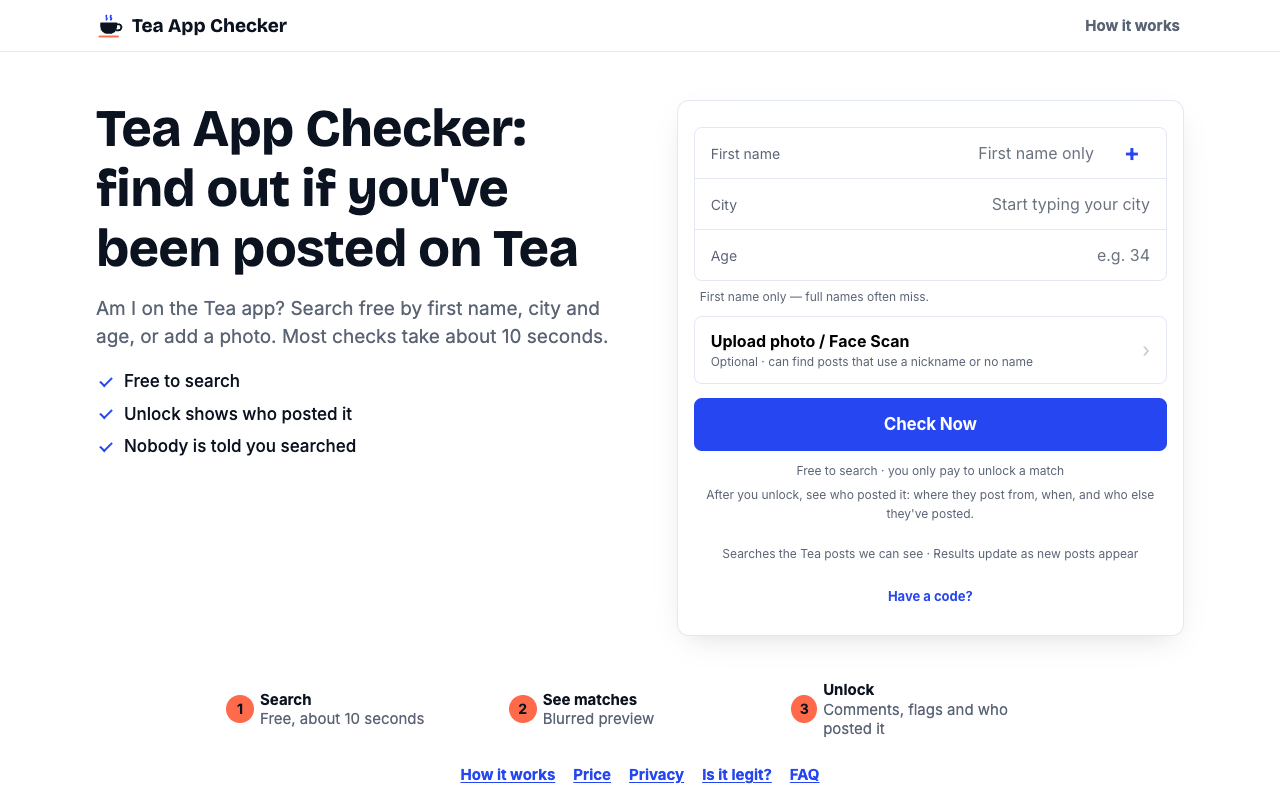
Tea App Checker is an independent third-party service built around the Tea dating-safety app, which men cannot open to search themselves. You enter a first name, city and age, or optionally add a photo, and it compares your details against the Tea posts it can see. It is aimed at men who want to find out whether they have been posted on Tea without asking someone with an account.
How it works
You type your first name, the city you live or date in, and your age; the site notes that a first name only works best. Optionally you can upload a clear photo of your face, which helps when a post uses a nickname or no name. A name search looks for posts fitting your first name, city and age, while a photo search uses the site's own face match to look for a similar face. Most checks take about 10 seconds, and each result is presented as a possible match rather than proof.
What you see for free
Before paying anything you see every possible match the search found, with the post's photo unblurred, the first name, age and city on the post, and the date it was posted. Each result also shows how many comments it has and how many red flags and green flags it carries. If nothing turns up, there is nothing to unlock, and the site notes that a clean result is not proof you were never posted because new posts appear over time.
Pricing and limits
Searching and previewing matches is free. To read a post you unlock that single post with a one-time payment, and the price is shown on the button before you pay; there is no plan, no account and no repeat charge. An unlocked post stays open for 7 days in the same browser with free updates, and after that, or if you clear cookies or change devices, you pay again. Payments go through Stripe via Apple Pay, Google Pay or card, and charges appear as TEA APP GREEN FLAGS on your statement.
Privacy and photo handling
No one on Tea is notified when you search, and the person who wrote a post will not know you looked. Searching needs no sign-up; checkout asks only for an email and payment details. A photo is used only if you choose to add one and agree first, and it is used to compare faces for your search. Photos are kept in encrypted storage, and face data is destroyed within 3 years or sooner once it is no longer needed.
Key features
Free name search
Enter a first name, city and age to look for Tea posts that fit your details, with no account required.
Optional face match
Add a clear photo of your face to find posts that use a nickname or no name at all.
Free match previews
See each possible match's photo, first name, age, city, post date, and comment and flag counts before paying.
Per-post unlock
Pay once to read a single post and its comments, with the price shown on the button before checkout.
7-day browser access
An unlocked post stays open for 7 days in the same browser, with free updates during that time.
Private searches
No one on Tea is notified when you search, and checkout only asks for an email and payment details.
Use cases
Checking if you were posted
Men who cannot open Tea themselves can search from the outside by name or photo.
Dating in several cities
Run a separate check for each city you live or date in.
Finding posts without a name
Use the optional face scan to surface posts that use a nickname or omit a name.
Reading a specific post
Unlock only the posts you want to read, one at a time, instead of paying upfront.
Pricing & limits
Listed as freemium. A dated pricing breakdown is not available. Check the provider for current plans and allowances.
Check current pricing on the official siteFrequently asked questions about Tea App Checker
- What is Tea App Checker?
- It is an independent service that searches the Tea posts it can see so you can find out whether you have been posted, without a Tea account.
- Is Tea App Checker free?
- Searching is free, and so is seeing each match's photo, first name, age, city, date and flag counts. Reading a post costs a one-time payment per post, shown on the button before you pay.
- How long does a check take?
- Most checks take about 10 seconds, though it can take a little longer at busy times.
- Do I need a Tea account to use it?
- No. You search with a first name, city and age, or an optional photo, and no Tea account is needed.
- How long does an unlocked post stay open?
- It stays open for 7 days in the same browser with free updates. After 7 days, or if you clear cookies or switch devices, you pay again to open it.
Related tools

StarProphecy AI
Generate personalized entertainment reports from zodiac, names, and birth details.

Lopaw
Get a daily, adaptive separation anxiety training plan for your dog, with an AI coach that knows your dog's history.

AskJoey
Optimize your dating profile and get personalized conversation starters for Tinder, Bumble, Hinge, and Facebook Dating.

Stamp Identifier
Identify postage stamps from photos and keep your collection organized.

FindByVibe
Describe a scene, quote, or plot to instantly find the movie title.

What Is My Nose Shape
Upload a photo to get your nose shape and tailored makeup tips in seconds.

Astrologer Bot AI
Get instant personalized astrology readings from an AI chatbot that maps your birth chart and transits.

InformedMar
Search any product and get an honest verdict from 10,000+ reviews, not star ratings.