
Saparo AI Shopping Agent
saparo.aiAI shopping agent for savings
Compare coupons, cashback, card rewards, and gift card savings before you pay.
Overview
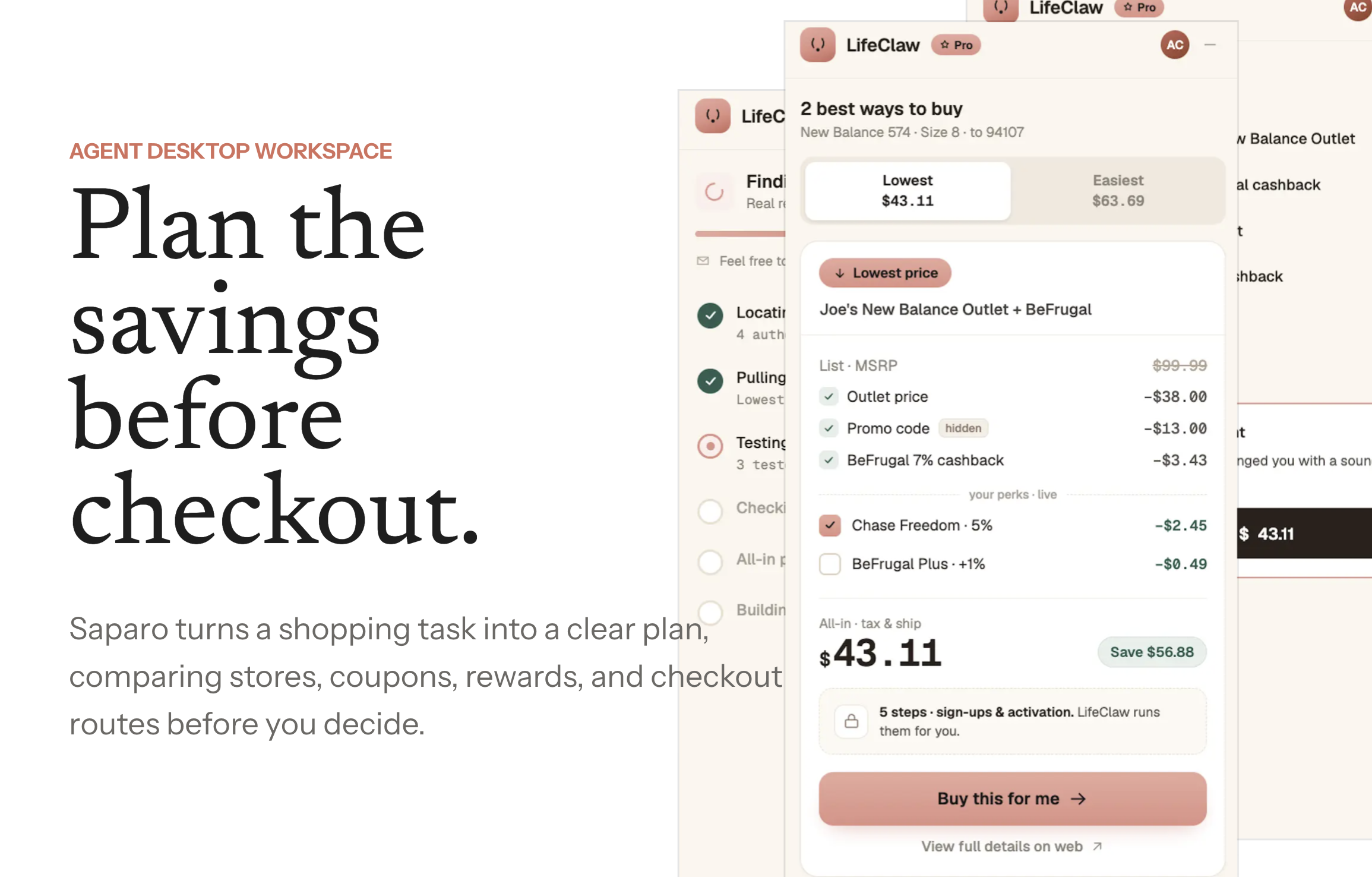
Saparo is an AI shopping agent that helps online shoppers find the best checkout route by comparing coupons, cashback, card rewards, gift card discounts, retailer prices, shipping, and tax. Users paste a product link or describe a shopping task, and Saparo returns a readable savings stack with the final all-in price before payment. It is designed for shoppers who want to save money and effort on higher-value purchases like electronics, shoes, apparel, and home goods.
How it works
Saparo works by taking a product link, cart, or plain sentence as input. It then searches across retailers, tests coupon codes, compares cashback portals, card rewards, and gift card discounts, and calculates the all-in price including shipping and tax. The agent filters out expired or non-applicable codes and presents a single readable savings panel. The user reviews the stack and approves the final payment before anything reaches checkout.
Key capabilities
Key capabilities include comparing official stores, outlets, and marketplaces for the same product, ranking cashback portals by final value, and bringing card rewards and gift card discounts into the same view. Saparo shows explainable savings lines, so each discount that changed the price is visible. It also handles retailer login, CAPTCHA, and payment steps by bringing the user back into the flow when needed.
Who it is for
Saparo is built for high-intent shopping moments, such as expensive purchases with meaningful savings potential, repeat purchases where rewards and cashback matter, and gift card or card reward optimization. It is useful for shoppers who care about both savings and convenience, and who want to avoid the hassle of checking multiple tabs and portals manually.
Pricing and limits
Saparo is currently in Beta and free to use. Every Beta account starts with 300 credits, enough for about five complete shopping tasks. After running out, users can claim 60 Daily Beta Credits each day, valid through the end of that day. There are no subscriptions, no success fees, and no card required while in Beta.
Key features
Full-stack savings comparison
Compares coupons, cashback, card rewards, and gift card discounts in one stack
Coupon code validation
Filters out expired or non-applicable coupon codes before checkout
Transparent final price
Shows all-in price including shipping, tax, and eligible rewards
Retailer comparison
Compares retailer options for the same product across official stores, outlets, and marketplaces
User-approved checkout
User approves the final payment; card number is entered on the merchant's checkout page
Use cases
High-value purchases
Find the best checkout route for expensive items like electronics, shoes, and apparel
Repeat shopping
Compare recurring savings paths for stores you shop at often
Reward optimization
Optimize credit card offers, cashback portals, and discounted gift cards
Pricing & limits
From the official site · checked 10/10/2026Frequently asked questions about Saparo AI Shopping Agent
- What is Saparo?
- Saparo is an AI shopping agent that compares coupons, cashback, card rewards, gift card discounts, retailer prices, shipping, and tax before checkout.
- Who is Saparo for?
- Saparo is for online shoppers who want to save money and effort on purchases, especially for higher-value items like electronics, shoes, apparel, and home goods.
- Is Saparo free?
- Yes, Saparo is free during Beta. Every Beta account starts with 300 credits for complete shopping tasks, and you can claim 60 Daily Beta Credits each day.
- What platforms does Saparo support?
- Saparo is available as a Chrome extension and works on web, macOS, and Windows.
Related tools

StarProphecy AI
Generate personalized entertainment reports from zodiac, names, and birth details.

detectadeal
Track millions of products and get instant price drop alerts on web and Android.

Astrologer Bot AI
Get instant personalized astrology readings from an AI chatbot that maps your birth chart and transits.

InformedMar
Search any product and get an honest verdict from 10,000+ reviews, not star ratings.

Discover Your Nose Shape with AI
Upload a photo to get your nose shape and tailored makeup tips in seconds.

FindByVibe
Describe a scene, quote, or plot to instantly find the movie title.

SearchSpot
Compare flights, hotels, restaurants, and transport with live data and transparent reasoning.

EvoLink
Access 170+ LLM, image, video, and audio models through one OpenAI-compatible API with automatic failover and pay-as-you-go pricing.