
RemoveMate
removemate.comAI background remover with no prompt needed
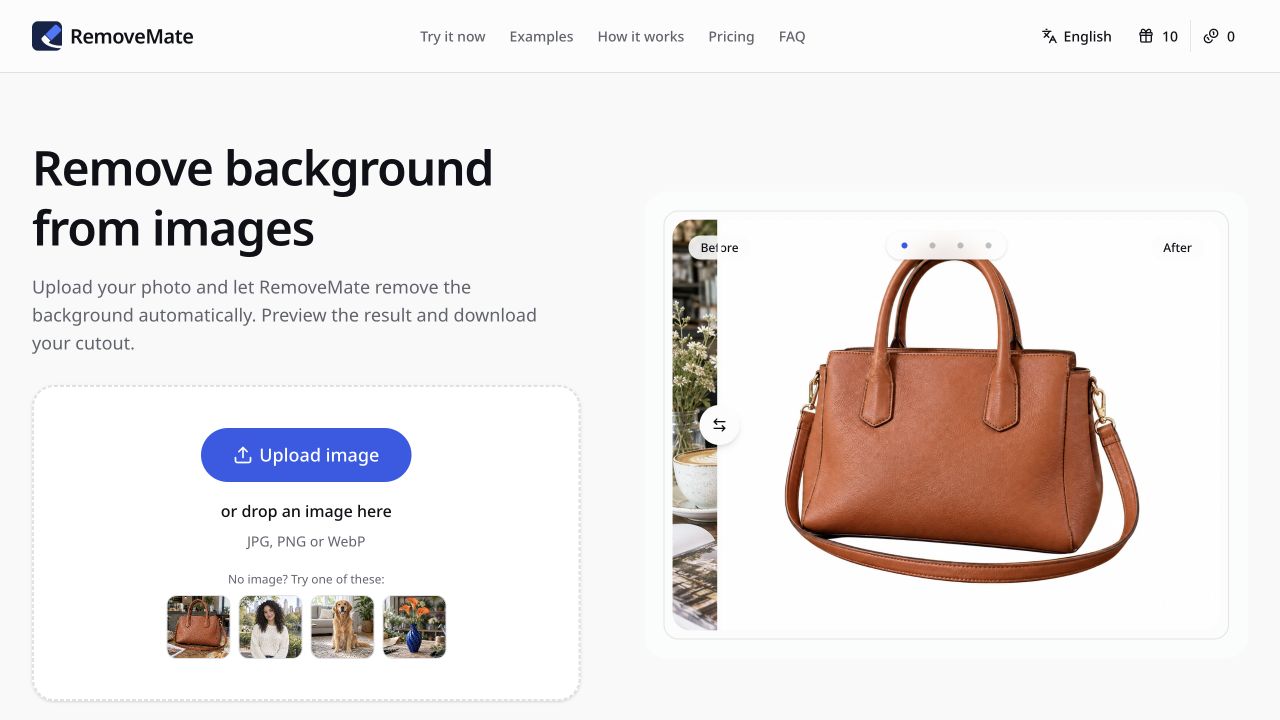
Upload a photo, remove its background automatically, and download the cutout.

Overview
RemoveMate is an AI background remover that lets you upload a photo and automatically separates the subject from its background. It works on product photos, portraits, pets, and everyday objects, and you can preview the cutout before downloading. The tool is for anyone preparing images for shop listings, catalogs, profile pictures, or collages, and it requires no prompt or app installation. This is an independent third-party service and is not operated by the company behind the model it is built around.
How it works
To remove a background, upload a clear photo of the subject. Processing starts automatically, and there is no prompt to write. After processing, preview the result and check fine details such as hair, fur, straps, and edges before downloading. The tool works in the browser on desktop or mobile and supports JPG, PNG, and WebP formats.
Who it is for
RemoveMate is designed for product photos for shop listings and catalogs, portraits for profile pictures or team pages, pets for cards or collages, and objects like vases or handmade pieces for portfolios. It helps you isolate the subject so it stands out against a clean background, and you can compare small details with the original before publishing.
Pricing and limits
RemoveMate offers a free plan with 10 free credits every 24 hours, no sign-up required. For more processing, you can buy one-time credit packs: the Starter pack costs $9 for 100 credits, and the Project pack costs $19 for 250 credits. Purchased credits never expire, and there is no subscription. Payments are handled by Waffo, with 7-day refunds for unused packs.
What sets it apart
RemoveMate uses AI, including OpenAI's GPT Image 2, to process images. The model can vary by tool. The homepage tool only removes the existing background and does not accept instructions for generating a new scene. Results are processed images, and AI can alter details, so you should inspect the image before publishing or relying on it.
Key features
Automatic background removal
Upload a photo and the background is removed automatically without needing to write a prompt.
Preview and inspect results
Preview the cutout and inspect fine details like hair, fur, straps, and edges before downloading.
Multiple image formats
Supports JPG, PNG, and WebP image formats.
Browser-based tool
Works in the browser on desktop and mobile without needing to install an app.
Free credits and one-time packs
Offers a free plan with 10 credits every 24 hours and one-time credit packs that never expire.
Use cases
Product photos for e-commerce
Prepare product cutouts for shop listings or catalogs by removing the surrounding scene.
Portrait cleanup
Remove busy backgrounds from portraits for profile pictures or team pages.
Pet photo cutouts
Separate pets from their surroundings for cards or collages.
Object isolation
Isolate handmade pieces or objects for portfolios or sales listings.
Pricing & limits
From the official site · checked 10/10/2026Frequently asked questions about RemoveMate
- What is RemoveMate?
- RemoveMate is an AI background remover that lets you upload a photo, automatically removes the background, and lets you preview and download the cutout.
- Who is RemoveMate for?
- It is for anyone who needs to remove backgrounds from product photos, portraits, pets, or objects for shop listings, catalogs, profile pictures, or collages.
- Is RemoveMate free?
- Yes, RemoveMate offers a free plan with 10 free credits every 24 hours, no sign-up required, and no credit card required.
- What platforms and formats does RemoveMate support?
- RemoveMate works in the browser on desktop or mobile. You can upload JPG, PNG, or WebP images.
Related tools
AI Character Generator
Generate unique characters with profiles and multi-view consistency in seconds.
KI Bilder erstellen – Verwandeln Sie Ihre Ideen in beeindruckende Bilder
Create AI images in seconds with a German interface, no registration needed, and styles like Ghibli and 3D Chibi.

AIChangeHair
Try on 180 hairstyles and colors from one selfie, with free daily credits.
Fast Image AI
Turn photos or text into cartoon images in seconds, free and without login.

MedShotsAI
Turn one selfie into professional photos for LinkedIn, dating, real estate, law, and healthcare.

Pixolm
Generate AI images from text or references, then edit with prompts and masks.

GPTImage2
Generate product visuals, marketing creatives, and polished image edits with text-to-image and image-to-image workflows.

Nano Banana Pro
Transform photos into posters, infographics, and storyboards with simple text prompts.