AIChangeHair
aichangehair.comFace-preserving hairstyle preview
Try on 180 hairstyles and colors from one selfie, with free daily credits.
Overview
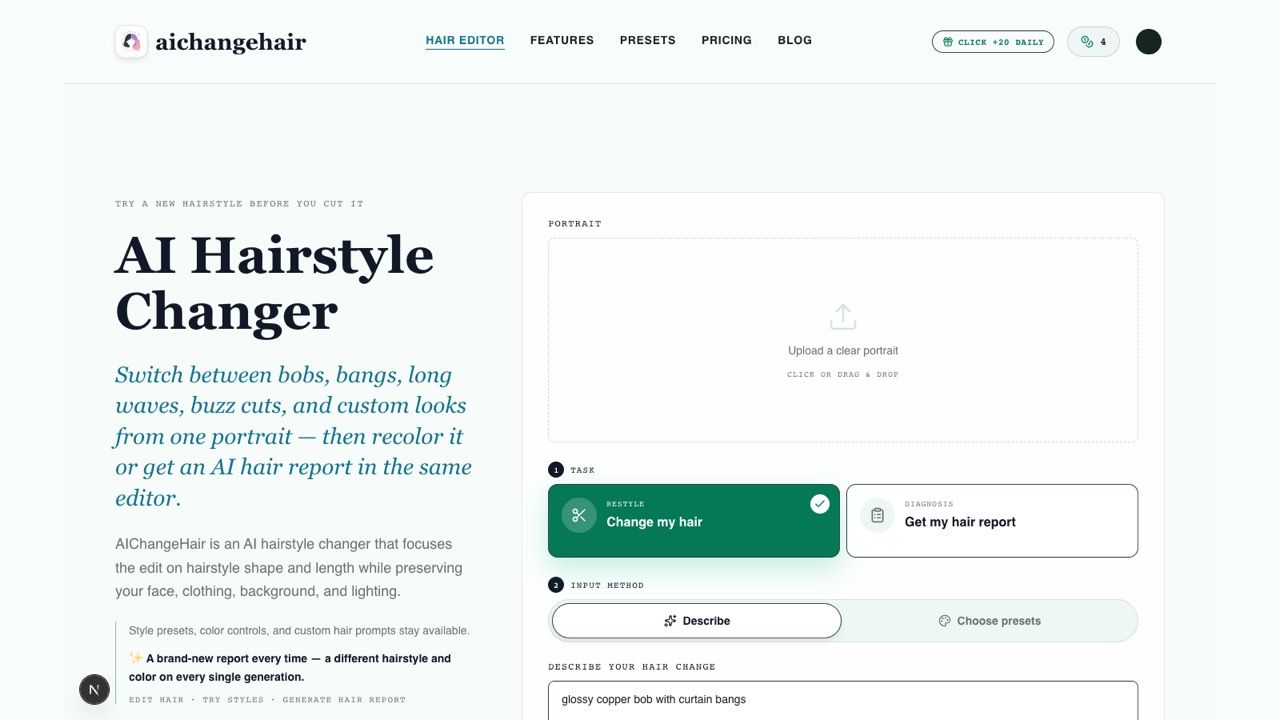
AIChangeHair is a free AI hairstyle changer that lets you preview new haircuts and hair colors from a single portrait. Upload a clear photo, then choose from 180 hairstyle presets, describe a custom look, or generate a face-shape-aware AI hair report. It is built for stylists, salons, creators, photographers, and everyday users who want realistic hair previews before committing to a real change.
How it works
Upload a clear portrait with visible hair, then choose a hairstyle preset, a hair color, or describe a custom look. The editor builds a focused prompt that changes only the hair while preserving your face, pose, clothing, background, and lighting. Most edits finish in about 1 to 2 minutes, and failed generations are refunded automatically.
Key capabilities
The tool offers 180 hairstyle presets across female, male, and children groups, including bobs, pixie cuts, bangs, waves, buzz cuts, and fades. You can keep the current color, pick a preset shade like blonde, copper, or rose pink, or pass a custom HEX color. A custom prompt editor lets you describe layers, bangs, volume, texture, length, or a full custom haircut.
Who it is for
AIChangeHair is designed for stylists who show clients color and cut directions, salons and colorists creating visual references, creators testing profile looks, photographers producing beauty concepts, and everyday users comparing different styles. The AI hair report mode studies your face shape and recommends a flattering hairstyle and color, shown front, side, and back, with why it suits you.
Pricing and limits
The Starter plan is free forever with 10 credits at signup plus 10 every day you claim, enough for one standard 1K edit per day. Monthly costs $14.99 per month for 800 credits, and Yearly is $6.99 per month billed $83.88 for the first year, renewing at $179.88 per year. One-time credit packs are also available: $9.90 for 300 credits, $19.90 for 650, and $39.90 for 1,400, with credits that never expire.
Key features
180 hairstyle presets
Choose from 180 hairstyle presets across female, male, and children groups, including bobs, pixie cuts, bangs, waves, buzz cuts, and fades.
Color controls
Keep the current color, pick a preset shade like blonde, copper, or rose pink, or pass a custom HEX color.
Custom hair prompts
Write a free-form prompt for layers, bangs, volume, texture, length, or a full custom haircut.
AI hair report
Generate a face-shape-aware visual consultation with flattering styles, avoid notes, length, fringe, and color direction, shown front, side, and back.
Face-preserving edits
Edits preserve identity, face shape, skin, clothing, background, and lighting while changing only the hair.
Privacy and data safety
Uploads are encrypted in transit and at rest, used only to generate your result, never used to train public models, and deletable anytime.
Use cases
Salon consultations
Show clients color and cut directions before a consultation.
Profile previews
Test a new profile photo look before posting or booking a shoot.
Photography concepts
Produce hairstyle references and beauty concepts without reshooting the subject.
Personal style exploration
Compare blonde, copper, black, pastel, short, long, wavy, and custom looks from one upload.
Pricing & limits
From the official site · checked 10/10/2026Frequently asked questions about AIChangeHair
- How does the AI hairstyle changer work?
- Upload a clear portrait, choose a hairstyle preset, a hair color, or describe a custom look. The AI edits only the hair while preserving your face, clothing, background, and lighting.
- Is the AI hairstyle changer free to use?
- Yes, it is free to start. You get 10 credits at signup with no credit card, plus 10 more every day you check in. A standard hair edit costs 10 credits.
- Can I use it on my phone?
- Yes, it runs entirely in your mobile browser on iOS Safari and Android Chrome, with no app to install. It adapts for one-handed use.
- Can I try both hairstyles and hair colors?
- Yes, you can keep the current style or color, combine a hairstyle with a new color, write a custom hair prompt, or generate an AI hair report.
- What kind of photos work best?
- Clear, well-lit portraits with visible hair work best. Front-facing or three-quarter angles give the most natural result. Avoid hats, heavy shadows, and cropped hair.
Related tools

KI Bilder erstellen – Verwandeln Sie Ihre Ideen in beeindruckende Bilder
Create AI images in seconds with a German interface, no registration needed, and styles like Ghibli and 3D Chibi.
Pixolm
Generate AI images from text or references, then edit with prompts and masks.

RemoveMate
Upload a photo, remove its background automatically, and download the cutout.
AI Character Generator
Generate unique characters with profiles and multi-view consistency in seconds.

Nano Banana Pro
Transform photos into posters, infographics, and storyboards with simple text prompts.

MedShotsAI
Turn one selfie into professional photos for LinkedIn, dating, real estate, law, and healthcare.
Fast Image AI
Turn photos or text into cartoon images in seconds, free and without login.
GPTImage2
Generate product visuals, marketing creatives, and polished image edits with text-to-image and image-to-image workflows.