
Quiz Genius - AI Flashcards and more
quizgenius.appStudy set generator with spaced repetition
Turn notes, PDFs, and photos into flashcards, quizzes, and exams with AI, and study with spaced repetition on any device.
Overview
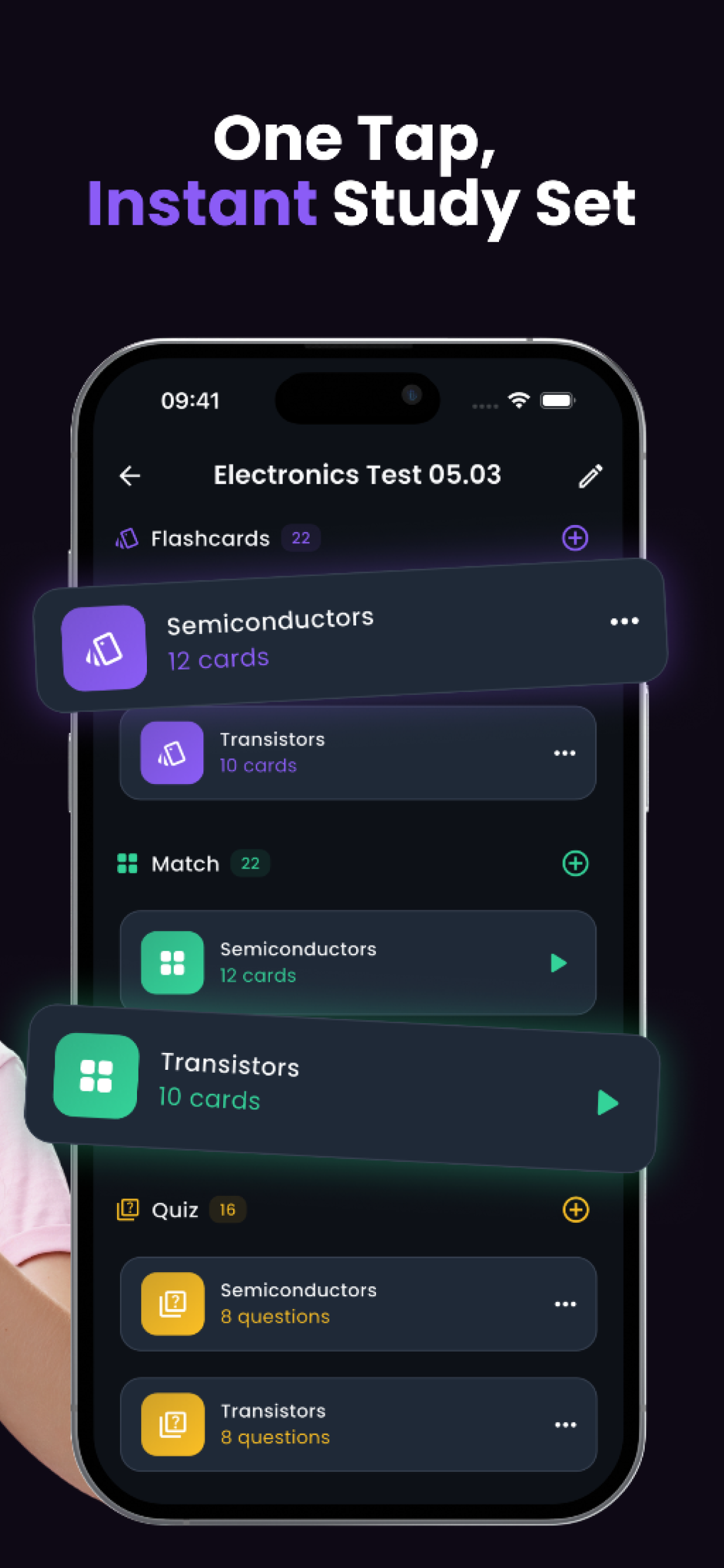
Quiz Genius is an AI-powered study tool that turns notes, PDFs, photos, and pasted text into flashcards, practice quizzes, exams, and smart notes. It uses spaced repetition to schedule reviews and offers six study modes, including an AI tutor. Designed for students from high school to medical school, it works on iPhone, Android, and the web with synced progress.
How it works
Upload a PDF, take a photo of notes or slides, paste text, or type a topic. The AI builds a complete study set in seconds, including flashcards, quiz questions, an exam, and smart notes. You can edit anything before studying, and your progress follows you across devices.
Study modes
Every study set includes six ways to learn: flashcards with spaced repetition, practice quizzes with instant feedback, a match game for quick recall, timed exams with score breakdowns, smart notes that summarize key concepts, and an AI tutor that explains step by step. Switch between modes anytime without losing progress.
Who it is for
Quiz Genius is built for high school, university, medical, law, and language learners, as well as those preparing for certifications like SAT and IT exams. It adapts to your subject and pace, with public study sets on thousands of topics available to preview for free.
Platforms and pricing
The app supports 11 languages and renders math and science formulas correctly, making it suitable for STEM subjects. It is free to download and use on iOS, Android, and the web, with a premium subscription for additional features. One account keeps your study sets in sync everywhere.
Key features
AI study set generation
AI generates flashcards, quizzes, exams, and smart notes from uploaded PDFs, photos, or pasted text.
Spaced repetition
Spaced repetition schedules reviews at increasing intervals, bringing back weak cards sooner and pushing strong ones further out.
Six study modes
Six study modes: flashcards, practice quizzes, match game, timed exams, smart notes, and an AI tutor.
Cross-platform sync
Available on iPhone, iPad, Android, and web with one account syncing study sets and progress across devices.
Multilingual and STEM ready
Supports 11 languages and renders math and science formulas, equations, and symbols properly.
Use cases
Exam preparation
Upload lecture slides or textbook chapters to generate flashcards, quizzes, and smart notes for exam preparation.
Language learning
Use the match game and flashcards to build vocabulary and grammar in any of the 11 supported languages.
Medical school study
Memorize anatomy, pharmacology, and procedures with spaced repetition that scales for medical students.
Certification prep
Prepare for SAT, IT certifications, and professional exams with timed practice tests and detailed score breakdowns.
Pricing & limits
From the official site · checked 10/10/2026Frequently asked questions about Quiz Genius - AI Flashcards and more
- How do I create flashcards from my notes?
- Upload a photo of your notes, a PDF, or paste text. The AI analyzes your content and generates a complete set of flashcards in seconds. You can then edit, delete, or add cards before you start studying.
- Can AI generate quizzes from my textbook or lecture slides?
- Yes. Upload a photo, PDF, or text from any source and Quiz Genius generates multiple-choice, true/false, and written-answer questions automatically. You can run them as a practice quiz or a timed exam.
- Is Quiz Genius free?
- Quiz Genius is free to download and use on iOS, Android and the web. A premium subscription is available for additional features.
- What platforms does Quiz Genius support?
- Quiz Genius is available on iOS (iPhone and iPad) from the App Store, on Android from Google Play, and in any browser at quizgenius.app. One account keeps your study sets in sync everywhere.
- How does exam mode work in Quiz Genius?
- Exam mode lets you take a timed test from any study set. You answer questions under time pressure, then get a detailed score breakdown and a list of every question you missed so you know exactly what to review.
Related tools

FluentDictation
Practice English dictation with YouTube videos, bilingual subtitles, and instant feedback.

Cuflow AI
Turn PDFs, slides, and videos into summaries, flashcards, mind maps, and quizzes.

Bonjournal
Write journal entries in your target language and get AI corrections, coaching, and progress scores.

Permito
Practice US visa interviews with an AI officer and get verdicts plus specific feedback.

AI Math Photo Solver & Calculator Extension
Screenshot any math problem and get step-by-step solutions that make sense, free in any browser.

Cramberry
Upload notes, PDFs, or videos and get flashcards, quizzes, and summaries in seconds.
Learn English Fast
Practice CEFR-aligned conversations, study daily vocabulary, and get AI writing feedback to improve your English.

PatterAI
Practice speaking daily with personalized feedback to improve clarity, confidence, and conversation skills.