
Ptero
ptero.proFree multi-model AI chat with local privacy
Chat with multiple AI models for free, with your conversations staying private in your browser.

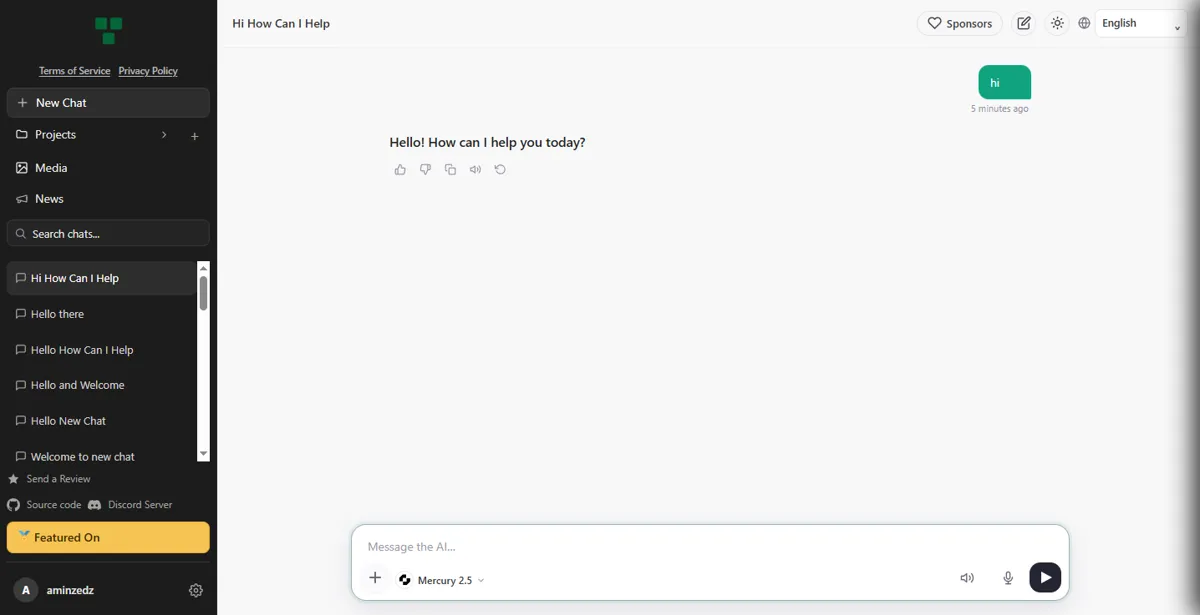
Overview
Ptero.pro is a free, non-profit AI chat platform designed for developers. It routes your messages to a variety of third-party models, including Ling 3.0 Flash, Deepseek v4.1 Flash, and Claude Haiku 5.5, all at no cost. Regular chats are stored locally in your browser, while optional Projects sync to the cloud via GitHub sign-in. It also offers an OpenAI-compatible API for integrating AI chat into your own applications.
How it works
Ptero.pro is a free, non-profit chat platform that routes your messages to independent third-party AI providers. You can use it as a guest with a randomly generated token stored in your browser, or sign in with GitHub for additional features. The service is fully open source, with source code available on GitHub, and it is designed for developers, offering an OpenAI-compatible API for integration into your own applications.
Privacy and storage
Regular chats are stored entirely in your browser's local storage, ensuring local-first privacy. However, chats inside Projects are synced to Ptero's servers and are available wherever you sign in with GitHub. You can import public GitHub repositories into Projects, and inactive project files are deleted after 90 days. The service also supports exporting and importing backups to move conversations between devices.
Developer API
Ptero.pro offers an OpenAI-compatible REST API with endpoints for chat completions, responses, and model listing. You can create API keys after GitHub verification, and use them as Bearer tokens. The API supports streaming via Server-Sent Events, and includes AI work modes like 'fast', 'quick', 'complex', 'full', and 'smart' to control response depth. Rate limits are based on hourly token quotas, which vary by model.
Pricing and limits
Ptero.pro is completely free to use and will always be free, with no premium plans or paywalls. You can earn bonus tokens by starring the GitHub repository, which grants +500,000 tokens/hour, or by inviting friends. Hourly token limits vary by model, ranging from 40,000 to 100,000 tokens, and usage resets every hour. The service also includes anonymous usage counters and per-model feedback votes for the admin dashboard.
Key features
No signup required
Chat with multiple AI models without needing to sign up.
Local-first privacy
Conversations are stored locally in the browser, not on servers.
Personal API keys
Create and manage private API keys for use in your own apps.
MCP server integration
Connect MCP servers to add tools to your chat.
Project organization
Organize related chats into named projects with cloud file storage.
Use cases
Private AI chat
Use Ptero to chat with AI models without creating an account, keeping your conversations private in your browser.
Developer integration
Create personal API keys to integrate Ptero's chat into your own applications.
MCP tool integration
Connect MCP servers to add tools to your chat, enabling more complex workflows.
Pricing & limits
From the official site · checked 10/10/2026Frequently asked questions about Ptero
- What is Ptero?
- Ptero is a free AI chat service that lets you chat with multiple AI models without requiring a signup.
- Is Ptero free?
- Yes, Ptero is free to use. The source states 'Free AI Chat with Multiple Models. No Signup.'
- Who is Ptero for?
- Ptero is for anyone who wants to chat with AI models without creating an account, including developers who can use API keys for their own apps.
- How does Ptero handle privacy?
- Ptero offers local-first privacy, meaning your chats stay in your browser and are not stored on their servers. Cloud storage is only used for project files.
- What integrations does Ptero support?
- Ptero supports connecting MCP servers to use tools in chat, and allows creating personal API keys for use in your own applications.
Related tools

aiME Private AI
Run AI models on your phone or computer, fully offline, with no account and no subscription.

AvenChat
Test Gemma 4 prompts free in your browser, then follow guides for local setup with Ollama or LM Studio.

GLM 5
Chat, code, generate images and videos with a 200K context frontier model.

GLM 5
Generate images, videos, and chat responses with the GLM 5.2 model in your browser.

Claude
Chat with an AI assistant that reads long documents, writes and edits text, and helps with code and research.

ChatGPT
Ask questions, draft text, analyze files and images, and write code in one chat on web, desktop, and mobile.