
Macuse
macuse.appMCP server for AI control of macOS apps
Let AI manage your calendar, email, notes, and any Mac app through MCP.
Overview
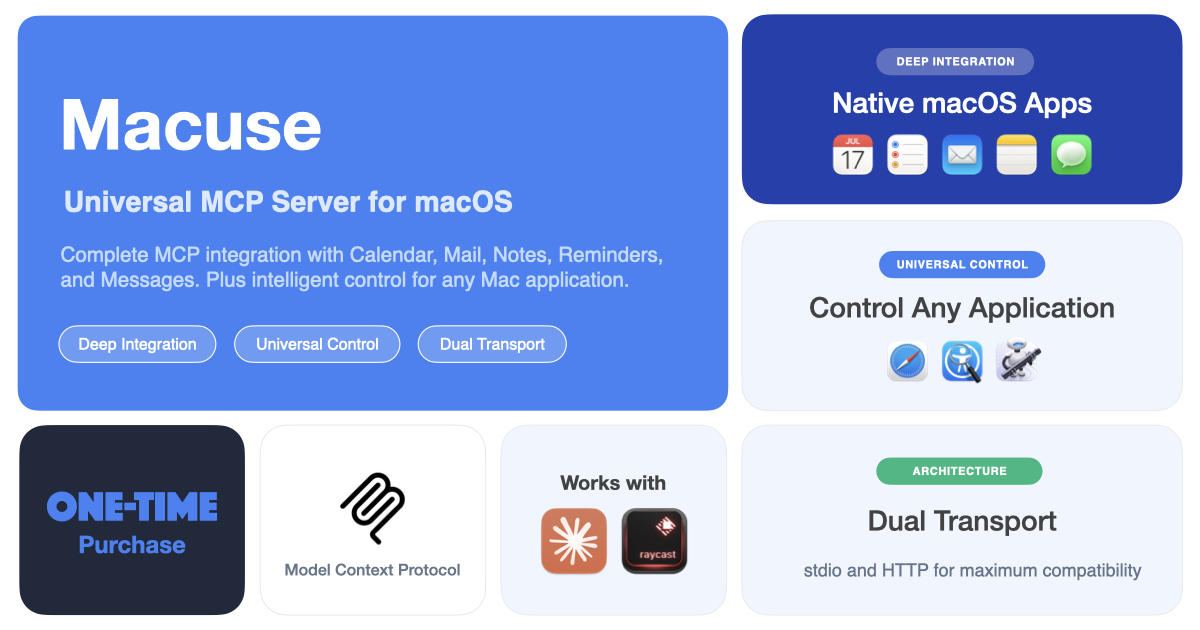
Macuse is a macOS MCP server that turns any AI assistant into a power user of your Mac. It connects Claude, Cursor, Raycast, and other MCP clients to native apps like Calendar, Mail, Notes, and Reminders, plus Computer Use for any application. Designed for Mac users who want AI to automate tasks through natural conversation, with local control and explicit permissions.
How it works
Macuse runs as a local MCP server on your Mac, exposing tools that AI clients can call. It auto-detects installed AI tools and configures them with one click, no terminal commands or config files. Native integrations use macOS frameworks and the standard system permission model, while Computer Use covers apps without dedicated integrations. Every connection stays under your control, with OAuth 2.1 for secure HTTP connections.
Key capabilities
Native integrations cover Calendar, Mail, Notes, Reminders, Messages, Stickies, Contacts, Maps, and Location. Computer Use lets AI click, type, scroll, drag, press shortcuts, manage windows, and read UI in any app, running in the background without stealing focus. Recent updates add recurring calendar events, email thread view, note attachments, Apple Shortcuts support, and interactive UI cards for results.
Who it is for
Macuse is for Mac users who want to delegate tasks to AI assistants, from scheduling meetings and replying to emails to capturing notes and setting reminders. It works with Claude Desktop, Cursor, Raycast, VS Code, Codex, JetBrains, Warp, and any MCP-compatible client. The free plan suits trying out the tool, while the Lifetime plan targets power users and professionals who need unlimited usage.
Pricing and limits
The Free plan includes all features with 100 tool calls per day and 1 connected client, resetting daily at midnight UTC. The Lifetime plan costs $49 one-time, covering 3 devices, unlimited tool calls, unlimited connected clients, and all future updates. A 7-day money-back guarantee applies to Lifetime purchases, and a 50% student discount is available.
Key features
Native macOS app integrations
Native integrations for Calendar, Mail, Notes, Reminders, Messages, Stickies, Contacts, Maps, and Location.
Computer Use for any app
Computer Use for any Mac app, running in the background without stealing focus.
One-click setup for AI clients
One-click setup for Claude Desktop, Cursor, Raycast, and any MCP client, with auto-detection and no config files.
Private by design
Tools run locally with OAuth 2.1, per-app permissions, and the ability to revoke client access anytime.
Latest MCP protocol support
Supports MCP 2026-07-28 and earlier versions, with interactive UI cards and approval prompts in chat.
Use cases
Schedule meetings
AI can add events, check availability, and manage recurring calendar events.
Manage email
AI can search, compose, reply, and organize emails, including attachments and threads.
Capture notes
AI can create, search, and update notes, including reading attachments and preserving formatting.
Set reminders
AI can set reminders with repeat rules and location-based alarms, and manage lists.
Control any app
AI can click, type, scroll, and navigate any Mac app in the background.
Pricing & limits
From the official site · checked 10/10/2026Frequently asked questions about Macuse
- What is Macuse?
- Macuse is a macOS app that connects AI assistants like Claude, Cursor, and Raycast to native apps such as Calendar, Mail, Notes, and Reminders via the MCP protocol, plus Computer Use for any app.
- Who is Macuse for?
- It is for anyone using AI tools on a Mac who wants to automate tasks like managing calendar events, replying to emails, taking notes, setting reminders, and controlling apps through natural conversation.
- Is Macuse free?
- Yes, Macuse offers a free plan with 100 tool calls per day and 1 connected client, with limits resetting daily at midnight UTC. A paid Lifetime plan removes these limits.
- Which AI tools and platforms are supported?
- Macuse works with Claude Desktop, Cursor, Raycast, VS Code, Codex, JetBrains, Warp, and any MCP-compatible client. It requires macOS 13.0 or later.
Related tools

HiringFast
Hire AI agents like digital employees with monthly contracts and signing bonuses.

ClawdBot AI
Automate tasks across 50+ apps with a private, self-hosted AI assistant.

CrePal
Build and govern MCP servers and AI agents with 1,000+ data connectors and cost visibility.

BotBridge — Encrypted Peer-to-Peer Networking for OpenClaw.
Connect your AI agents with secure, encrypted relay communication.

Broodnet
Give every AI agent a real inbox to receive verification codes, notifications, and inter-agent messages.

Hermes Agent Helper
Deploy a private Hermes Agent on a dedicated server, connected to Feishu, Telegram, WeChat, and more.
Ruflo AI
Coordinate Codex and Claude Code agents with reusable memory and review loops.

Connect Machine
Manage your digital cards and contacts with natural language queries.