
BulkBgRemove
bulkbgremove.comBatch background remover for product photos
Upload JPG, PNG, or WebP batches and download transparent PNGs, individually or as a ZIP.
Overview
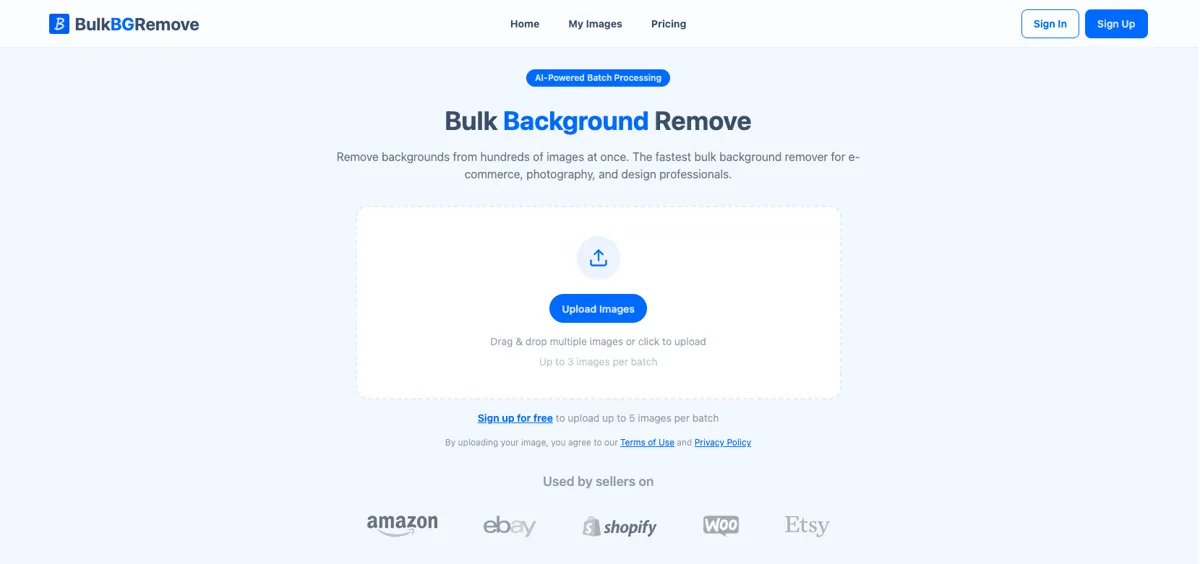
Bulk Background Remove is a browser-based AI tool that removes backgrounds from many images at once. You upload JPG, JPEG, PNG or WebP files in batches and download HD transparent PNGs individually or as a ZIP. It is aimed at e-commerce sellers, photographers, designers and marketing teams handling large image volumes.
How it works
You drag and drop multiple images or click to upload, and the AI detects and removes the background from each file. Results come back as transparent PNGs at HD resolution, which you can download one by one or all together as a ZIP archive. The free plan processes images one by one, while paid plans use parallel bulk processing for faster turnaround. No software install or Photoshop is needed; everything runs in the browser.
Plans and limits
The Free plan costs $0 per month with no credit card and includes 300 images per month with up to 5 images per batch. Starter is $9 per month for 1,000 images and up to 20 per batch, and Pro is $19 per month for 3,000 images and up to 50 per batch plus priority processing and support. On-demand credits cost $20 for 1,600 images, never expire, and work alongside a subscription. Yearly billing is offered with two months free, and subscriptions can be canceled anytime with access until the end of the billing period.
Who it is for
The tool is positioned for e-commerce, photography and design professionals, and the site shows sellers on Amazon, eBay, Shopify, WooCommerce and Etsy. Typical uses include product listings, headshots and portraits after a shoot, client cutouts for design work, and weekly batches of hundreds of product images. Testimonials come from store owners, graphic designers, marketing managers, photographers and web developers.
Privacy and payments
Images are processed securely in the cloud and are never shared or used for AI training, according to the site. Payments are handled through Stripe and accept major credit cards including Visa, Mastercard and American Express. A refund policy is referenced on the pricing page, and support is listed as a feature across all plans.
Key features
Batch uploads up to 50 images
Upload multiple images at once and let the AI detect and remove each background; batch size depends on plan.
Transparent PNG and ZIP output
Every processed image is returned as a transparent PNG, downloadable one by one or all together as a ZIP archive.
Parallel processing on paid plans
Paid plans run parallel bulk processing for faster results, while the free plan processes images one by one.
JPG, JPEG, PNG and WebP input
Accepts JPG, JPEG, PNG and WebP uploads and outputs HD-resolution transparent PNG files.
On-demand credits that never expire
Extra credits can be bought alongside a subscription to process images beyond the monthly allowance.
Use cases
E-commerce product listings
Sellers on Amazon, eBay, Shopify, WooCommerce and Etsy use it to give product photos clean white or transparent backgrounds.
Photography batch cutouts
Photographers upload a whole batch of headshots and portraits after a shoot and get transparent PNGs ready for compositing.
Design client work
Graphic designers produce quick cutouts for client projects and download all results as a ZIP.
High-volume marketing assets
Marketing teams processing hundreds of product images per week handle them in bulk instead of outsourcing.
Pricing & limits
From the official site · checked 11/25/2026Frequently asked questions about BulkBgRemove
- What is Bulk Background Remove?
- It is an AI-powered tool that removes backgrounds from multiple images at once and returns transparent PNG files, with no Photoshop required.
- How many images can I process at once?
- Free users can upload up to 5 images per batch, Starter supports 20 per batch, and Pro supports 50 per batch.
- Which image formats are supported?
- You can upload JPG, JPEG, PNG and WebP files; all processed results are downloaded as transparent PNG files.
- Is there a free plan?
- Yes. The Free plan costs $0 per month, requires no credit card, and includes 300 images per month with up to 5 images per batch.
- What happens if I run out of monthly images?
- You can buy on-demand credits that never expire, such as 1,600 images for $20, and use them alongside your monthly allowance.
Related tools

InkStudio.ai
Turn a tattoo idea into a body preview and clean artwork, then try it on your own photo before you ink.

Seedream Pro
Generate 2K or 4K images with Seedream 4.5, 5.0 Lite and 5.0 Pro, and turn stills into Seedance clips.

MyColoring.AI
Turn a text idea, photo or name into a printable coloring page or a whole coloring book.

moodkept
Drop your mood, get a warm AI response. No sign-up needed

Z Image Turbo
Turn natural-language prompts into 768-1024px images with style presets and negative prompts.

DatingProfile
Realistic dating profile photos from one selfie

Nano Banana 2
Generate 2K images with readable text in 100+ languages and upscale them to 4K.

Open AI Image
Independent AI image generation and editing studio