
PrivateClawd
privateclawd.comManaged OpenClaw hosting with a spending cap
Run OpenClaw, Hermes Agent, Claude Code or Codex on a private cloud computer you reach by web or Telegram.
Overview
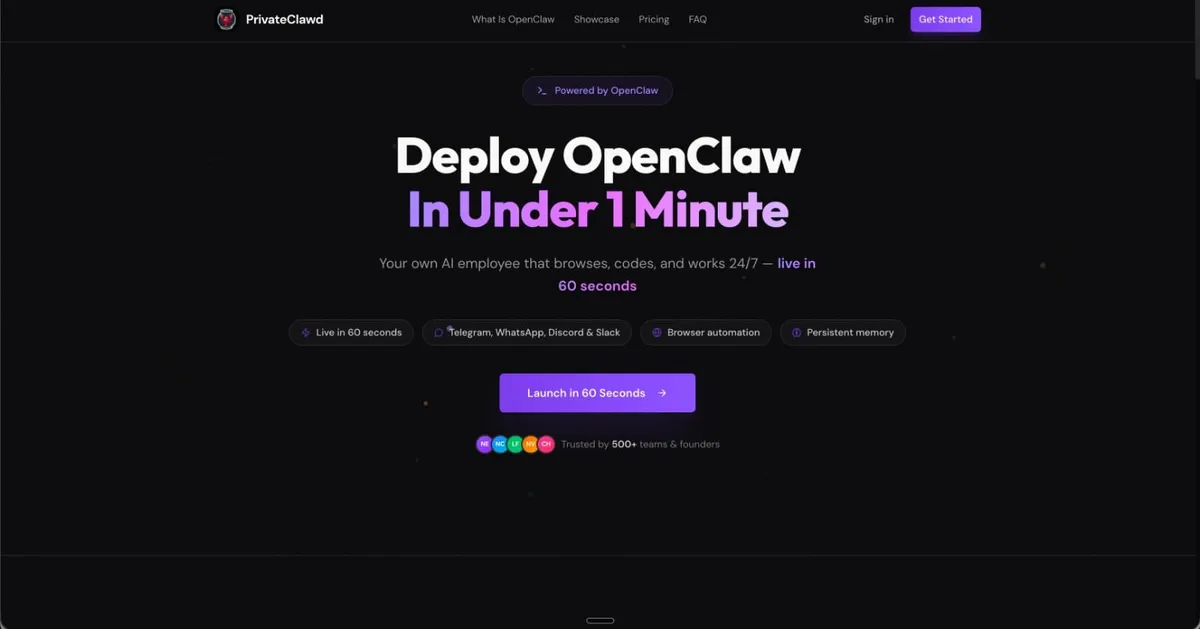
PrivateClawd is a managed hosting service that runs a personal AI assistant on its own private computer in the cloud. You write to it on the web or in Telegram, and it remembers notes, sends reminders and drafts replies in your voice. It is aimed at people who want an always-on OpenClaw agent without setting up a server, Docker or SSH.
How it works
You pick a plan, name your assistant and pay, and it starts on its own private computer in under 5 minutes. From then on you write to it on its page or press Open in Telegram and then Start, by text or voice note. It runs around the clock and is restarted automatically if it stops, so reminders and schedules keep firing. Each assistant runs in an isolated container with its own disk, network identity and keys.
Key capabilities
The assistant keeps notes on its own disk about clients, timetables or the tone you like, and drafts channel posts, client replies and polite refusals for you to send yourself. It accepts PDFs and photos and turns long voice notes or documents into short lists. It runs OpenClaw, Hermes Agent, Claude Code or Codex, and an MCP server at /api/mcp exposes tools such as agent_create, agent_start, agent_pause and agent_usage.
Pricing and limits
The 10 GB computer costs $30 a month and includes $5 of AI credit, the 25 GB plan is $50 with $15, and the 50 GB plan is $70 with $30. Annual plans cost $300, $500 and $700, and extra disk is 10 GB for $5 a month. Plan credit is spent at 2 times the provider's price and balance at 5 times, with plan credit used first. You can set daily or monthly limits per assistant, and hourly checks pause one that suddenly spends much faster.
Key features
Private container per assistant
Each assistant runs in its own isolated container with its own disk, network identity and keys, with no shared memory between customers.
Spending limits and auto-pause
Set daily or monthly caps per assistant; hourly spend checks pause an assistant that hits its threshold or suddenly spends much faster than usual.
Web and Telegram access
Write to your assistant on its page or through the shared Telegram Hub bot, by text or voice note, with a ClawdBot iPhone app announced.
Bring your own model key
Use the plan's OpenRouter key or your own key from OpenAI, Anthropic, Google Gemini, DeepSeek, Groq, Mistral, xAI, Moonshot and others, switching models at any time.
MCP server for agent control
A Streamable HTTP MCP endpoint at /api/mcp exposes search and execute tools such as agent_create, agent_start, agent_pause and agent_usage.
Daily backups and auto-restart
Each assistant's disk is backed up daily with copies kept 7 days, and the assistant is restarted automatically if it stops.
Use cases
Reminders and schedules
Set a reminder or schedule in plain words and the assistant writes to you in Telegram when a bill is due or a post needs finishing.
Drafting in your voice
Get drafts for channel posts, client replies and polite refusals that you review and send yourself.
Document and voice note summaries
Send a PDF, photo or long voice note and ask for a short list of what is in it.
Multiple assistants per dashboard
Keep one assistant per job, such as client replies, a channel or the family, each with its own memory, model and computer.
Pricing & limits
From the official site · checked 11/20/2026Getting started
Create an account with Google or an email and password, then choose a plan and pay by card or from your balance. Give the assistant a name and press Pay; it starts on its own private computer. Write to it on its page right away, or open Telegram Hub in the dashboard and press Start in Telegram. A ClawdBot app for iPhone is announced for the App Store and uses the same account.
Frequently asked questions about PrivateClawd
- What is PrivateClawd?
- It is a private cloud for a personal AI assistant. Each assistant runs on its own isolated computer with its own disk, and you write to it on the web or in Telegram. It runs on open-source OpenClaw and is ready in under 5 minutes after you pay.
- How much does PrivateClawd cost?
- Hosting is $30 a month for a 10 GB computer with $5 of AI credit, $50 for 25 GB with $15, or $70 for 50 GB with $30. Annual plans cost $300, $500 and $700. Extra disk is 10 GB for $5 a month.
- Which AI models can the assistant use?
- On the plan with AI included it uses the plan's own key on OpenRouter. You can also supply your own key from OpenAI, Anthropic, Google Gemini, DeepSeek, Groq, Mistral, xAI, Moonshot and other providers, and switch models at any time.
- Can I control how much my assistant spends?
- Yes. The included AI key has a hard limit, and you can set daily or monthly limits per assistant that pause it when reached. Every hour PrivateClawd compares spending pace and pauses an assistant that suddenly runs much faster.
- Does it work in WhatsApp?
- Telegram works today through the Telegram Hub with nothing to install. WhatsApp, Discord and Slack can be connected in the assistant's settings, which is technical setup: a QR code for WhatsApp and an access token for the others.
Related tools

whacka
Turn one sentence into a working app with logins, data, and AI, live in minutes.

OpenClaw
Run OpenClaw in the cloud with a private instance, model credits included, and chat from Telegram, Feishu, or the web.

Glad AI
Mention @Glad in any Slack thread to search, update, and send across 1,500+ connected tools.

ReadyHermes
Your own hosted Hermes Agent, ready in seconds

privatclaw
Get a private AI assistant in Telegram, Slack, Discord, or WhatsApp that browses the web, manages LinkedIn, and drafts emails.

ClawHost
Deploy OpenClaw on your own VPS with one click and full root access.

VantaSoft Agent Service
Build custom AI agents that work in your Slack, tailored to your processes and tools.
Action Sync
Unify your tools and automate tasks with an AI that understands your business context.