
BibGenie
bibgenie.comZotero plugin for citation-traced paper chat
Chat with PDFs and EPUBs inside Zotero, trace every answer to a page, and approve library changes before they run.
Overview
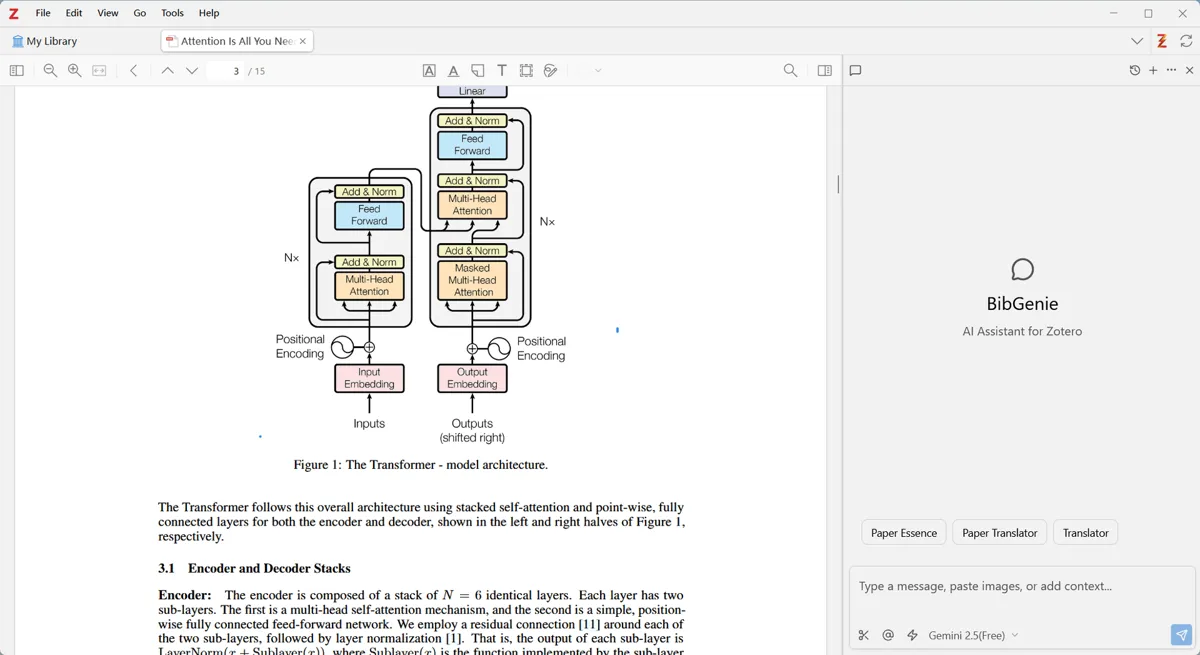
BibGenie is an AI research agent that runs as a plugin inside Zotero 7 through 10 on macOS, Windows, and Linux. It takes papers, PDFs, EPUBs, notes, annotations, and collections as context and returns answers with citations that link back to the source passage. It is built for researchers and students who want to read, search, and organize literature without leaving Zotero.
How it works
BibGenie docks in Zotero's right sidebar and follows the active PDF and current page, so no manual file upload is needed. You add context by typing @ or using Add Context to pull in items, notes, tags, collections, annotations, PDF pages, EPUB sections, and selected passages, and you can combine several sources in one prompt. Answers carry citation markers that jump back to the supporting PDF, EPUB, snapshot, note, or item. Answers can also be saved back to Zotero notes.
Key capabilities
Library search works by keyword or by meaning, using a local semantic index built from titles and abstracts. OpenAlex discovery finds scholarly works beyond your library, including articles, books, datasets, and preprints, and Web Search and Web Extract pull in outside information when enabled. For organization, BibGenie proposes collection structures, tag cleanups, and metadata updates, cross-checking against arXiv, Semantic Scholar, OpenAlex, DBLP, and OpenReview in read-only mode.
Models and data flow
Chat history, the library index, and vector embeddings are stored locally on your machine. You can use the managed service with no API key, connect your own key for OpenAI, Anthropic, DeepSeek, Gemini, OpenRouter, or Groq, or run local models through Ollama or LM Studio. With your own key, requests go directly from your machine to the provider with no BibGenie proxy in between. A Notion workspace can be connected through Notion MCP in Settings, then Connectors.
Pricing and limits
The Free plan includes 200 credits per month, and each successful OpenAlex, Web Search, or Web Extract call costs 1 credit. Pro is $9.99 per month or $99 per year with 10,000 credits and no extra charge for external tool calls, while Max is $30 per month or $295 per year with 35,000 credits. Pro Lifetime costs $199 one-time with 10,000 credits per month. A booster adds 5,000 credits for $6.99, valid for 6 months, and BYOK or local model requests do not consume BibGenie model credits.
Key features
Zotero-native chat with Add Context
A sidebar agent that tracks the active PDF and current page, and accepts items, notes, tags, collections, annotations, EPUB sections, images, and screenshots in one prompt.
Traceable citations
Citation markers in answers link back to the supporting PDF, EPUB, snapshot, note, or Zotero item so evidence can be checked in the reader.
Semantic and keyword library search
Search your own library by meaning using a local index of titles and abstracts, or by keyword, then add found papers to the conversation.
OpenAlex discovery and web tools
Find scholarly works beyond your library, including articles, books, datasets, and preprints, and use Web Search and Web Extract when external information is needed.
Preview-before-write library organization
Proposed collection, tag, and metadata changes appear as diff cards with affected items and run only after explicit approval, preserving Better BibTeX citation keys.
Bring your own model or run locally
Use the managed service, your own API key for OpenAI, Anthropic, DeepSeek, Gemini, OpenRouter, or Groq, or local models through Ollama and LM Studio.
Use cases
Reading a paper closely
Researchers ask questions about the open PDF or EPUB and jump from each answer back to the cited passage to confirm it supports the claim.
Comparing multiple sources
Students combine several papers, notes, and annotations in one prompt to contrast methodologies and see the evidence behind each conclusion.
Finding related work
Scholars run semantic search over their own library and OpenAlex discovery to surface papers that use different terminology.
Cleaning up a library
Users ask BibGenie to structure collections, merge messy tags, and cross-check metadata against arXiv, Semantic Scholar, OpenAlex, DBLP, and OpenReview before approving changes.
Pricing & limits
From the official site · checked 11/24/2026Frequently asked questions about BibGenie
- What is BibGenie?
- BibGenie is an independently developed AI research plugin for Zotero. It adds a sidebar chat that reads the active paper, searches your library, discovers works through OpenAlex, and proposes library changes for approval.
- Which Zotero versions and operating systems are supported?
- BibGenie supports Zotero 7, 8, 9, and 10 on macOS, Windows, and Linux. It is installed from an .xpi file through Tools, then Plugins, then Install Plugin From File.
- Is BibGenie free?
- Yes, there is a Free plan with 200 monthly credits for official models, plus core features such as Add Context, library search, Save as Note, and BYOK. Paid plans start at $9.99 per month for 10,000 credits.
- Do I need my own API key?
- No. You can start with the built-in managed model after signing in. You can also supply your own key for OpenAI, Anthropic, DeepSeek, Gemini, OpenRouter, or Groq, or run a local model through Ollama or LM Studio.
- Does BibGenie change my Zotero library automatically?
- No. Collection, tag, and metadata changes are shown as diff preview cards with the affected items, and they are written only after you approve them.
Related tools

BatchData
Property data APIs, skip tracing and a hosted MCP server

WOIPS
Empowering innovation with AI-driven intellectual property solutions.

Lattice AI Research
Track what top AI labs publish daily with AI summaries, trend charts, and a weekly digest.

Truessay
Search 200M+ peer-reviewed papers first, then draft essays with verifiable DOIs in 11 languages.

Tapetide
AI-first stock research platform and MCP server for every NSE & BSE listed stock.

HyperGSC
Google Search Console AI MCP

AccuraCite
Verify bibliographies against six academic databases and find real, claim-relevant citations in seconds.

ExtWise
Search, compare, and analyze Chrome extensions with AI-powered insights across reviews, competitors, and security.